New Workflow not triggering
Status: Closed · Asked by petepell on · 0 views
Hi,
I recently created a new account to test automation between WooCommerce orders and Asana. I've got the workflow set up the way I want and everything looks good except that when a new order is placed in Woo, the trigger doesn't fire unless I go in and refresh each of the steps of the workflow manually. How can I get this to automatically trigger?
Thanks,
Pete
Hello @petepell,
Thank you for reaching out.
Please provide us with a screen recording showing how you have set up the webhook in WooCommerce. Additionally, create a dummy order so we can investigate why the workflow is not triggering automatically.
Looking forward to your response!
Hi, thanks for the quick reply. Attached is a short video of the webhook and there is now an order placed that should be triggering the workflow.
Actually never mind, not sure why but now the triggering is working, however before sending this support request I couldn't get it to fire off even after several orders were placed. I'll keep testing to ensure it works reliably, but for now it would appear we're ok.
Hello @petepell,
Thank you for the update. If you encounter any further issues, please don’t hesitate to reach out to us.
Hello @Prem Gupta,
Please provide us with the workflow URL with which you're facing this issue so we can better look into the issue.
Hi Support,
Ok so I tried another order this morning and so far I don't see a new task in Asana, also I don't see anything in Pabbly transactions that shows that the workflow has been run.
At this point order 100665 should have triggered the workflow. The purpose of my testing Pabbly is to determine if it is reliable enough to use in production so I would like to see this working flawlessly before committing to a subscription.
Ok so it looks like it just took some time to run. Is there a way I can know or even set how long before the workflow will run? Ideally I'd like to see these show up a bit faster for testing, although for production it is an acceptable time between the order and the trigger.
Hello @petepell,
Please note that the trigger you are using is a descriptive webhook-based trigger. The responses sent by the application (WooCommerce) are captured under the webhook response as soon as they are sent. This process typically takes only a few seconds.
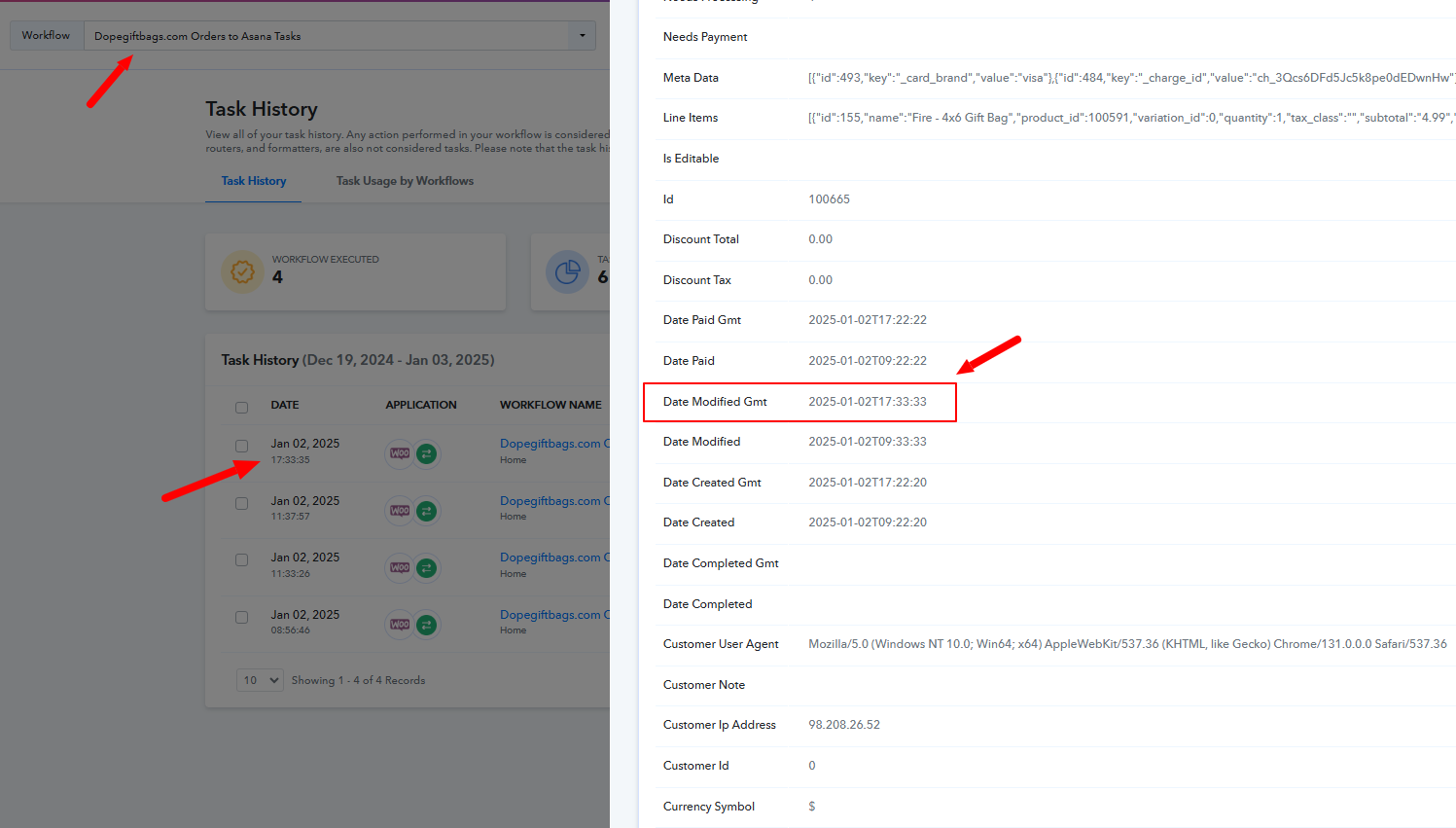
However, upon reviewing the task history, it appears that the responses are being sent based on the modified date and time by WooCommerce. Kindly refer to the attached image for more details.
Hi Preeti,
Ok so looks like you found it. I'm still too new at this to understand what I need to do or even where that modified date is located. Can you help me just get it to fire off right away?
Hello @petepell,
It seems there may be some confusion regarding my last response. I just want to let you know that the trigger you are using is a description-based webhook. Our webhook is simply installed in the trigger application (WooCommerce), and the responses are sent directly by WooCommerce. We do not have control over how or when the responses are sent.
Upon investigation, we found that WooCommerce sends responses based on the modified time of the order, not the created time.
I hope this clears up any confusion. Please let us know if you have further questions!
Ok that makes sense, I've set the timezones for both Wordpress and Pabbly to my correct timzone. Let's see if that helps. I'm not sure where you got the image on the right from or how I access that so this is all I can think of to fix the issue.
WooCommerce triggers are based on descriptive webhooks, your workflow will be trigger within moments of an order being placed.
Thanks ArshilAhmad, after setting both time zones in WordPress and Pabbly correctly, the trigger seems to be firing correctly now.
Thank you for the update. We are glad it's working now.