Not all emails being sent via Pabbly Gmail Workflow
Status: Open · Asked by Girish on · 0 views
Hi,
I have a workflow where data from a form is collected into Google Sheets and then a document is created using the data. The pdf version of the same is to be sent as an attachment via the email. I am using my gmail account to send the emails. I was expecting about 70 emails to be sent, but only about 40 got sent. Why is that? I used 'Send Custom Data' from Pabbly Connect Webhooks on the Google Sheet and was sending about 10 - 12 records per iteration.
Thanks.
Hi @Girish,
Could you please share the Workflow URL where you have this concern?
The Workflow URL - https://connect.pabbly.com/workflow/mapping/IjU3NjYwNTY5MDYzMjA0MzM1MjZiNTUzYzUxM2Ei_pc
Also, it's not like the 35 - 40 emails that got sent were the first 35 - 40 records, they were just those many emails out of the 70 expected.
Thanks.
Hello @Girish,
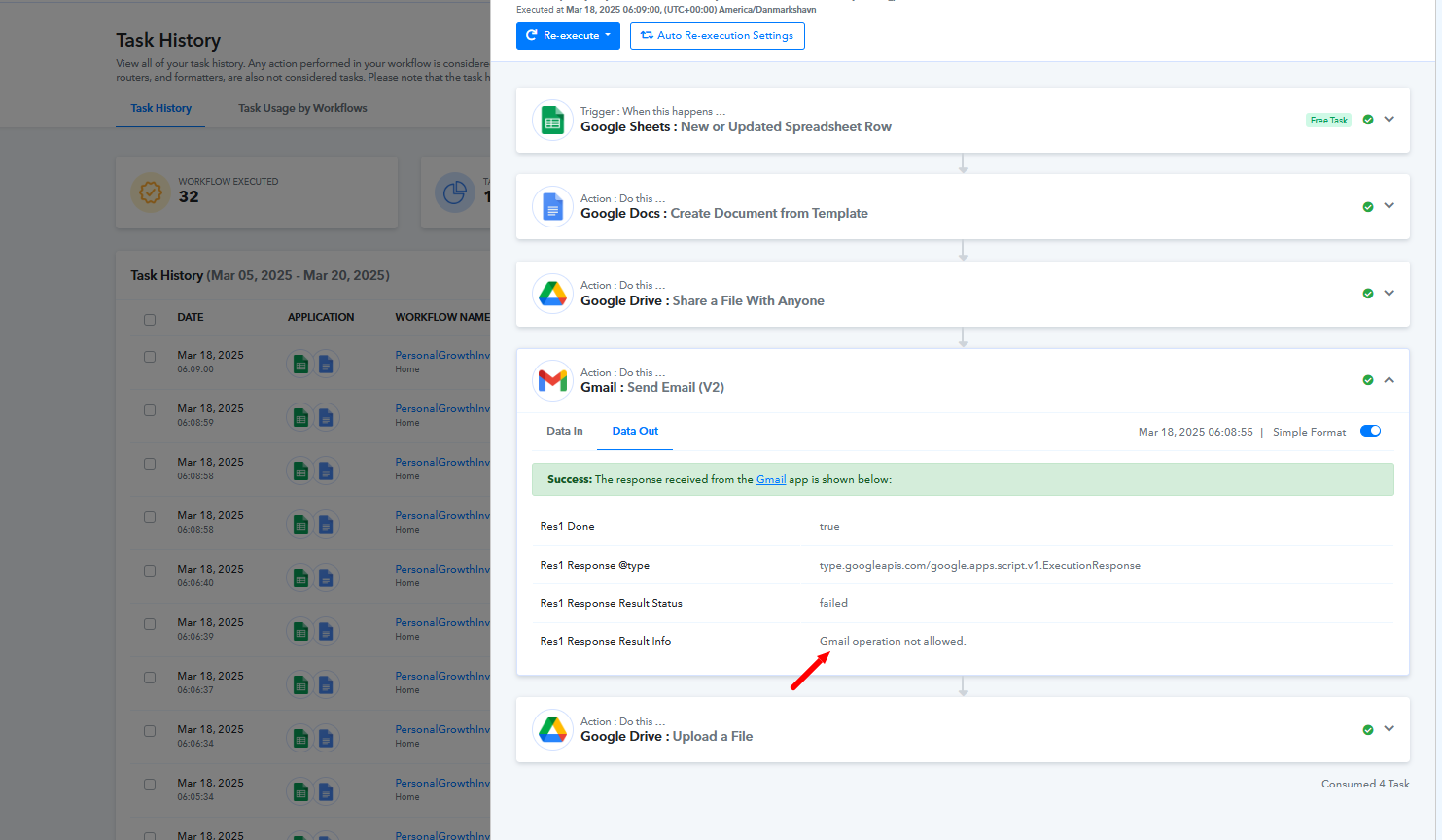
The error message "Gmail operation not allowed" indicates that the quota per minute limit was exceeded, which likely prevented some emails from being sent. In your workflow, 32 task histories encountered this error, which resulted in only a portion of the emails being successfully delivered. Reducing the batch size or adding delays between email sends can help stay within Gmail’s limits.
Let me know if you need any further assistance.
Hello @Girish,The error message "Gmail operation not allowed" indicates that the quota per minute limit was exceeded, which likely prevented some emails from being sent. In your workflow, 32 task histories encountered this error, which resulted in only a portion of the emails being successfully delivered. Reducing the batch size or adding delays between email sends can help stay within Gmail’s limits.
Let me know if you need any further assistance.
Thank you so much for your help. This clarifies everything.
Hello @Girish,
Thanks for the update, we'd love to hear your thoughts! If you have a moment, please rate us on Google. Your feedback helps us improve.