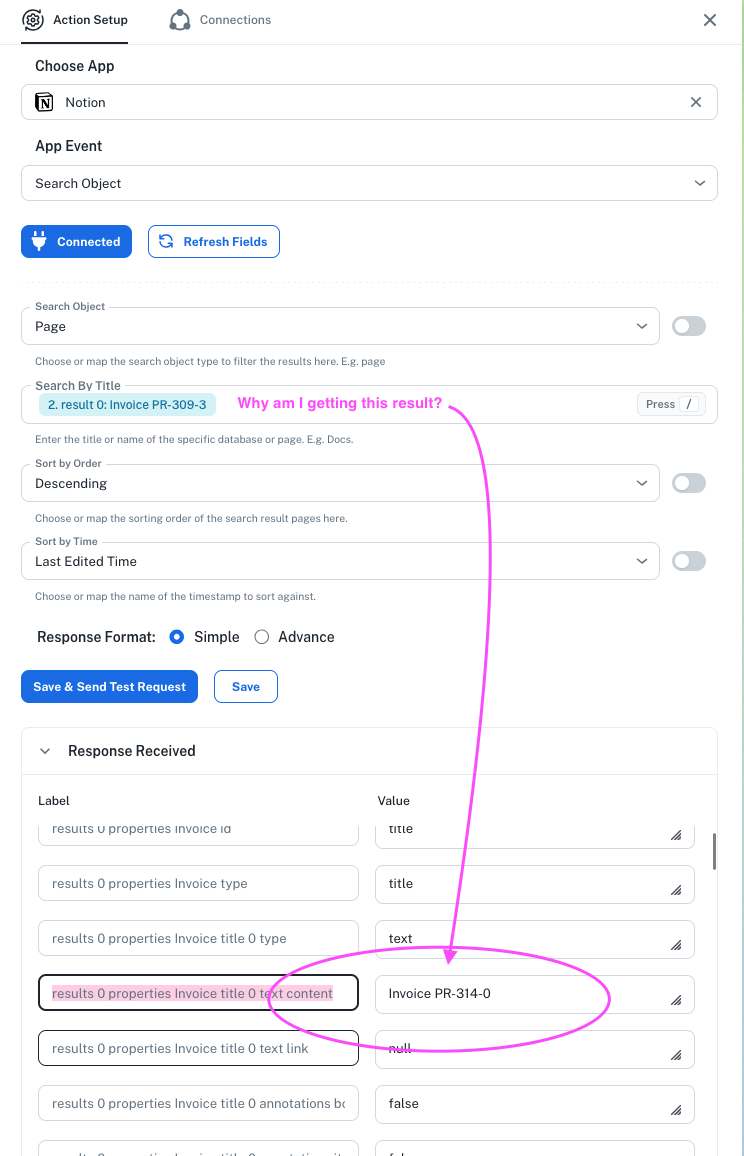
Notion "Query Database Item" no actually filtering by title?
Status: Closed · Asked by Leslie Irvine on · 0 views
Hello Leslie,
Thank you for reaching out.
The action you are currently using is Search Object, which is designed to search for a page or database by its title/name. If you check the help text for the Search by Title field, it states:
"Enter the title or name of the specific database or page."
Since this action searches pages and databases based on their titles, it does not perform an exact record-level lookup. As a result, if Notion cannot identify a single matching page or database from the title provided, it may return multiple results that partially match the search criteria.
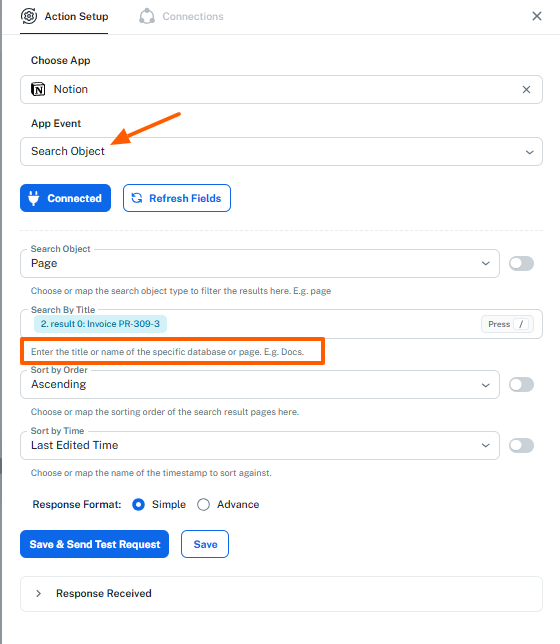
For your use case, where you are trying to retrieve a specific item using a unique code, we recommend using the Query a Data Source action instead. This action is better suited for filtering and retrieving specific database entries based on property values and should help you obtain the exact record you are looking for.
Please give that action a try and let us know the results. If you continue to face any issues, share a screenshot of your configuration and we'll be happy to assist further.
Thanks and Regards,Preeti Paryani
Customer Success Associate,
Pabbly.com
 | Leslie Irvine (She/Her) | Design + Marketing Specialist | lidm.ca Book a Call |
Hello Leslie,
Thank you for reaching out.
The action you are currently using is Search Object, which is designed to search for a page or database by its title/name. If you check the help text for the Search by Title field, it states:
"Enter the title or name of the specific database or page."
Since this action searches pages and databases based on their titles, it does not perform an exact record-level lookup. As a result, if Notion cannot identify a single matching page or database from the title provided, it may return multiple results that partially match the search criteria.
For your use case, where you are trying to retrieve a specific item using a unique code, we recommend using the Query a Data Source action instead. This action is better suited for filtering and retrieving specific database entries based on property values and should help you obtain the exact record you are looking for.
Please give that action a try and let us know the results. If you continue to face any issues, share a screenshot of your configuration and we'll be happy to assist further.
Thanks and Regards,
| Leslie Irvine (She/Her) | Design + Marketing Specialist | lidm.ca Book a Call |
I tried both — and there is a page that has that exact title.I also tried "contains" and not "equals". It's inconsistent and non-functional half the time. I got it to work once, changed nothing, and now it's not working again.
Leslie Irvine (She/Her) | Design + Marketing Specialist | lidm.ca Book a Call
On Fri, Jul 17, 2026 at 11:01 PM Pabbly Support <[email hidden]> wrote:Hello Leslie,
Thank you for reaching out.
The action you are currently using is Search Object, which is designed to search for a page or database by its title/name. If you check the help text for the Search by Title field, it states:
"Enter the title or name of the specific database or page."
Since this action searches pages and databases based on their titles, it does not perform an exact record-level lookup. As a result, if Notion cannot identify a single matching page or database from the title provided, it may return multiple results that partially match the search criteria.
For your use case, where you are trying to retrieve a specific item using a unique code, we recommend using the Query a Data Source action instead. This action is better suited for filtering and retrieving specific database entries based on property values and should help you obtain the exact record you are looking for.
Please give that action a try and let us know the results. If you continue to face any issues, share a screenshot of your configuration and we'll be happy to assist further.
Thanks and Regards,
Hello Leslie,
Thank you for sharing the screenshots.
Upon reviewing the configuration, the query structure itself appears to be correct. However, this seems more likely to be a connection or database selection issue rather than a problem with the filter condition.
Could you please confirm whether the Notion connection is linked to the correct database where this invoice/page actually exists? From what we can see, the request is unable to locate the record, which may indicate that the connected Notion account does not have access to the intended database or that the workflow is connected to a different database than expected.
We recommend the following:
Verify that the workflow is connected to the correct Notion account.
Ensure that the target database has been shared with the Notion integration being used.
Recreate the Notion connection and reselect the correct database.
Test the request again after reconnecting.
For additional reference on how Notion queries should be structured, you can review their documentation here:
https://developers.notion.com/reference/query-a-data-source
Please let us know your findings, and we'll be happy to assist further.
Also, how does this math work exactly?
Leslie Irvine (She/Her) | Design + Marketing Specialist | lidm.ca Book a Call
On Sat, Jul 18, 2026 at 8:44 AM Leslie Irvine <[email protected]> wrote:I tried both — and there is a page that has that exact title.I also tried "contains" and not "equals". It's inconsistent and non-functional half the time. I got it to work once, changed nothing, and now it's not working again.
Leslie Irvine (She/Her) | Design + Marketing Specialist | lidm.ca Book a Call
On Fri, Jul 17, 2026 at 11:01 PM Pabbly Support <[email protected]> wrote:Hello Leslie,
Thank you for reaching out.
The action you are currently using is Search Object, which is designed to search for a page or database by its title/name. If you check the help text for the Search by Title field, it states:
"Enter the title or name of the specific database or page."
Since this action searches pages and databases based on their titles, it does not perform an exact record-level lookup. As a result, if Notion cannot identify a single matching page or database from the title provided, it may return multiple results that partially match the search criteria.
For your use case, where you are trying to retrieve a specific item using a unique code, we recommend using the Query a Data Source action instead. This action is better suited for filtering and retrieving specific database entries based on property values and should help you obtain the exact record you are looking for.
Please give that action a try and let us know the results. If you continue to face any issues, share a screenshot of your configuration and we'll be happy to assist further.
Thanks and Regards,
Preeti Paryani
Customer Success Associate,
Pabbly.com
Thanks and Regards,
Preeti Paryani
Customer Success Associate,
Pabbly.com
| Leslie Irvine (She/Her) | Design + Marketing Specialist | lidm.ca Book a Call |
Hello Leslie,
Thank you for sharing the screenshots.
Upon reviewing the configuration, the query structure itself appears to be correct. However, this seems more likely to be a connection or database selection issue rather than a problem with the filter condition.
Could you please confirm whether the Notion connection is linked to the correct database where this invoice/page actually exists? From what we can see, the request is unable to locate the record, which may indicate that the connected Notion account does not have access to the intended database or that the workflow is connected to a different database than expected.
We recommend the following:
Verify that the workflow is connected to the correct Notion account.
Ensure that the target database has been shared with the Notion integration being used.
Recreate the Notion connection and reselect the correct database.
Test the request again after reconnecting.
For additional reference on how Notion queries should be structured, you can review their documentation here:
https://developers.notion.com/reference/query-a-data-source
Please let us know your findings, and we'll be happy to assist further.
On Jul 18, 2026, 5:21 PM, Leslie Irvine <[email hidden]> wrote:Also, how does this math work exactly?
Leslie Irvine (She/Her) | Design + Marketing Specialist | lidm.ca Book a Call
On Sat, Jul 18, 2026 at 8:44 AM Leslie Irvine <[email hidden]> wrote:I tried both — and there is a page that has that exact title.I also tried "contains" and not "equals". It's inconsistent and non-functional half the time. I got it to work once, changed nothing, and now it's not working again.
Leslie Irvine (She/Her) | Design + Marketing Specialist | lidm.ca Book a Call
On Fri, Jul 17, 2026 at 11:01 PM Pabbly Support <[email hidden]> wrote:Hello Leslie,
Thank you for reaching out.
The action you are currently using is Search Object, which is designed to search for a page or database by its title/name. If you check the help text for the Search by Title field, it states:
"Enter the title or name of the specific database or page."
Since this action searches pages and databases based on their titles, it does not perform an exact record-level lookup. As a result, if Notion cannot identify a single matching page or database from the title provided, it may return multiple results that partially match the search criteria.
For your use case, where you are trying to retrieve a specific item using a unique code, we recommend using the Query a Data Source action instead. This action is better suited for filtering and retrieving specific database entries based on property values and should help you obtain the exact record you are looking for.
Please give that action a try and let us know the results. If you continue to face any issues, share a screenshot of your configuration and we'll be happy to assist further.
Thanks and Regards,
Preeti Paryani
Customer Success Associate,
Pabbly.com
Thanks and Regards,
Hello Leslie,
Thank you for confirming.
If you are open to giving it another look, we would love the opportunity to resolve this for you!
Could you please share the URL of your Pabbly Connect workflow with us? Once you provide the workflow link, our technical team can inspect your exact setup, check the API responses from Notion, and fix the filtering issue directly for you.
If you've already fully transitioned to another tool, we completely understand and wish you the best with your setup. However, if you'd like us to take a look, just drop the workflow URL here and we’ll get right on it!
Thanks & Regards,
Hrishabh
Customer Support Associate
🌐 Pabbly.com
👉 Rate your support