Open AI - Custom GPT
Status: Open · Asked by Green Circle on · 0 views
I have created a Custom GPT on Open AI. This Custom GPT is a sale bot which is capable on answering some basic questions that a customer might have regarding our products and services and takes them forward to booking an appointment. I want to integrate this specific Custom GPT to Pabbly, so I can set this up to have a conversation with a customer via SMS (Through Pabbly and Cell Cast). At the moment, All the video tutorials of Pabbly on youtube is only showing connections to Open AI ChatGPT only. not Custom GPT. How can I integrate to my Custom GPT created on Open AI ?
Hello @Green Circle
You can use the Custom API Request(Beta) action to connect with the Custom GPT.
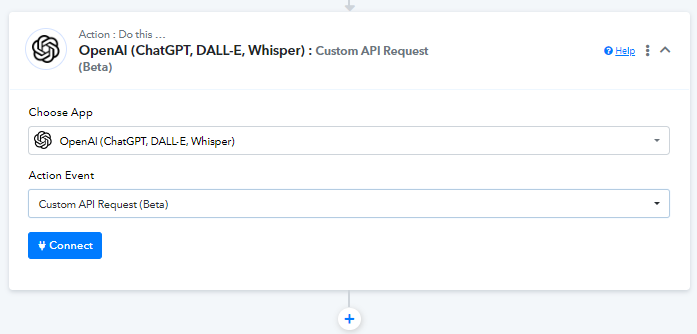
Thank you @Preeti Paryani for your response. Do you have a video explaining these inputs ? I need your help, please ?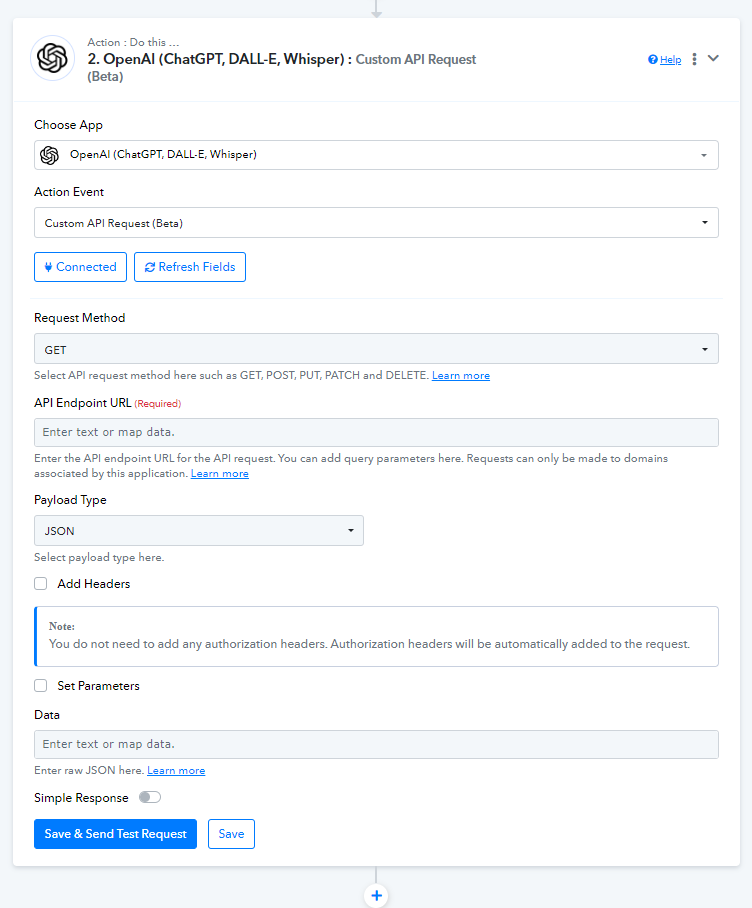
An alternative to GPTs is OpenAI Assistant. I think it's better, because you can send the information generated by AI to anywhere: Google docs, chatbot, etc. GPTs are restricted to GPT users.
An alternative to GPTs is OpenAI Assistant. I think it's better, because you can send the information generated by AI to anywhere: Google docs, chatbot, etc. GPTs are restricted to GPT users.
Thank you @Vitorouski . Appreciate your support.
I am trying to create a Phone SMS Chatbot, to have basic conversation with a customer and help them with their enquiry, over SMS.
The workflow that I am trying to achieve is as follows,
1. SMS received on Pabbly Connect using a Web hook.
2. This SMS message is sent to an Open AI custom GPT that I have created and trained on the Open AI platform. This GPT will generate a response and send back to Pabbly Connect.
3. The Open AI (Custom GPT) reponse received on Pabbly Connect is sent to the SMS software via API and then sent out to the customer as an SMS.
4. Back to 1 when the customer responds.
Will I be able to achieve this using Open AI assistant ?
Looking forward to hear from you on your thoughts. Thanks in advance.
Will I be able to achieve this using Open AI assistant ?
I'm not sure at 100% but I think you can't do it with GPTs. I recommend you to use Open AI Assistant. It's like GPTs but it's open to 3rd party software and you can connect them using Pabbly.
Hey @Green Circle
Please let us know if you are able to accomplish your workflow using OpenAI. Feel free to reach out to us if in case you face any errors.
Hi @Luv ,
No, I still haven't been able to achieve this. Can you please guide me ?
I am trying to create a Phone SMS Conversation Chatbot, to have basic conversation with a customer and help them with their enquiry, over SMS.
The workflow that I am trying to achieve is as follows,
1. SMS received on Pabbly Connect using a Web hook.
2. This SMS message is sent to an Open AI custom GPT that I have created and trained on the Open AI platform. This GPT will generate a response and send back to Pabbly Connect.
3. The Open AI (Custom GPT) response received on Pabbly Connect is sent to the SMS software via API and then sent out to the customer as an SMS.
4. Back to 1 when the customer responds.
Hey @Green Circle
Kindly let us know the application by which you want to receive the new SMS and send a reply for the same.
Also, please mention your workflow URL if you have created one.
Hey @Green CircleKindly let us know the application by which you want to receive the new SMS and send a reply for the same.
Also, please mention your workflow URL if you have created one.
Hi @Luv, Cellcast is the application to send and receive the SMS. This is the workflow that i started working on.
https://connect.pabbly.com/workflow/mapping/IjU3NjYwNTZkMDYzMjA0MzY1MjY5NTUzZDUxMzIi_pc
Hey @Green Circle
It appears that you have not set a proper prompt for ChatGPT to process and generate a proper reply.
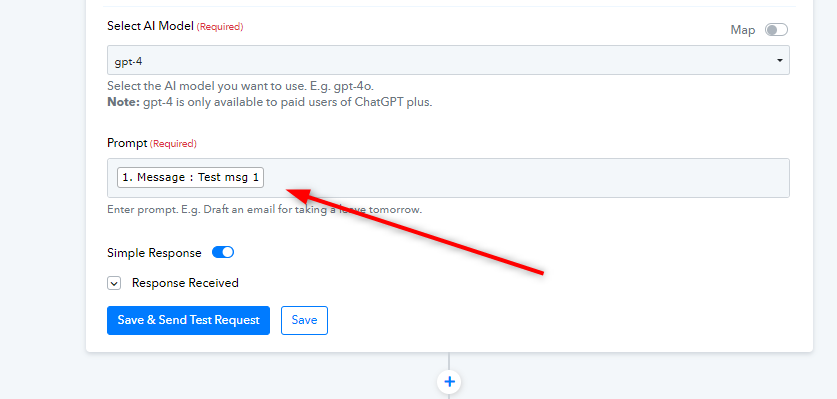
Although, sending messages with CellChat will create a new conversation every time a message is sent. We would recommend you to use another application like Twilio which will allow you to send the message in that conversation only, like a Chatbot.
Let us know if it works for you.
Hey @Green CircleIt appears that you have not set a proper prompt for ChatGPT to process and generate a proper reply.
Although, sending messages with CellChat will create a new conversation every time a message is sent. We would recommend you to use another application like Twilio which will allow you to send the message in that conversation only, like a Chatbot.
Let us know if it works for you.
Hi @Luv, I presume that this is how to send a prompt to ChatGPT and get a response? My question, is how do I send the prompt to a specific GPT, in the screenshot here, called "Steve" and not ChatGPT. Can you please help on how to send the prompt to the Open AI GPT called "Steve" that I have create and get a response ?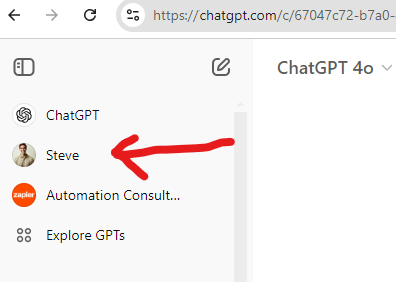
Hello @Green Circle
Connecting with a custom GPT model via a custom API would not be possible, as OpenAI or ChatGPT does not currently provide such an endpoint.
Hello @Green CircleConnecting with a custom GPT model via a custom API would not be possible, as OpenAI or ChatGPT does not currently provide such an endpoint.
Hi @Preeti Paryani , in that case, If I want to build an SMS chat bot where I can send and receive SMS using Twilio, based on custom prompt and content, How would you recommend I do it ?
Hello @Green Circle
You can use the create message action step of OpenAI to achieve this use case. Please refer to this tutorial to learn more about how to send customized response -
I'm working on creating a Phone SMS Conversation Chatbot to engage with customers over SMS, helping them with their inquiries. Here’s the workflow I’m aiming for:
- An SMS is received in Pabbly Connect using a webhook.
- This SMS is sent to a custom OpenAI GPT model I created and trained on the OpenAI platform. This GPT generates a response, which is then sent back to Pabbly Connect.
- The response from OpenAI (Custom GPT) is forwarded by Pabbly Connect to the SMS software via API, which then sends it to the customer as an SMS.
- The workflow repeats from Step 1 whenever the customer responds.
Additionally, I’d like to integrate an online bill check for MEPCO feature, allowing customers to access their billing information directly through SMS.
I'm working on creating a Phone SMS Conversation Chatbot to engage with customers over SMS, helping them with their inquiries. Here’s the workflow I’m aiming for:
- An SMS is received in Pabbly Connect using a webhook.
- This SMS is sent to a custom OpenAI GPT model I created and trained on the OpenAI platform. This GPT generates a response, which is then sent back to Pabbly Connect.
- The response from OpenAI (Custom GPT) is forwarded by Pabbly Connect to the SMS software via API, which then sends it to the customer as an SMS.
- The workflow repeats from Step 1 whenever the customer responds.
Additionally, I’d like to integrate an online bill check for MEPCO feature, allowing customers to access their billing information directly through SMS.
Please watch the video shared below and see if it helps you achieve your desired use case.
youtube.com/watch?v=7p_PvQTSIpY
You can use Twilio action step to send the SMS.