pabbly api invalid token
Status: Open · Asked by cynopha on · 0 views
so i am making the api call(to get email template specific) with my token and getting Invalid token in response with 200 status.
Token is valid, Bearer authentication is being used and request format matches the API documentation.
could you please check the issue
Hello @cynopha,
Could you please share the following details so that we can check the issue further from our end:
- The workflow URL where you are attempting this
- The API documentation link you are referring to
- The exact API endpoint you are trying to execute
Once we have these details, we will investigate the issue accordingly.
Hello @cynopha,Could you please share the following details so that we can check the issue further from our end:
- The workflow URL where you are attempting this
- The API documentation link you are referring to
- The exact API endpoint you are trying to execute
Once we have these details, we will investigate the issue accordingly.
I am not using a Pabbly Connect workflow currently. I am directly testing the Pabbly Email Marketing API using Postman
API DOCS: https://apidocs.pabbly.com/#e7138bf1-25c0-424d-ace6-b9d4222b8dff
API Endpoint:
GET
https://emails.pabbly.com/api/email-templates
I am using Bearer token authentication as mentioned in the documentation, but receiving:
{
"status": "error",
"message": "Invalid Key"
}
Hello @cynopha,
Thanks for sharing the endpoint details.
The issue is likely occurring because the API endpoint you are using belongs to the older Pabbly Email Marketing version:
https://emails.pabbly.com/api/email-templates
However, currently Pabbly Email Marketing V2 has been launched, and tokens generated from the V2 application are only supported with the V2 APIs.
This means:
- Old API endpoints will not work with V2 tokens
- V2 tokens must be used only with the newer V2 API endpoints
That is why you are receiving the "Invalid Key" response even though the token itself is valid.
We recommend checking the V2 API documentation/endpoints and using the corresponding V2 APIs with your generated token.
Hello @cynopha,Thanks for sharing the endpoint details.
The issue is likely occurring because the API endpoint you are using belongs to the older Pabbly Email Marketing version:
https://emails.pabbly.com/api/email-templates
However, currently Pabbly Email Marketing V2 has been launched, and tokens generated from the V2 application are only supported with the V2 APIs.This means:
- Old API endpoints will not work with V2 tokens
- V2 tokens must be used only with the newer V2 API endpoints
That is why you are receiving the "Invalid Key" response even though the token itself is valid.We recommend checking the V2 API documentation/endpoints and using the corresponding V2 APIs with your generated token.
Thank you for the clarification regarding V1 and V2 APIs.
I am unable to find the standalone Pabbly Email Marketing V2 API documentation publicly.
Could you please share the link
Hello @cynopha,
Currently, there is no separate standalone public documentation page for Pabbly Email Marketing V2.
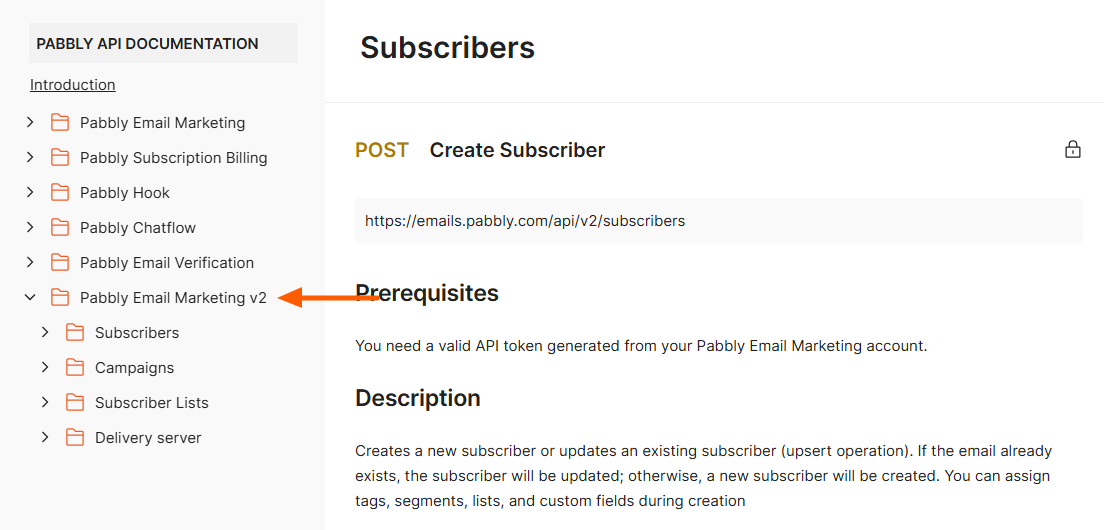
The V2 API endpoints are available within the same API documentation itself under the “Pabbly Email Marketing v2” section.
Please refer to:
https://apidocs.pabbly.com/#bc2f0fbb-9f66-4c45-a43f-95001d57eed1
For better understanding, kindly refer to the attached image where the “Pabbly Email Marketing v2” section is highlighted, and you will find all the respective V2 endpoints there.