Pabbly Connect does not recognise automatically-added new line as a trigger event in Google Sheets

Status: Closed Β· Asked by Chantal Wellavize on Β· 0 views

Chantal Wellavize β€” Question Β·
The task: to add an Auto ID to contact fields in Hubspot. Why Hubspot can't do it itself I don't know, but it can't as there is no way to set it to see the Contact ID on the front end. So, I have set up two workflows, which worked perfectly for a couple of years... until a couple of months or so ago. It works like this:

Workflow 1: When a new contact is created in Hubspot, Pabbly pulls the (hidden) Hubspot Contact ID, firstname, surname and email address and creates it as a new line in a Google Sheet. It adds the next consecutive "Auto ID" for the contact into a column in that sheet. End of workflow.

Workflow 2: When a new line is added to the above Google Sheet, Pabbly picks it up and pings the newly created "Auto ID" back into the Hubspot contact. 

That used to work fine! Now it doesn't for some reason. 

I have:
- updated the first workflow from the old legacy Hubspot "contact created" trigger to the new one. So now it shows up in the Google sheet instantly (it used to have to wait for polling, so this is much better). 
- checked that the webhook URL is copy / pasted accurately
- read the Pabbly help page that tells me that Google Sheets can do this, BUT because the line has been created by an automation, not manually, it will take an hour to update and ping back to Hubspot
- in the Pabbly extension in the Google Sheet, ticked BOTH the "Send on Event" and "Auto Send on Schedule" as shown in the Pabbly Help page. 
- also tested it with "Send on Event" unticked but "Auto Send on Schedule" ticked
- also tested it with "Send on Event" ticked but "Auto Send on Schedule" unticked

I have then repeatedly tested with "Recapture Webhook Response", adding a new contact in Hubspot and waiting for Pabbly to pick it up. Workflow 1 is working perfectly (and instantly), but workflow 2 cannot pick up the webhook response. I thought maybe this was because it times out after 2 minutes but Google Sheets will take an hour to provide the webhook response... in which case, it would have worked an hour later. It never does.

The screenshots attached show:
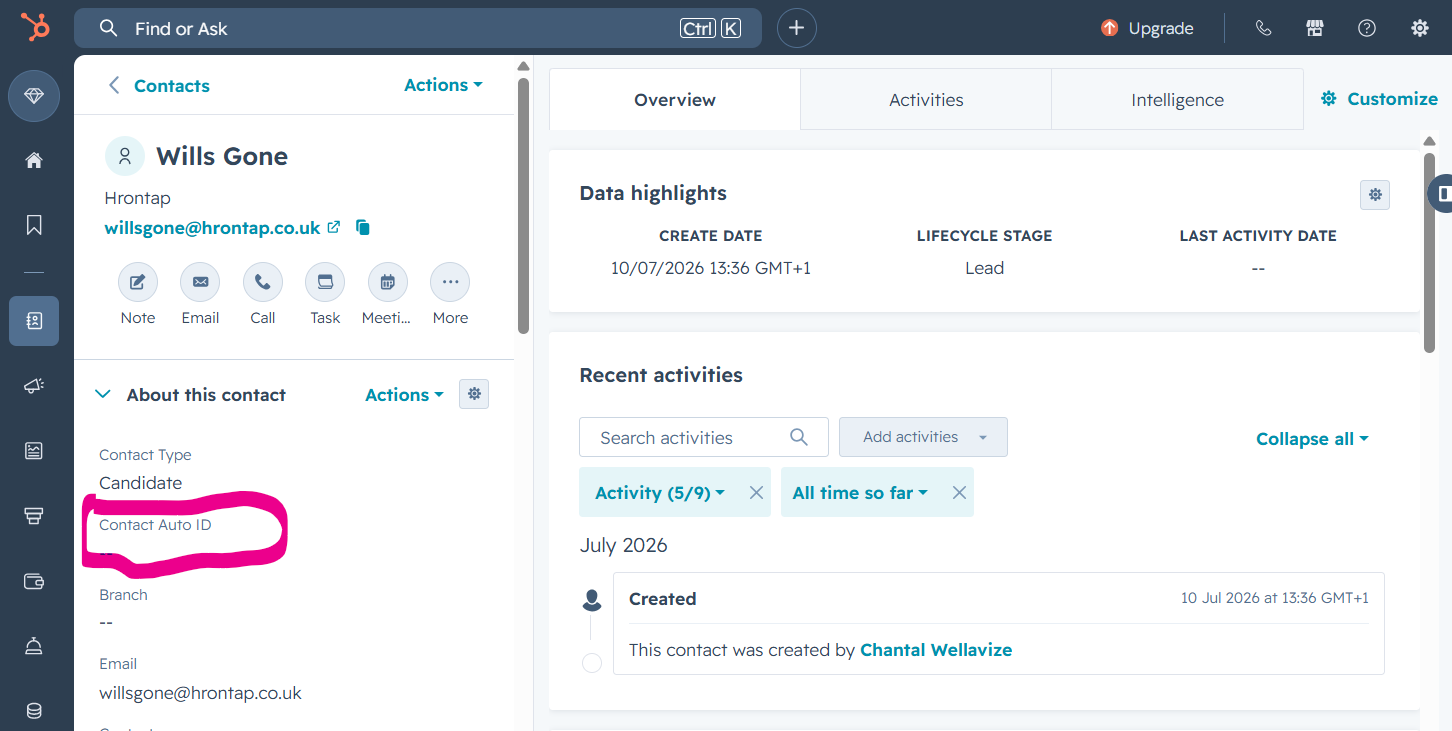
1. the Hubspot contact that has been manually added, highlighting in pink the field that should auto-populate from the workflows, but does not. (It used to!) and
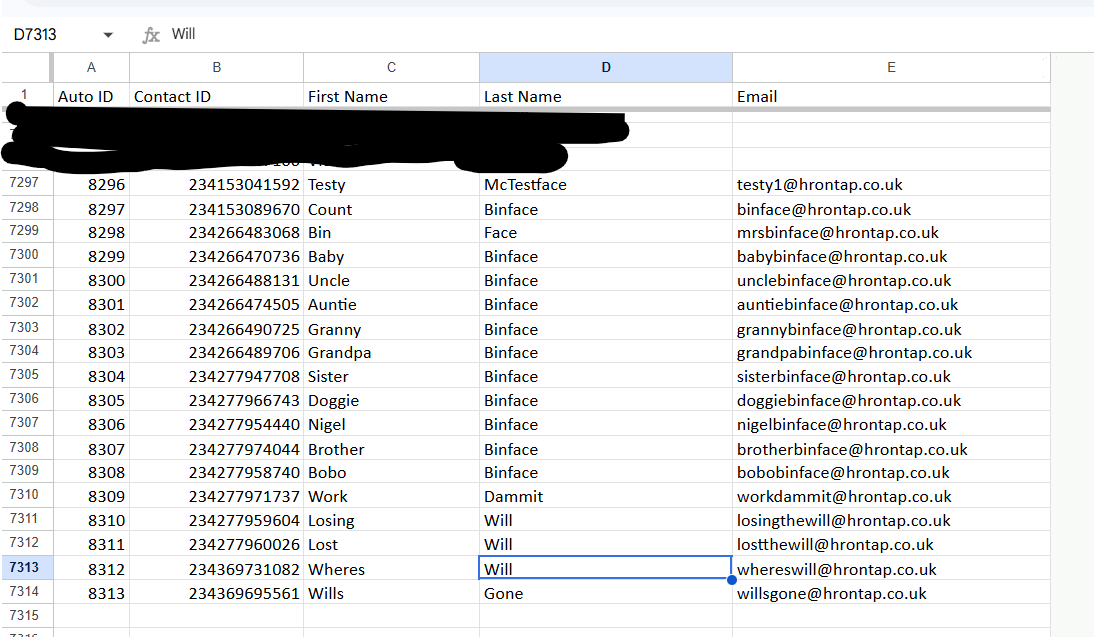
2. the Google sheet that automatically pulls in the new Hubspot contact and adds it, creating the Auto ID (column A) that then needs to ping back to Hubspot with workflow 2 to create the auto ID in the contact.

Interestingly... if I use "Send Custom Data" in the Google Sheets extension webhook, and select individual lines, it DOES ping those back to Hubspot. So it is working if I tell it manually to do it but it is not doing it automatically.

What am I missing?
Google Sheets Auto ID added working.png
Hubspot Auto ID not there.png
Pabbly Support β€” Reply Β·

Hello there,

Thanks for contacting us.

Could you please share the 2nd Workflow URL that has the Google Sheet trigger so that we can look into it and provide information accordingly?

Please be aware that to assist you effectively, we may need to access your Pabbly Connect account. If you're comfortable with this, please grant us permission by stating in your next email: "You have my permission to log into my Pabbly Connect account, and edit workflow {If required}. Here is the registered email address associated with it."

Also, share the screenshots of the Pabbly Connect Plugin settings, event selection, and webhook settings page installed on your Google Sheet.

Thanks & Regards,

Adeel Akhtar
🌐 Pabbly.com

Chantal Wellavize β€” Reply Β·

You have my permission to log into my Pabbly Connect account, and edit workflow {If required}.  [email hidden] is the registered email address associated with it.

I think the attached screenshots cover the info you need from the Google Sheets end, but please let me know if you need anything else.

Best wishes

Chantal Wellavize

Executive Director


Helping small businesses increase profits through people


Book a meeting with me at https://bookme.name/hrontap


facebooktwitterlinkedin

PHONE

01775 769829

WEBSITE

https://www.hrontap.co.uk

ADDRESS

27 Westlode Street, Spalding, Lincs, UK PE11 2AF

HR on Tap is a trading name of HR on Tap Ltd.  Reg: 4393992. VAT: 721261571. 

"HR on Tap" is a Registered Trademark

ICO Reg: Z136113X 


On Fri, 10 Jul 2026 at 15:57, Pabbly Support <[email hidden]> wrote:

Hello there,

Thanks for contacting us.

Could you please share the 2nd Workflow URL that has the Google Sheet trigger so that we can look into it and provide information accordingly?

Please be aware that to assist you effectively, we may need to access your Pabbly Connect account. If you're comfortable with this, please grant us permission by stating in your next email: "You have my permission to log into my Pabbly Connect account, and edit workflow {If required}. Here is the registered email address associated with it."

Also, share the screenshots of the Pabbly Connect Plugin settings, event selection, and webhook settings page installed on your Google Sheet.

Thanks & Regards,

Adeel Akhtar
🌐 Pabbly.com

Pabbly Support β€” Reply Β·

Hello there,

Can you also let me know how you are adding the Auto ID in the Google Sheet? And is Column D, which is the trigger column, also getting data added or updated at that time?

Thanks & Regards,

Adeel Akhtar
🌐 Pabbly.com

Chantal Wellavize β€” Reply Β·
Hi, there is another workflow in Pabbly that grabs the Contact ID, firstname, lastname and email address and pings it to the Google Sheet. The Auto ID is automatically added by Google Sheets when a new contact is pinged into it, using the formula in Cell A2 (which contains Auto ID 1001)

=ArrayFormula(if(B2:B<>"",row(A3:A)+998,""))

Best wishes

Chantal Wellavize

Executive Director


Helping small businesses increase profits through people


Book a meeting with me at https://bookme.name/hrontap


facebooktwitterlinkedin

PHONE

01775 769829

WEBSITE

https://www.hrontap.co.uk

ADDRESS

27 Westlode Street, Spalding, Lincs, UK PE11 2AF

HR on Tap is a trading name of HR on Tap Ltd.  Reg: 4393992. VAT: 721261571. 

"HR on Tap" is a Registered Trademark

ICO Reg: Z136113X 


On Fri, 10 Jul 2026 at 18:15, Pabbly Support <[email hidden]> wrote:

Hello there,

Can you also let me know how you are adding the Auto ID in the Google Sheet? And is Column D, which is the trigger column, also getting data added or updated at that time?

Thanks & Regards,

Adeel Akhtar
🌐 Pabbly.com

Pabbly Support β€” Reply Β·

Hello there,

Can you select Auto Send on Schedule (Beta) event in the Pabbly Connect plugin settings and then test?
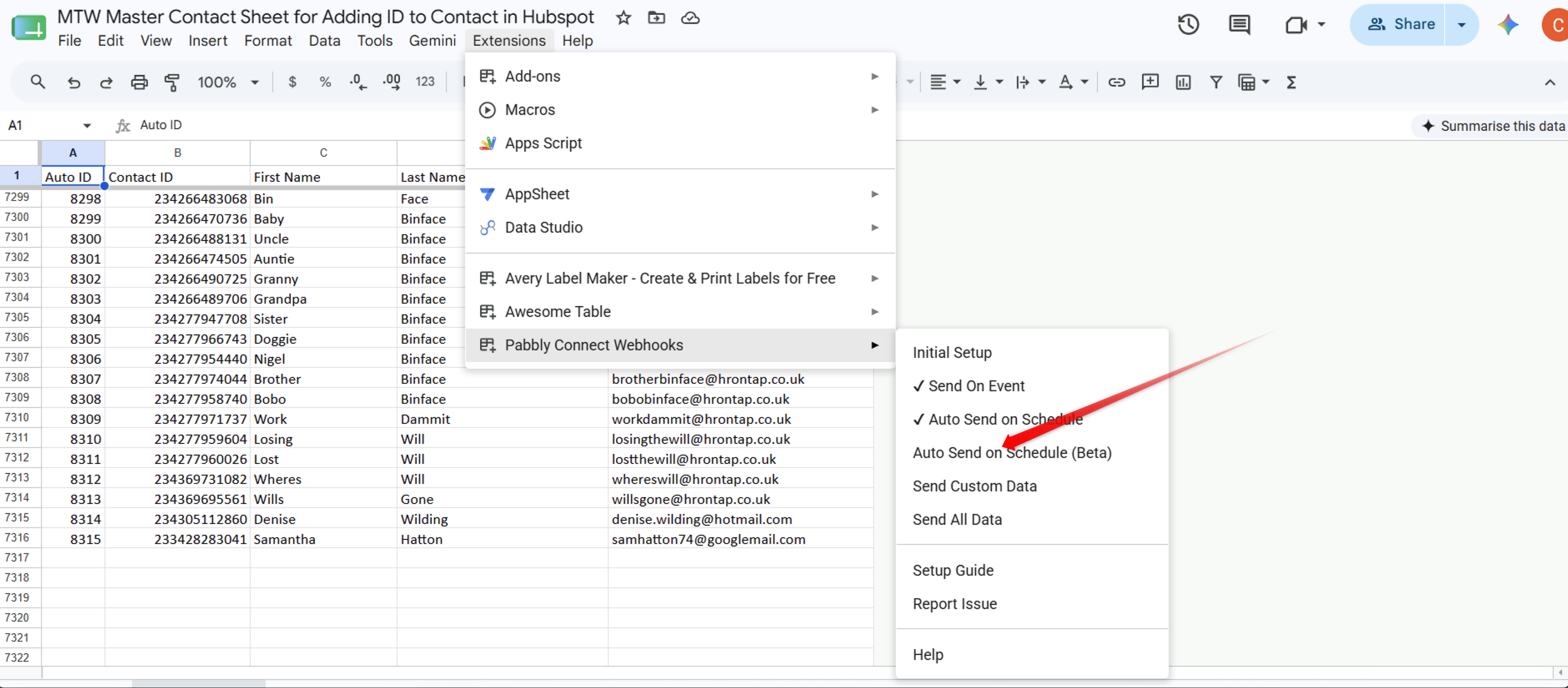
image.png

Thanks & Regards,

Adeel Akhtar
🌐 Pabbly.com

Chantal Wellavize β€” Reply Β·
Done... timed out with no response again, same as before.

Chantal Wellavize

Executive Director


Helping small businesses increase profits through people


Book a meeting with me at https://bookme.name/hrontap


facebooktwitterlinkedin

PHONE

01775 769829

WEBSITE

https://www.hrontap.co.uk

ADDRESS

27 Westlode Street, Spalding, Lincs, UK PE11 2AF

HR on Tap is a trading name of HR on Tap Ltd.  Reg: 4393992. VAT: 721261571. 

"HR on Tap" is a Registered Trademark

ICO Reg: Z136113X 


On Fri, 10 Jul 2026 at 20:15, Pabbly Support <[email hidden]> wrote:

Hello there,

Can you select Auto Send on Schedule (Beta) event in the Pabbly Connect plugin settings and then test?

image.png

Thanks & Regards,

Adeel Akhtar
🌐 Pabbly.com

Pabbly Support β€” Reply Β·

Hello Chantal,

To properly capture rows that are automatically added by your first workflow, please try configuring the Google Sheets extension settings with these exact steps:

  1. Clear Previous Settings: Open the Pabbly Connect extension menu within your Google Sheet and ensure that both "Send on Event" and "Auto Send on Schedule " are currently unchecked/disabled.

  2. Enable the Schedule Trigger: Click directly on Auto Send on Schedule (Beta) just once.

  3. Activation Note: Please note that clicking it once will activate the scheduling feature, though a visible tick mark will not appear next to the "Beta" option itself.

Once clicked, the scheduler will run in the background and periodically scan the sheet to pick up the automatically generated rows that "Send on Event" normally misses.

Please give it some time to run its schedule cycle and let us know if the data successfully pings back to HubSpot!

Thanks & Regards,
Hrishabh
Customer Support Associate
🌐 Pabbly.com
πŸ‘‰ Rate your support

Chantal Wellavize β€” Reply Β·
Hi, not sure how much time you want me to give it but it's been 2.5 hours and not pinged back yet. 

Best wishes

Chantal Wellavize

Executive Director


Helping small businesses increase profits through people


Book a meeting with me at https://bookme.name/hrontap


facebooktwitterlinkedin

PHONE

01775 769829

WEBSITE

https://www.hrontap.co.uk

ADDRESS

27 Westlode Street, Spalding, Lincs, UK PE11 2AF

HR on Tap is a trading name of HR on Tap Ltd.  Reg: 4393992. VAT: 721261571. 

"HR on Tap" is a Registered Trademark

ICO Reg: Z136113X 


On Sun, 12 Jul 2026 at 05:40, Pabbly Support <[email hidden]> wrote:

Hello Chantal,

To properly capture rows that are automatically added by your first workflow, please try configuring the Google Sheets extension settings with these exact steps:

  1. Clear Previous Settings: Open the Pabbly Connect extension menu within your Google Sheet and ensure that both "Send on Event" and "Auto Send on Schedule " are currently unchecked/disabled.

  2. Enable the Schedule Trigger: Click directly on Auto Send on Schedule (Beta) just once.

  3. Activation Note: Please note that clicking it once will activate the scheduling feature, though a visible tick mark will not appear next to the "Beta" option itself.

Once clicked, the scheduler will run in the background and periodically scan the sheet to pick up the automatically generated rows that "Send on Event" normally misses.

Please give it some time to run its schedule cycle and let us know if the data successfully pings back to HubSpot!

Thanks & Regards,
Hrishabh
Customer Support Associate
🌐 Pabbly.com
πŸ‘‰ Rate your support

Pabbly Support β€” Reply Β·

Hello there,

Kindly schedule a meeting with me at this link so that can look into the whole dataflow and figure out the issue you are facing and try resolving it - https://calendly.com/d/dvrf-j37-kcs

Thanks & Regards,

Adeel Akhtar
🌐 Pabbly.com

Back to all forum threads Β· Log in to reply