Pabbly Connect Workflow Not Triggering on Manual Contact Creation in HubSpot
Status: Open · Asked by Vais Sai on · 0 views
Dear Team,
I have created a workflow in Pabbly Connect to send a WhatsApp template message when a contact is created from HubSpot CRM.
The workflow works correctly during configuration when I click the “Save & Send a Test Request” button in Pabbly. However, the workflow does not trigger when a new contact is manually created in HubSpot.
Please help me on this.
Thanks.
Hello @vais,
Thank you for reaching out to us and sharing the details.
Upon checking, it appears that the HubSpot CRM – New Contact Added trigger you are using is a polling-based trigger with a 24-hour polling interval. Since you are currently on the free plan, the workflow will only check for new contacts once every 24 hours. Therefore, when a contact is created manually in HubSpot, the workflow will trigger only after the next polling cycle.
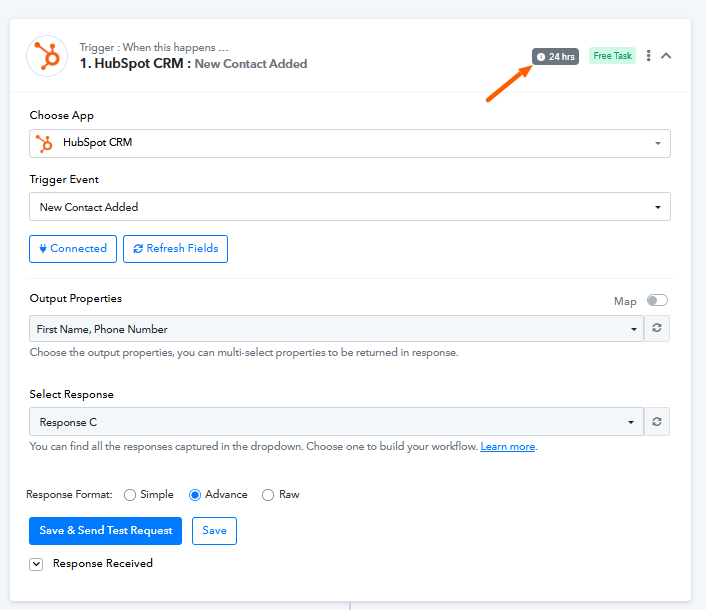
Please note that on our paid plans, the polling interval for this trigger can be reduced to as low as 10 minutes, allowing the workflow to trigger much faster.
We recommend waiting for the next polling run or upgrading the plan if you require quicker triggering. Let us know if you need any further assistance.
Hi Preeti,
Thanks for the reply.
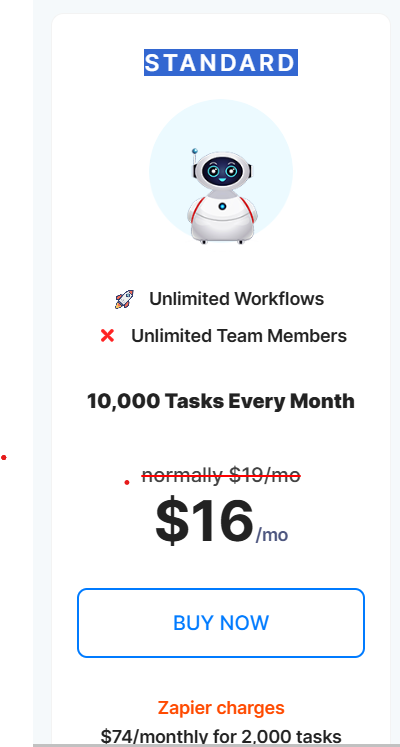
Could you please confirm whether the plan mentioned below will support changing the polling interval time?
Thanks.
Hey @vais,
Yes, this plan will help you in reducing the polling time. You may opt for it and test your workflow more effectively.