[Pabbly + Pipedrive] The automation partially fails and the other steps are not executed.
Status: Open · Asked by SupportHubstrat on · 0 views
I created this automation
- Google Sheets: Add/Update Row
- Pipedrive: Find or Create Persona
- Pabbly: Delay 1 min
- Pipedrive: Find Deal
- Pipedrive: Get All Stages
- Pipedrive: Create Deal
My problem is the following:
in step 4 I set the following condition: the search for the deal must be done against a CUSTOM FIELD created on Pipedrive. To be sure as a custom field I reuse the email to avoid creating duplicates as by using the Title parameter deals can be found that actually refer to other people.
The whole flow stops at step 4 because it says the required field was not found.
another strange thing is that if I add a new line equal to the previous one on the Google sheet, the flow works correctly
Wait for feedback
Hello @SupportHubstrat
We have reviewed your workflow and identified the issue. To test a workaround and resolve this matter, we may need access to your Pabbly Connect account to make some necessary changes.
Please grant us permission to access your account by replying to this thread with the following message:
"You can access my Pabbly Connect account and make changes if required. Here is the email associated with my Pabbly Connect account: {email}."
Just to be sure, after the fix can i remove the access to you?
Hello @SupportHubstrat
Sure, we will revoke the access ourselves.
You can access my Pabbly Connect account and make changes if required. Here is the email associated with my Pabbly Connect account: [email hidden]
Hello @SupportHubstrat
Thanks for the access. We will provide you with the updates soon. Also please avoid making any changes to the workflow until we provide you any updates.
Hi are there any news??
Hello @SupportHubstrat
We have tried some workarounds with no access.
However, we can suggest a workaround as per which a few changes would be made in the workflow. Instead of using the Find or Create a Person action use the Find Person action to get the person by email and then add a router with one route for if the user exists and another for if the user doesn't exist(this route will consist of the create person and find person steps as both has different response structure and the find person consists of the custom field to be mapped futher).
Can you send me all the steps that I need to add to the workflow?
Hello @SupportHubstrat
I have created a clone of that workflow and have added the router and other steps. Kindly refer to this workflow and add the other steps as per your requirements.
Workflow URL: https://connect.pabbly.com/workflow/mapping/IjU3NjYwNTZjMDYzNDA0M2M1MjZlNTUzNDUxMzIi_pc
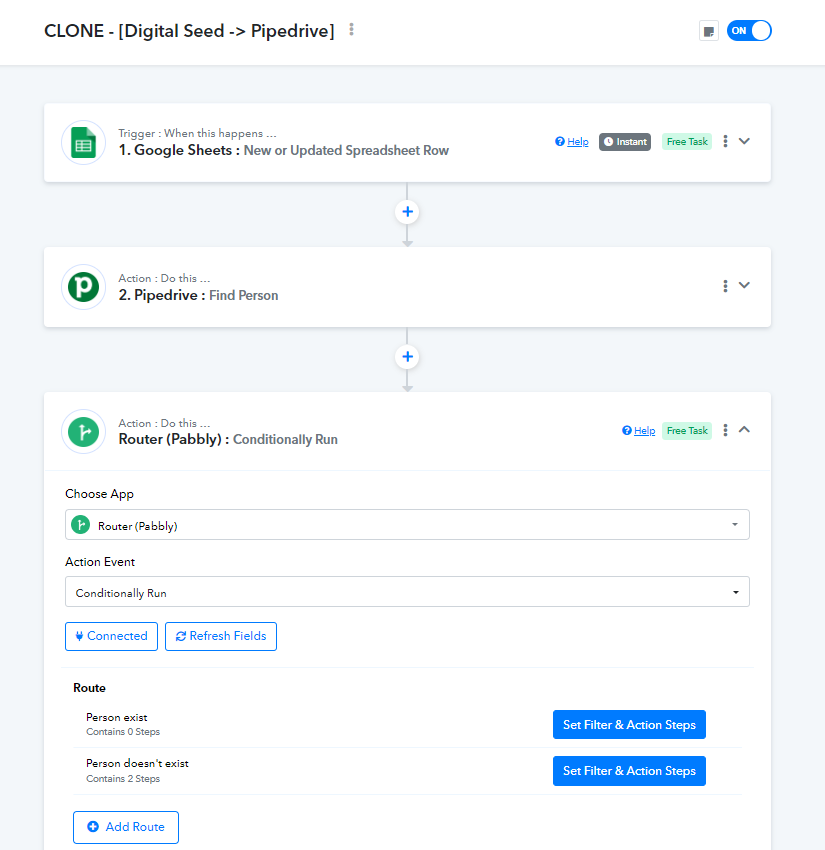
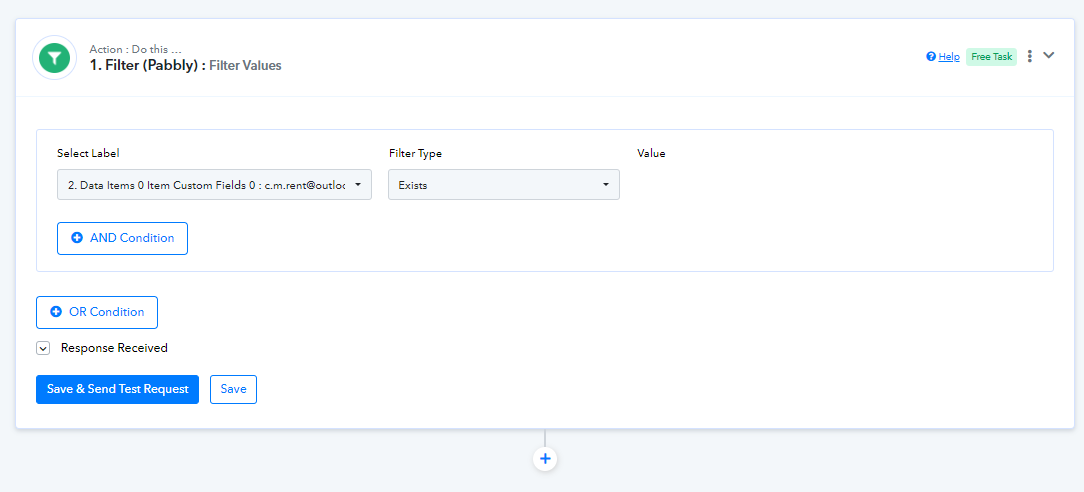
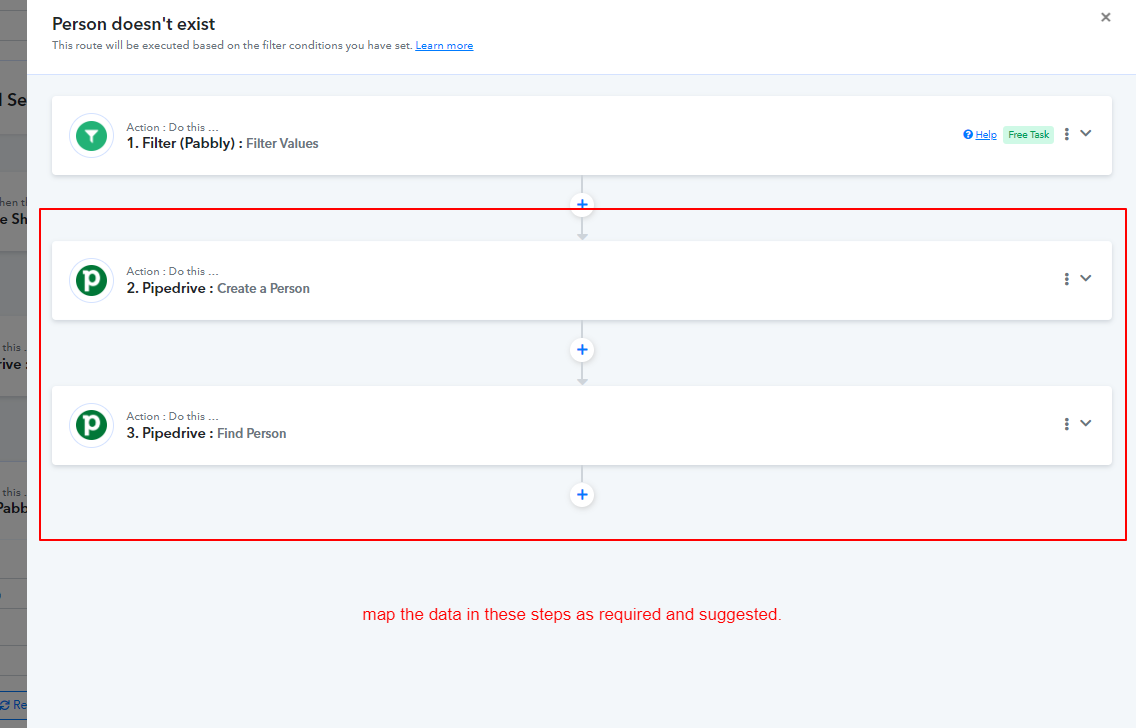
Where I need to add this steps?
Pipedrive: Find Deal
Pipedrive: Get All Stages
Pipedrive: Create Deal
Alway in rout Person doesn't exist?
You have to add all three steps to both routes.
Why do I have to add steps to both roads? If the person exists on pipedrive it means the deal exists too. if the person does not exist then the business does not exist either and therefore it must be created
In that case, the other route is not needed. I was referring to cases where a person exists but a deal is not associated with them. However, if there are no such persons, you can simply add the three steps to the 'Person doesn't exist' route.
Hi @Preeti Paryani can you tell me wich was the condition in Person doesn't Exist Step Filter Pabbly?
Thank you in advice
I've started a recapture the webhook to make a clean test
Hello @SupportHubstrat
The filter condition was if the customer ID exists.
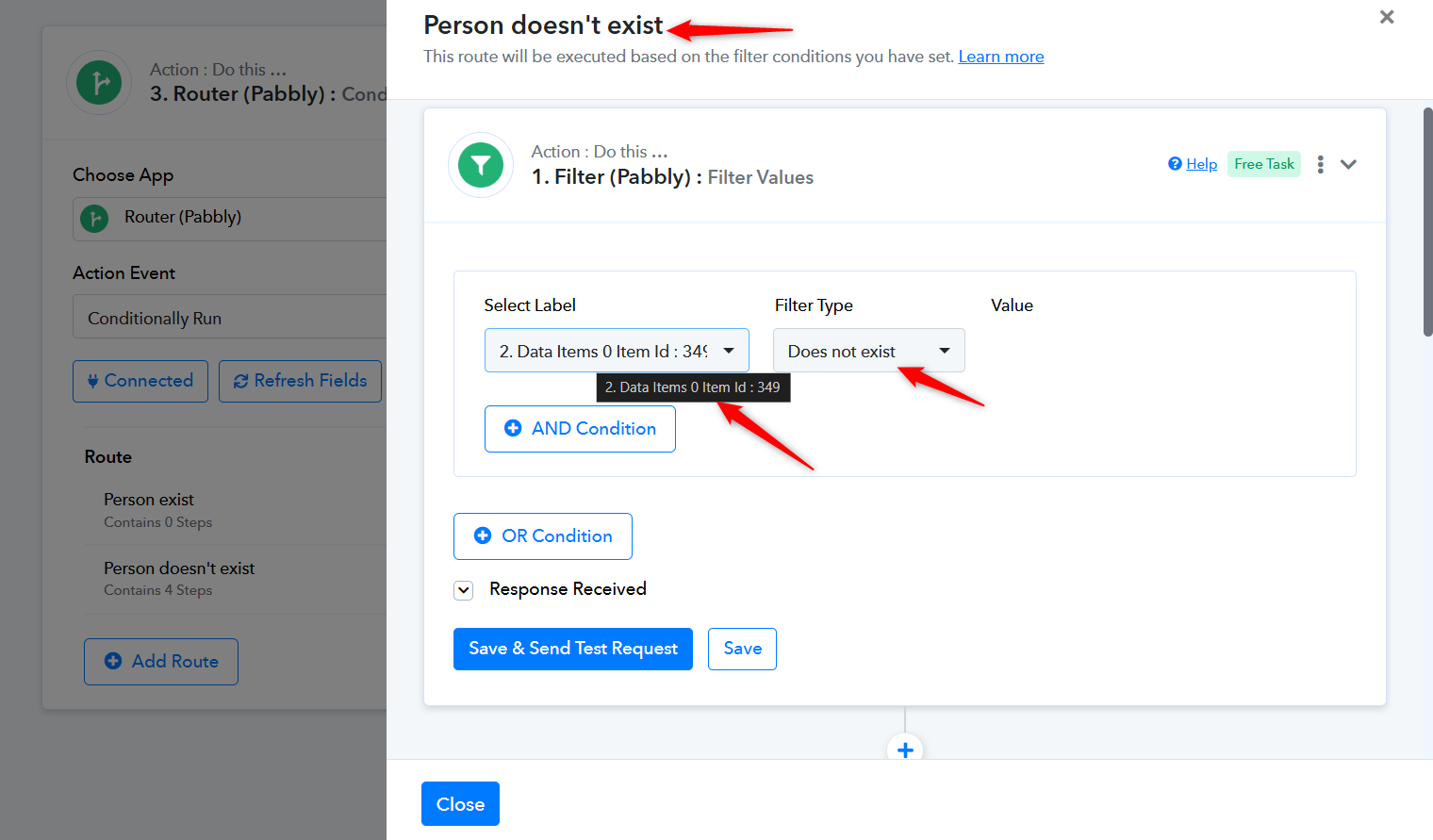
I don't understand why if i'm in Route: Person doesn't exist the condition is IF ID EXIST
The filter condition in 'Route: Person Doesn't Exist' needs to be as follows.
https://connect.pabbly.com/workflow/mapping/IjU3NjYwNTZjMDYzNDA0M2M1MjZlNTUzNDUxMzIi_pc
I'm trying to integrate the inclusion of the Organization/company. So as to associate the company with the person who left the lead. But I get a missing field error.
I structured the workflow like this:
1. Get data from Google Sheet
2. Find Person
3. Find or Create Organization
Pabbly Router
Route 1: Person Exist (No other step)
Route 2: Person doesn't exist
St1: Filter Pabbly
St2: Create Custom
St3: Find Deal
St4: Get all stages
St5: Create Deal
I'm trying to test the workflow runs smoothly, but the person and organization are not assigned to the Deal
Can you help me?
In the 'Create Deal' action step, the Person ID was previously mapped from the 'Find Person' action step (outside the Route). We've adjusted this to map it from the 'Create a Person' action step (step 2) within your Route.
Delete 'Find Deal' and 'Get all Stages' from your Route; its not needed.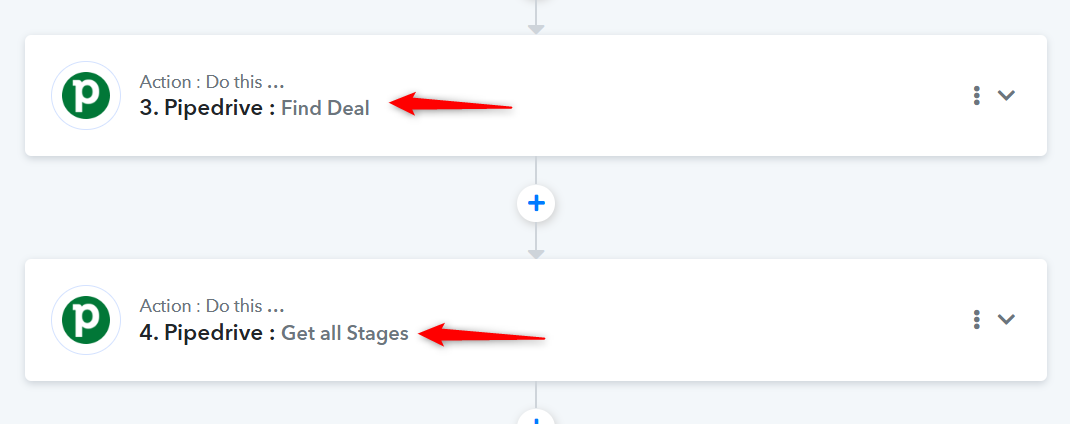
Hi I have the same problem with Organization.
The actual workflow is:
- Google Sheets : New or Updated Spreadsheet
- Pipedrive: Find Person
- Pipdedrive: Find or Create a Organization
- Router Pabbly
- Person Exist
- Person doesn't exist
- Filter Pabbly
- Pipedrive: Create a Person
- Pipedrive: Search Organization
- Pipedrive: Find Deal
- Pipedrive: Get all stages
- Pipedrive: Create Deal
By setting the workflow as specified above, the Organization is not linked to the Deal
Do you think is better to set the workflow in this way:
- Google Sheets : New or Updated Spreadsheet
- Pipedrive: Find Person
- Pipdedrive: Find Organization
- Router Pabbly
- Person Exist
- Person doesn't exist
- Filter Pabbly
- Pipedrive: Create a Person
- Pipedrive: Create Organization
- Pipedrive: Find Deal
- Pipedrive: Get all stages
- Pipedrive: Create Deal
thank you in advice for the support
Hello @SupportHubstrat
Please refer to the attached video and let us know all the possible scenarios so we can assist you regarding the workflow structure.
https://www.loom.com/share/532357a2d1c64fb4919b7ecdffd2ee63 sid=7b7edf03-fce4-48f3-b363-2b54a9aaf813
Hi @Preeti Paryani first of all thanks for the feedback.
The process is as follows
The user leaves his data to be contacted in an ELEMENTOR form, this Elementor form is connected to a Google Sheet.
Starting from the Google sheet, our goal is that the information entered in the form is reported on Pipedrive.
Specifically, the informations we want to import into Pipedrive are:
Name
Surname
E-mail
Telephone
Company Name
The process should work like this:
On Pipedrive the person is created with the following information:
Name
Surname
E-mail
Telephone
Agency
Once the person has been created a Deal must be created and this must be associated with both the person and the company.
It may happen that the person already exists but since it is a very remote case it can be excluded from the pabbly router for the moment
We have added a delay of 1 minute before the 'Search Organization' action step. This will give enough time for a new organization created in the 'Find or Create an Organization' step to reflect in the 'Search Organization' action step response. This should fix the issue you are encountering, where the organization is not being associated with the deal.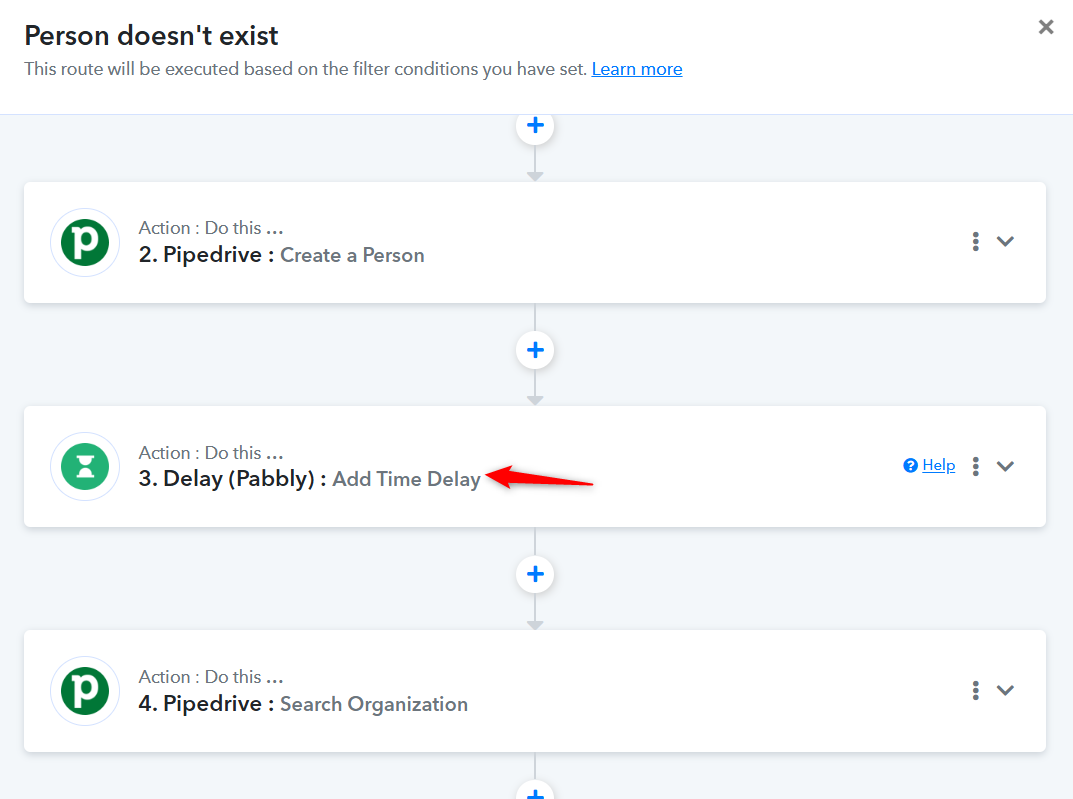
If I want to add the organization even to the Person I need to move up the step 4 search organization before the step 2 create person?
Hello @SupportHubstrat
In that case, please move both the Delay and Search Organization steps before the Create Person step.
Hi @Preeti Paryani
I moved Delay and Search organization before Creating Person but the organization is not added to Person
Hello @SupportHubstrat
Please do a test submission and see if it now works for you.
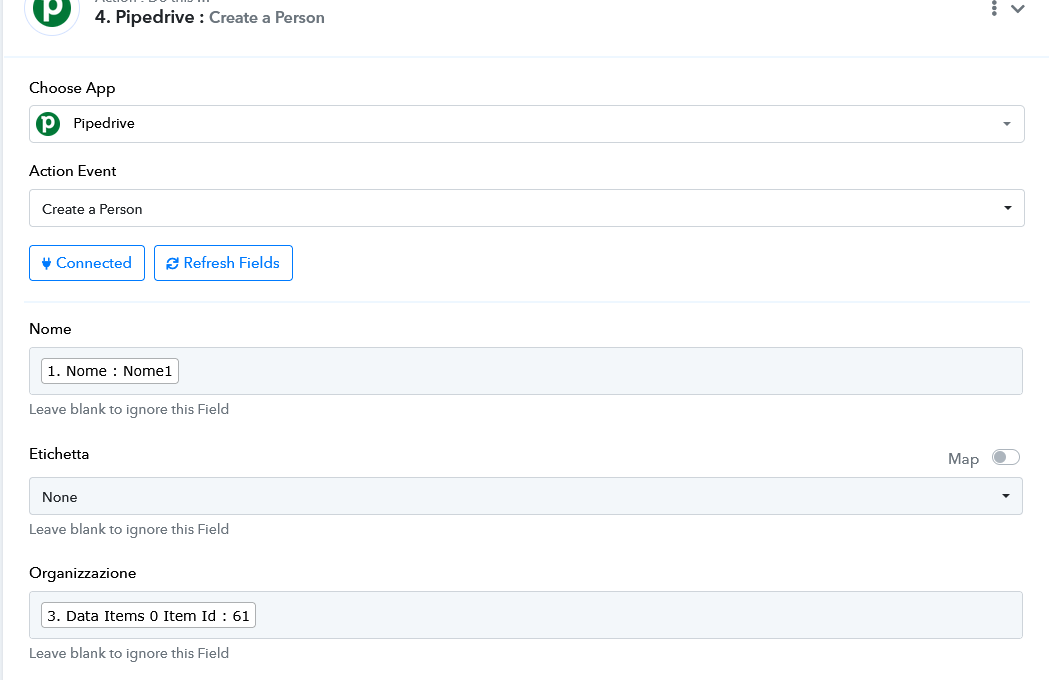
Now it works thank you so much @Preeti Paryani
Hello @SupportHubstrat
Thanks for the update!
We'd love to hear your thoughts! If you have a moment, please rate us on Google. Your feedback helps us improve.