problem in google sheet new and updated row trigger
Status: Closed · Asked by Rajender Garg on · 0 views


Hi Rajender,
Thank you for reaching out to us.
First, could you please reply and share the actual text links (URLs) to both of your workflows? The images you attached showing the URLs are unfortunately blurry, and having the direct links will allow us to check your backend configurations more effectively.
Regarding the issue where the workflow triggers manually but not automatically via the API/Pabbly action:
Please open your Google Sheet and navigate to Extensions > Pabbly Connect Webhook > Initial Setup and check the following configurations:
Trigger Column: Ensure that your Trigger Column is explicitly set to the column where the
"Approved"text is being populated (Column F). If it is set to a different column, the webhook will not detect updates in Column F.Auto Send on Schedule: Make sure that you have enabled "Auto Send on Schedule" from the extension dropdown menu. If this option is not checked, the Google Sheet extension will not automatically push changes to Pabbly when rows are updated via third-party APIs or scripts.
Please check these settings and reply back with your workflow URLs so we can assist you further!
Thanks & Regards,
Hrishabh
Customer Support Associate
🌐 Pabbly.com
👉 Rate your support
Flow 1: https://connect.pabbly.com/v2/app/workflow/mapping/IjU3NjcwNTY5MDYzMzA0M2M1MjZjNTUzYzUxM2Ii_pc
Flow 2 : https://connect.pabbly.com/workflow/mapping/IjU3NjcwNTZjMDYzNTA0MzQ1MjZjNTUzZDUxMzUi_pc
If I check schedule on event does all data go to the pabbly or the new and updated row only??

Hi Rajender,
Thank you for providing the workflow links.
To answer your question regarding "Send on Event": When you use "Send on Event", it triggers the webhook immediately whenever a row is modified manually in the sheet. However, changes made automatically by third-party tools, APIs, or other Pabbly workflows often do not trigger "Send on Event", which is why your automated update isn't firing the workflow.
To fix this, please update your Google Sheet extension settings as follows:
Open your Google Sheet and go to Extensions > Pabbly Connect Webhook.
Click on Send on Event to untick/disable it.
Click on Auto Send on Schedule to enable/tick it instead.
Once you have switched the setting to Auto Send on Schedule, please run your automation test again and let us know if the workflow triggers correctly!
Thanks & Regards,
Hrishabh
Customer Support Associate
🌐 Pabbly.com
👉 Rate your support
still i have doubt that only new record will go or all??
Hi Rajender,
To completely clear your doubt:
Inside the Google Sheets extension dropdown menu, you will see two scheduling options available:
Auto Send on Schedule: If you select this classic option, the extension scans the sheet periodically and will send all data/rows that match the trigger conditions to Pabbly Connect.
Auto Send on Schedule (Beta): If you enable this newer option, it will track row states intelligently and ensure that only newly added or updated rows are sent to your Pabbly workflow.
Since you only want the new and updated data to be sent to your workflow, please make sure to tick/enable the "Auto Send on Schedule (Beta)" option.
Give this a try with a new automated test row and let us know if it works perfectly for you!
Thanks & Regards,
Hrishabh
Customer Support Associate
🌐 Pabbly.com
👉 Rate your support
| |
kindly reply
Hi Rajender,
Great news! I have verified your workflow task history on our backend, and your automation is now working perfectly!
Your second workflow, 2026-27 Dealer Coupon Printing, successfully triggered and executed all 58 steps for row 125 (MORBI TILES AND SANITARY) using the data updated by your first workflow.
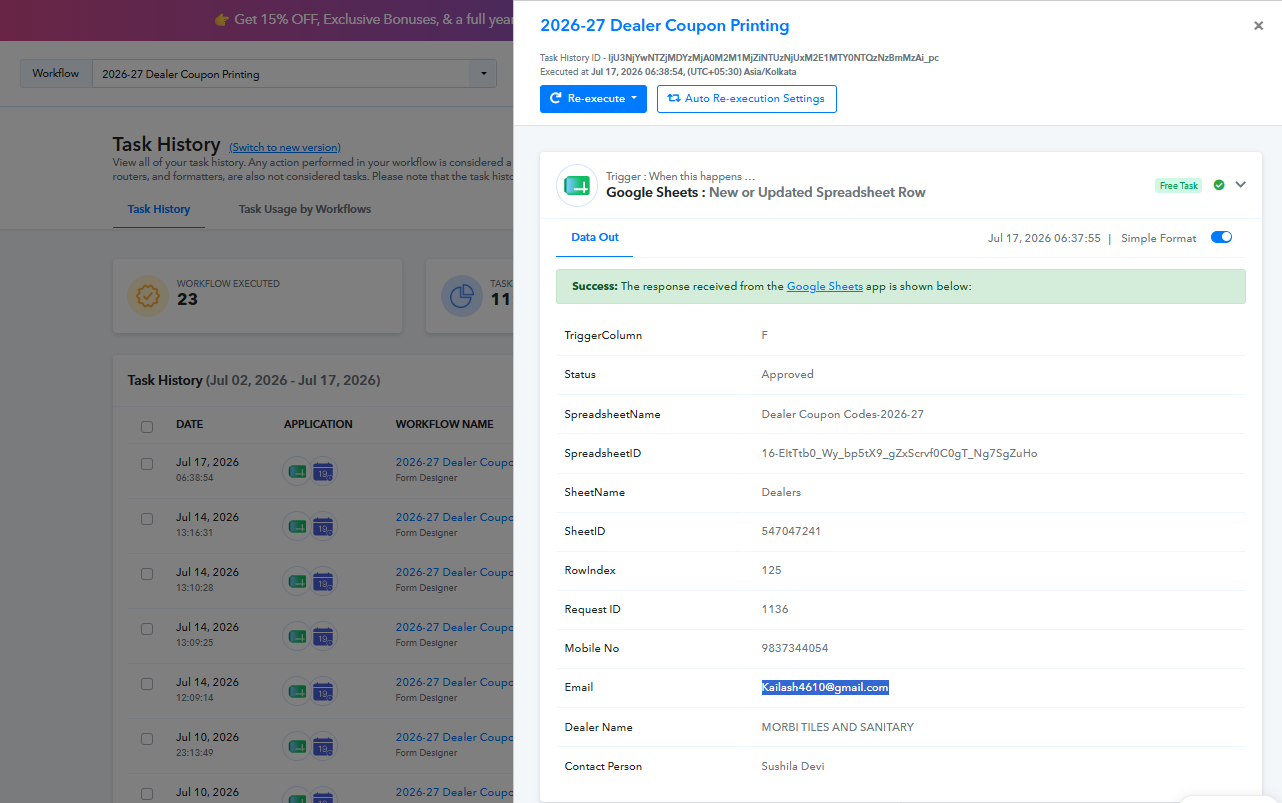
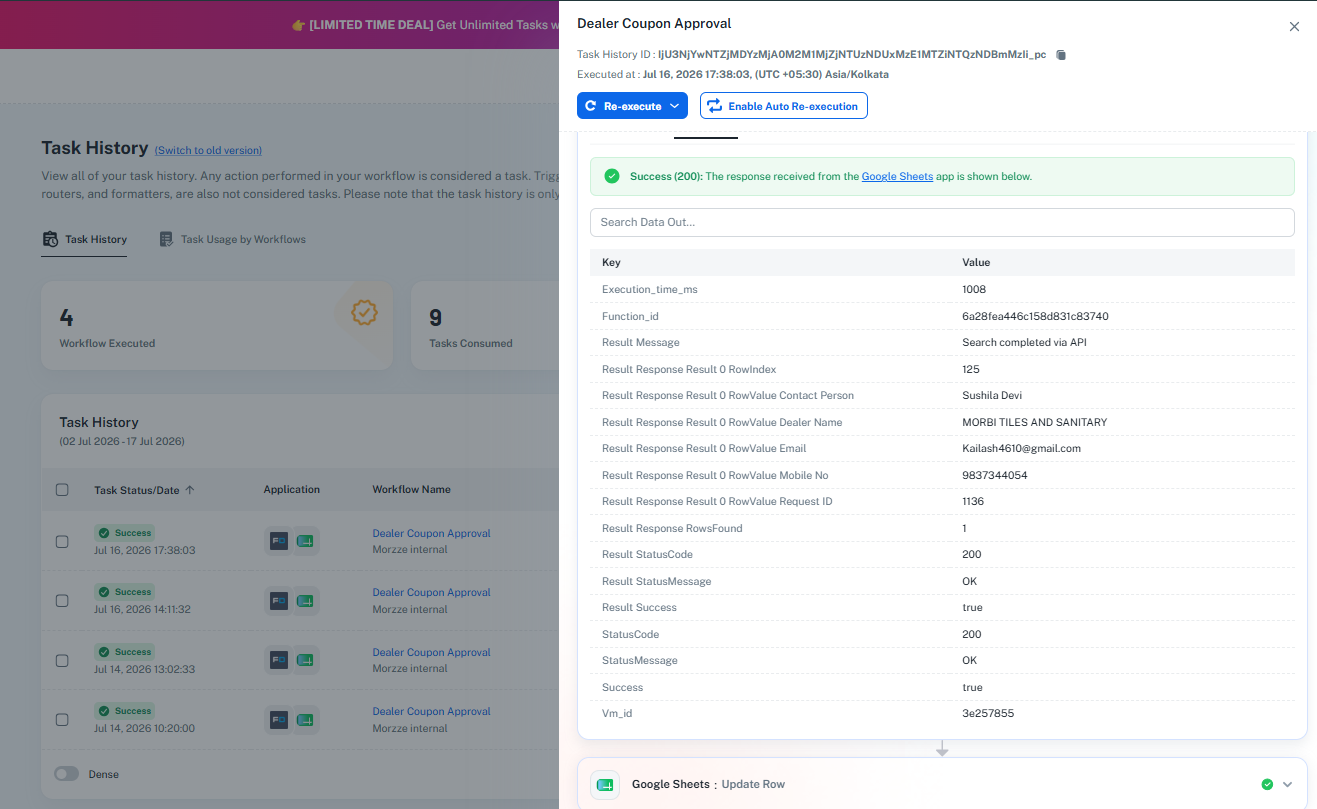
How it works now and what to expect:
The "Send on Schedule" Time Delay: Because the "Approved" status is updated automatically in your sheet via an API/Workflow (and not typed in manually by a human), Google Sheets does not send an instant "on-edit" signal.
The Schedule Interval: Instead, Pabbly Connect's Auto Send on Schedule (Beta) periodically scans your spreadsheet for changes. Because of this, please expect a delay of up to 1 hour from the time Flow 1 updates the row to when Flow 2 automatically triggers and processes it.
Only New/Updated Rows: As you requested, enabling the Beta scheduler ensures that only newly updated rows are processed, so you don't have to worry about older, already-processed data being sent again.
Your setup is fully optimized and working exactly as intended. Please monitor your upcoming automated entries, and let us know if you need any further assistance!
Thanks & Regards,
Hrishabh
Customer Support Associate
🌐 Pabbly.com
👉 Rate your support