Problem with Involve.me connection and question mapping
Status: Open · Asked by Paul Smithson on · 0 views
I have connected Involve.me up just fine and now want to have the data from any forms that are filled out in Involve.me sent to Infinity.
All is working well apart from one question, which is a multiple choice question with a single answer.
If I try to select it in the normal way I just get a list of all the different answer, e.g. Option 1, Option 2, Option 3. It looks like this.
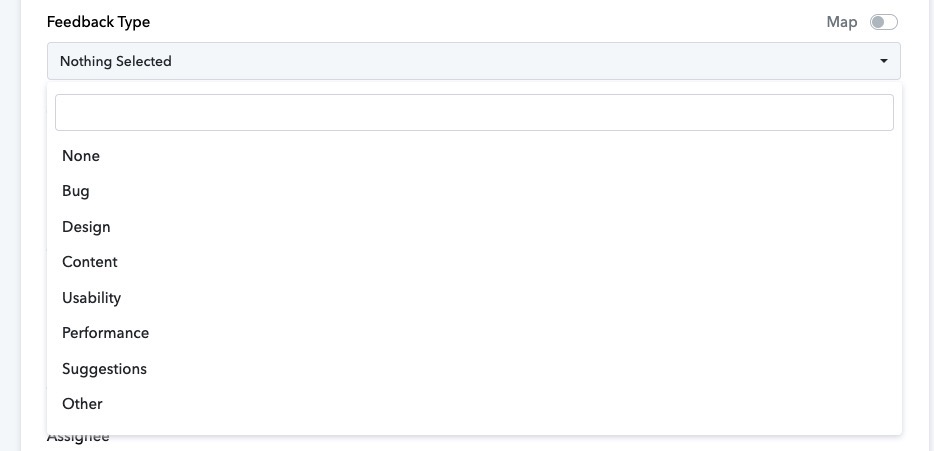
What I want is the one that the person selected in Involve.me, e.g. Bug
If I select the map toggle switch in the top right corner, ie can then pick from the list and so choose:

But then when I click on Save and Send Test Request I get this error:
Invalid data (string) '"Design"' supplied to 'label' attribute: Data "'Design'" is not an array supplied to App\Item\Types\Label class.
Hope someone can help, as I could really do with being able to get the answers to multiple choice questions to pass through correctly.
Hi @yorkieman,
Infinity requires you to pass the ID associated with a specific option, not its name. For example, if you want to pass the option Design, you must pass the corresponding ID, which is c85997bc-4652-4122-9c2b-8018d51c93c8.
https://drive.google.com/file/d/1wbQzHkmNr9WYOmT-3MdWtHYSQqUsxG4s/view?usp=sharing
To achieve this, add a Lookup Table to your workflow and configure it to provide the ID corresponding to the given option. You can then map the ID from the Lookup Table step directly to the Feedback Type field in the Infinity action step.
Excellent. Thanks for letting me know about that.
Just watched the initial bit of the video and it looks like it should do the trick. It is late here so I will get going on this when I am refreshed and ready to absorb it :-)