Problem with Shopify V2
Status: Open · Asked by Steven Everett on · 0 views
the Shopify Trigger Order Payment "re-capture webhook response" just keeps spinning and doesn't capture the responses even after I run a test purchase on my shopify store. Tried this at least a dozen times and it just keeps spinning until it resets and I try it again. I want to transfer the customer data and tag associated with the product purchased over to go high level CRM.
Hi @stemd1966,
Please create a new workflow from scratch and follow the steps shown in the video shared below to set up Shopify as your trigger step and capture the order details.
Kindly record your screen throughout the entire process. If the issue persists, please share the recording in this thread.
youtube.com/watch?v=jmn1Se7ayW0:194
We have moved this thread to Private Discussions to maintain confidentiality.
Thanks & Regards,
Arshil Ahmad
Customer Support Associate
? Pabbly.com
Hi @stemd1966,Please create a new workflow from scratch and follow the steps shown in the video shared below to set up Shopify as your trigger step and capture the order details.
Kindly record your screen throughout the entire process. If the issue persists, please share the recording in this thread.
youtube.com/watch?v=jmn1Se7ayW0:194
We have moved this thread to Private Discussions to maintain confidentiality.
Thanks & Regards,
Arshil Ahmad
Customer Support Associate
? Pabbly.com
Thanks, I got it to work with "Order Creation" as the event . Now that I have it set up, take a look at the workflow in the URL below for this particular question.
If I have it set up with a 4 way Router as seen, in order to place the appropriate "tag " on/for the product(s) the customer purchased, when they purchase 2 different products within the SAME ORDER, for instance, they purchase both the BUNDLE and the SUPPORT product, will the router allow for it to go down the 2 different paths corresponding to the 2 different products and place a tag for each within my Go High Level CRM for that customer?
See this Workflow here > https://connect.pabbly.com/v2/app/workflow/mapping/IjU3NjcwNTY5MDYzNjA0MzI1MjZiNTUzMzUxMzIi_pc
Regards,
Steve
No, it won't.
For this use case, you will need to capture a multi-product order in your Shopify trigger step using the Advanced format. Once the order data is captured, you can use Code (Pabbly) to convert the comma-separated product IDs into tag names, and then pass those comma-separated tag names to the GHL action step.
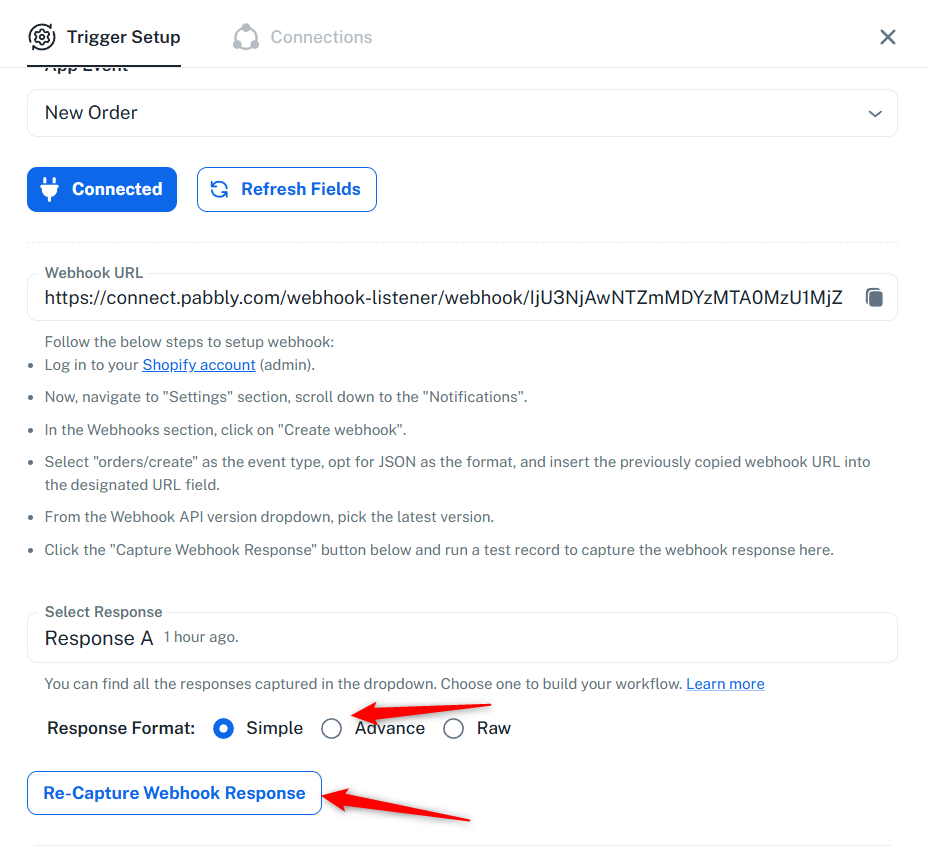
Please select "Advanced" in your trigger step, click on "Re-Capture Webhook Response", and then place a multi-product order in Shopify. Once the new response is captured, let us know and we'll setup the rest of the workflow on your behalf.
Thanks & Regards,
Arshil Ahmad
Customer Support Associate
? Pabbly.com
No, it won't.For this use case, you will need to capture a multi-product order in your Shopify trigger step using the Advanced format. Once the order data is captured, you can use Code (Pabbly) to convert the comma-separated product IDs into tag names, and then pass those comma-separated tag names to the GHL action step.
Please select "Advanced" in your trigger step, click on "Re-Capture Webhook Response", and then place a multi-product order in Shopify. Once the new response is captured, let us know and we'll setup the rest of the workflow on your behalf.
Thanks & Regards,
Arshil Ahmad
Customer Support Associate
? Pabbly.com
Actually, would it be BETTER if I just created another workflow "just" for the support product when it gets added to the purchase order? That way if one of the 3 digital products gets purchased, the original workflow will fire and apply the appropriate "tag" and IF SUPPORT is also purchased in the same order, the OTHER/second workflow will fire and apply that SUPPORT tag too
Hi @stemd1966,
Yes, your approach is also viable! While the method recommended by our team (using Advanced format + Code step in a single workflow) is the cleaner solution, creating a separate workflow for the Support product works too.
Here's how you can set it up:
1. Create a new workflow with Shopify "Order Created" as the trigger
2. Select "Advanced" format in the trigger step and capture the webhook response by placing a multi-product test order
3. Add an Iterator step to loop through each line item/product in the order
4. Add a Filter step after the Iterator to check whether the Support product was purchased (filter by product ID or product name)
5. If the filter condition is met, add a Go High Level action to apply the Support tag to the customer
This way, whenever a new order comes in, this workflow will automatically check if the Support product is part of that order and tag the customer accordingly — regardless of what else they purchased in the same order.
Let us know if you need help setting this up!