Problema invio messaggi
Status: Closed · Asked by Giuseppe Guastaferro on · 0 views
Ieri ho avuto un problema con Meta dovuto al metodo di pagamento: dopo alcuni tentativi andati a vuoto sono riuscito a saldare correttamente, ma mi sono state applicate delle restrizioni temporanee sull'invio dei messaggi.
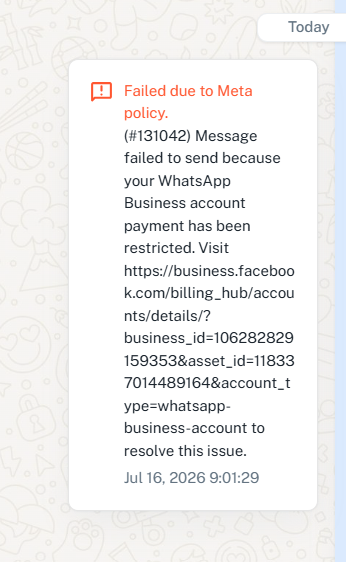
Successivamente ho lanciato un flusso di invio, ma in realtà non è stato consegnato neanche un messaggio.
Il problema è dovuto al fatto che la restrizione non è ancora stata completamente rimossa? Questa mattina ho riprovato, ma di nuovo non è partito alcun messaggio
hi you can
James Wilsworth:
hi you can
What? I didn't understand, sorry
Hello Giuseppe,
Thank you for the update.
Based on the screenshot you shared, the error appears to be WhatsApp Error Code 131042, which indicates that there is an issue related to the payment configuration of your WhatsApp Business Account.
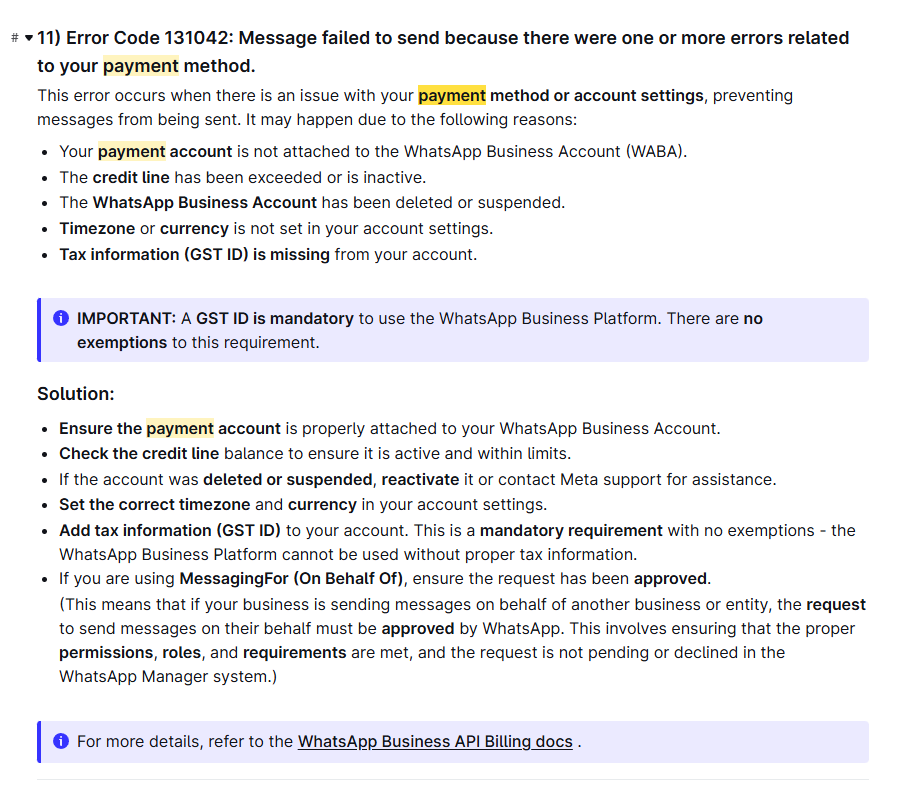
Some common reasons for this error are:
The payment account is not properly attached to the WhatsApp Business Account (WABA).
The credit line has been exceeded or is inactive.
The WhatsApp Business Account has been suspended or restricted.
The timezone or currency settings are not configured correctly.
Tax information (such as VAT/GST details, where applicable) is missing from the account.
Since you recently experienced a payment-related issue with Meta, it is possible that the restriction has not yet been fully removed or that there is still an issue with the billing configuration on the WhatsApp Business Account.
We recommend reviewing the following guide, which explains this error in detail along with the required troubleshooting steps:
If the issue still persists after verifying the above settings, please share the following details with us via email at [email protected]:
The email address associated with your Pabbly Chatflow account.
A screenshot of the WhatsApp Account Overview section in Meta Business Suite.
A screenshot showing the Payment Method and Payment Settings configured for the WhatsApp Business Account.
As these details contain sensitive billing information, we recommend sharing them directly over email rather than publicly.
Once we receive these details, we'll be happy to investigate further.
Thanks and Regards,Preeti Paryani
Customer Success Associate,
Pabbly.com