Problems when creating new products on Shopify with Google Sheet - Variant Options
Status: Open · Asked by mamgt on · 0 views
Hello, I have problems when creating a new product on Shopify through Google Sheet, because the product created does not respect the Option1 and Option2 value I wrote in the sheet file. Furthermore the price is 0€ even if I mapped a column for the price.
Someone had the same problem?
thank you
Hello, I have problems when creating a new product on Shopify through Google Sheet, because the product created does not respect the Option1 and Option2 value I wrote in the sheet file. Furthermore the price is 0€ even if I mapped a column for the price.
Someone had the same problem?
thank you
Hello @mamgt,
Could you please share the workflow URL where you are encountering this issue? This will allow us to analyze the problem in detail and provide you with better assistance.
Looking forward to your response.
Hello, sure, here it is: https://connect.pabbly.com/workflow/mapping/IjU3NjYwNTY5MDYzNjA0MzY1MjZiNTUzMjUxM2Ei_pc
Hello @mamgt,
Please allow us some time to investigate the issue. We will get back to you shortly.
Hello @mamgt,
Upon reviewing your setup, we noticed that for Variant Option 1, you have mapped three comma-separated values, whereas for Variant Option 2 (Colore), you have entered only two values. This discrepancy is causing the error message: "You need to add option values for Colore."
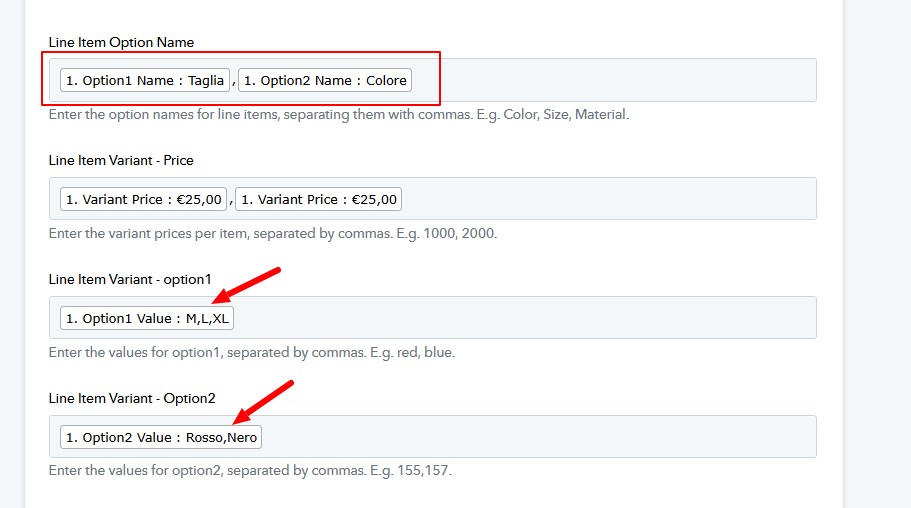
To resolve this issue, please ensure that the number of values mapped under all variant options is equal.
Additionally, since we do not have visibility into the actual response, we are unable to determine the issue with the price.