Rate limit exceeded!
Status: Open · Asked by FrancescoPremier on · 0 views
Hi
I am trying to send 1,500 whastapp messages through wati in 1 time for my automated reminder sequence containing several messages leading up to an event, however, it is not sending all messages. The error for the messages that are send is
[TABLE]
[TR]
[TD]Rate limit exceeded[/TD]
[/TR]
[/TABLE]
I only bought this platform so I can do this, so how do I do this without rate limit being exceeded.
Zapier allows 5,000 requests every 60 seconds.
Hello @FrancescoPremier,
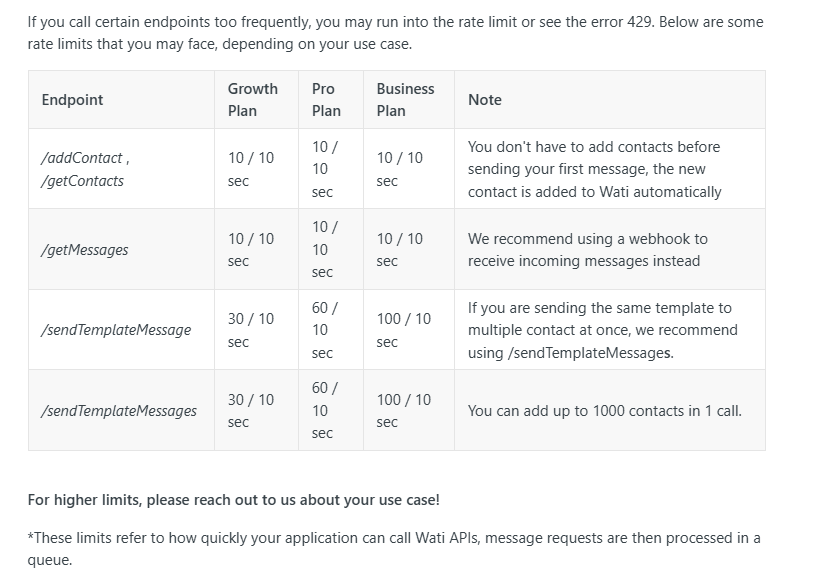
Could you please let us know the Wati plan you're currently using as the rate limit for each plan varies? Also please provide us with the workflow URL where you're facing this issue so we can better look into the concern.
https://docs.wati.io/reference/errors
we are currently on Pabbly Connect 1-Yearly Plan-Tier 1 not sure what that equates to.
this is the lastest workflow that didn't send all the messages https://connect.pabbly.com/workflow/mapping/IjU3NjYwNTY5MDYzMDA0MzQ1MjZiNTUzMzUxMzci_pc
Hello @FrancescoPremier,
It seems there is some confusion. We were asking for the Wati plan that you are currently using, not your Pabbly Connect profile.
Please let us know which Wati plan you are currently subscribed to so we can assist you better.
these are the only subscriptions I see, where can i find what plan were on?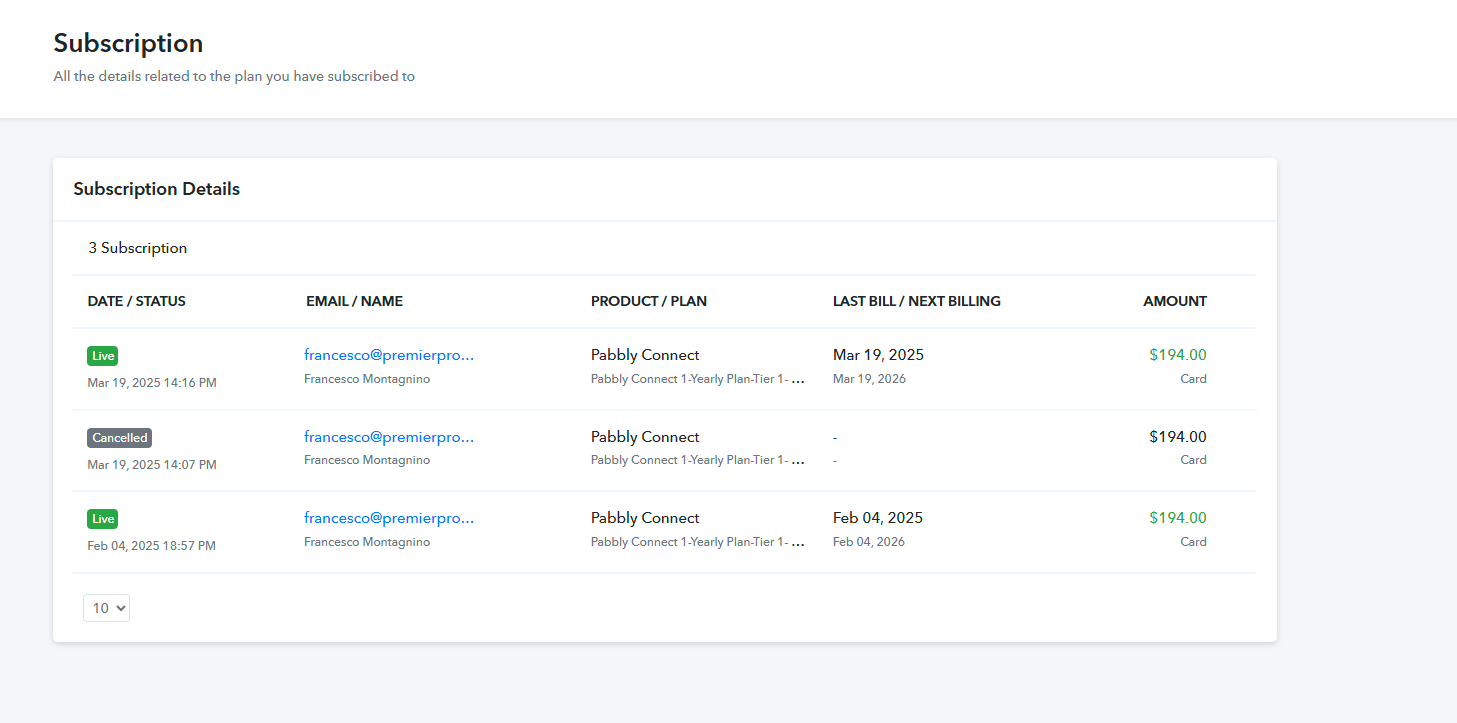
Hello @FrancescoPremier,
We are asking about the Wati Plan you are using not pabbly's plan. Please let us know the WATI Plan you're using.
am trying to send 1,500 whastapp messages through wati in 1 time for my automated reminder sequence containing several messages leading up to an event, however, it is not sending all messages. The error for the messages that are send is
oh apologies, we are on the pro plan
Hello @FrancescoPremier,
Thank you for reaching out.
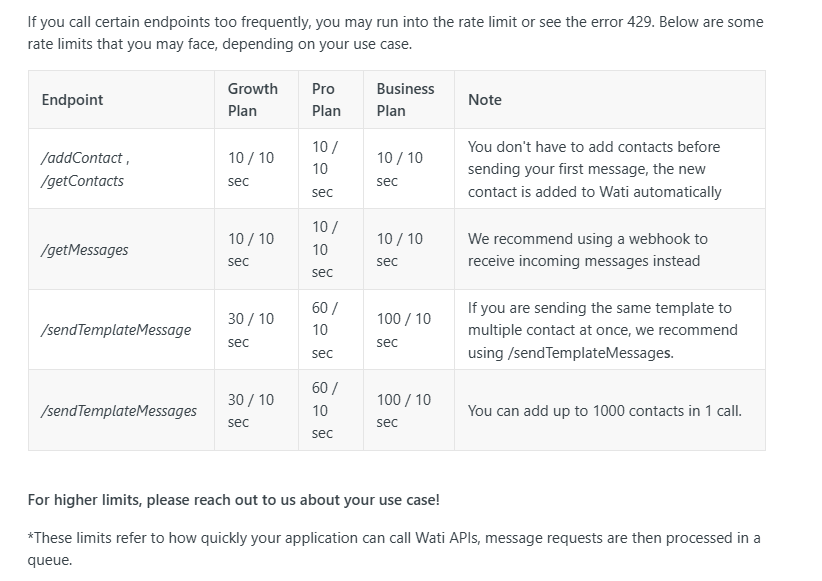
Upon reviewing your plan, we noticed that the Pro plan has a limit of 60 requests per 10 seconds for sending template messages. The rate limit errors you encountered on March 21st were due to over 100 requests being sent within just two seconds, exceeding the allowed limit.
You can try executing the requests again, and they should work fine now. However, to avoid this issue in the future, please ensure that no more than 60 requests are made within a 10-second window.
If you require a higher request limit to accommodate your message flow, we recommend upgrading to a plan that better suits your needs. Let us know if you need any further assistance.
https://docs.wati.io/reference/errors
How can I ensure this doesn't happen and that the requests are staggered out? If I have 1500 people register on a list, I need to make sure that they all receive the message.
You have to make sure to send fewer than 60 requests per 10 seconds, i.e., the workflow should trigger fewer than 60 requests per 10 seconds. There is no other workaround.
is there not a way stopping it at 60 per 10 seconds and then running another 60 10 seconds later and doing that until they are all complete?
Hello @FrancescoPremier,
No, currently this is not possible.
is there not a way stopping it at 60 per 10 seconds and then running another 60 10 seconds later and doing that until they are all complete?
However, you can add a few seconds/milliseconds of delay before your WATI action step which will ensure that every 10 seconds, not more than 60 requests get processed. You can use the Code (Pabbly) action application and utilize the below javascript code
await new Promise(resolve => setTimeout(resolve, 20000));
output = [{wait: "20000ms"}];
are you able to go in and duplicate my tax thursday sequence and show me how to set that up?
Hello @FrancescoPremier,
Please provide us with the workflow URL so we can guide you on adding the delay.