Read a spreadsheet & Create a design & Post to Pinterest
Status: Open · Asked by Marcos Assis on · 0 views
Hello, I would like to ask a question...
Create automation to:
Read a spreadsheet & Create a design & Post to Pinterest
every day at 6am
Since on the first day
She posted EVERYTHING I had on the spreadsheet.
And it was doubled because I have 60 lines and she posted 120 pins
And it still consumed a large part of my tasks this month.
What's wrong?
Follow the link and print
https://connect.pabbly.com/workflow/mapping/IjU3NjYwNTZkMDYzNzA0M2Q1MjZhNTUzNzUxMzIi_pc
Attachments
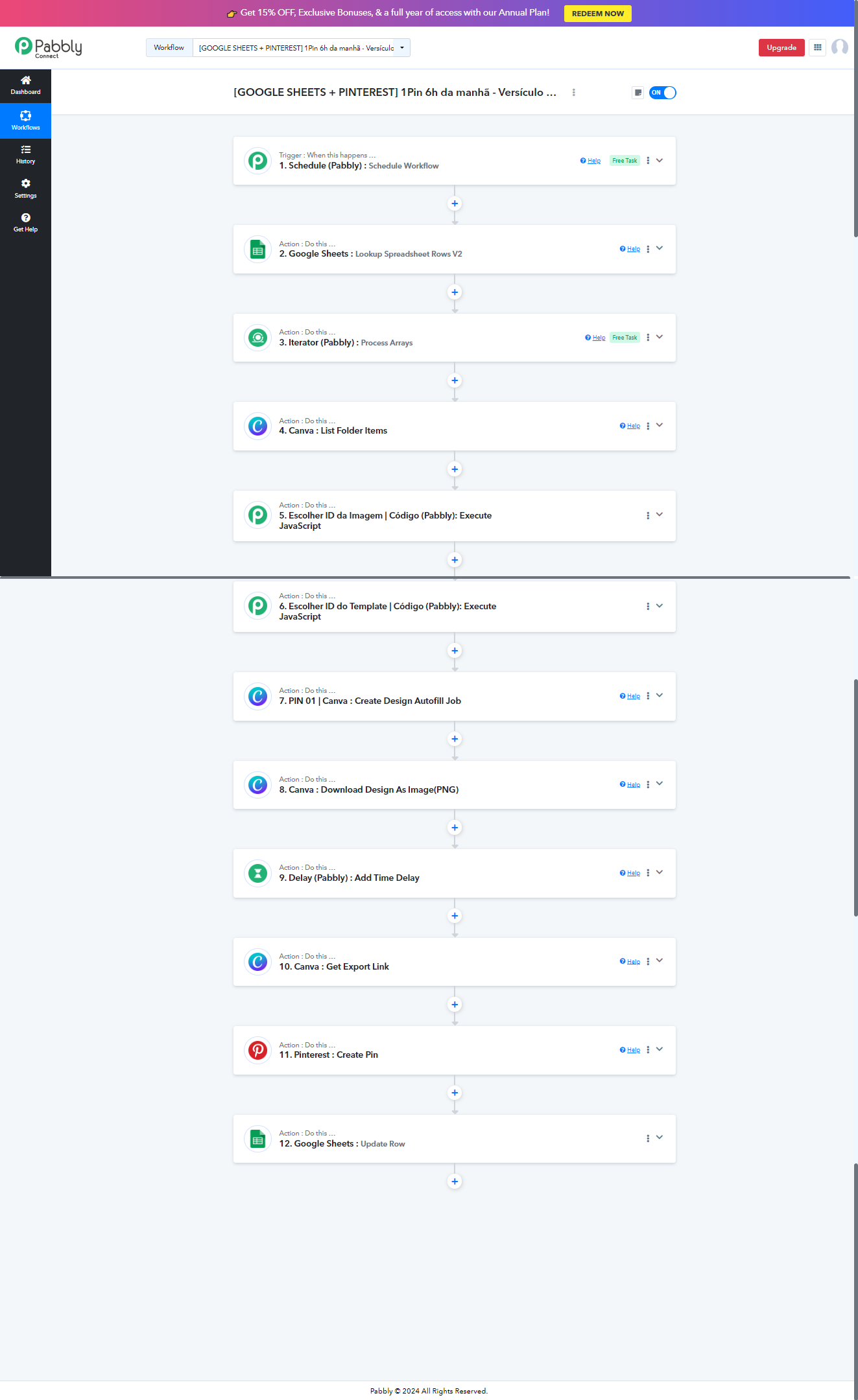
Here are some more prints
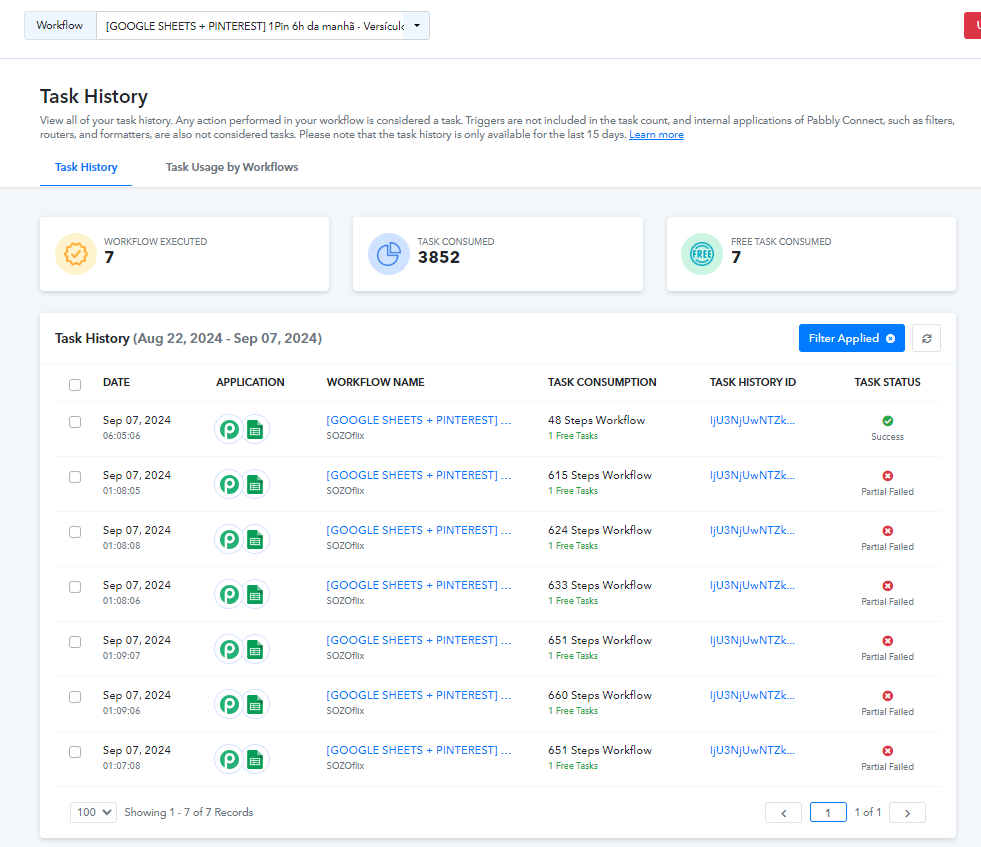
Attachments

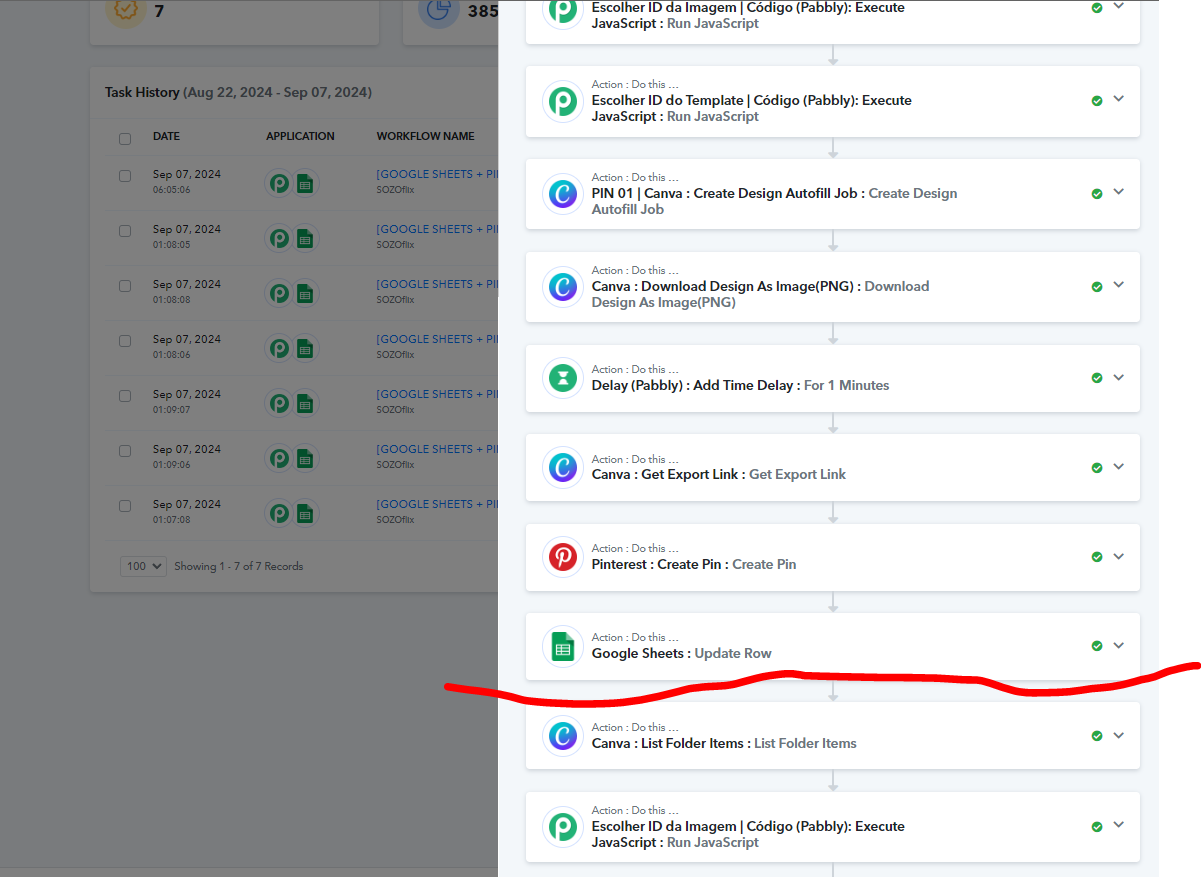
Analyzing one of the histories, look what I noticed...
It loops the automation, although I didn't program it!
The automation should stop at Update Row.
But she continued in an eternal loop
Until all spreadsheet rows are posted
Hi @Marcos Assis,
The way your workflow is currently set up, every day at 6 AM, it will look up the word 'Não' in your spreadsheet, fetch all the rows that have the word 'Não', iterate through each such row, and map it to the next steps. The steps after the Iterator will execute repeatedly until all the rows that contain the word 'Não' have been processed. So, it’s not looping, but rather iterating through all the rows that contain the word 'Não' each day at 6 AM.
Perfect, so I understand where I went wrong...
How do I make this automation work every day at 6 AM and perform only one action per day?
I want it to read the first line with the word "no," take the actions, and then only run again the next day at 6 AM.
So, you want it to fetch only the topmost row with the word 'No' every day at 6 AM and execute the rest of the steps based on the data in that row?
Got it!
I want it to execute one line per day at 6 AM.
Here are all the possible use cases:
- You can post the topmost row containing 'No' every day at 6 AM. This means that even if the content in the topmost row with 'No' remains the same, the same row will be executed every day.
- You can post the bottom-most row containing 'No' every day at 6 AM. This means that even if the content in the bottom-most row with 'No' remains the same, the same row will be executed every day.
- You can fetch one row at a time from your spreadsheet (not just the row containing 'No', but any row from top to bottom) and execute it every day at 6 AM.
Use case that is not possible:
You cannot fetch only rows containing 'No' one at a time each day. That is, you cannot fetch the first row containing 'No' one day, then the next row containing 'No' the following day, and so on. This use case is not possible.
Hello, Pable team!
Thank you for the automation options you provided. I'd like to focus specifically on the first option.
I have a spreadsheet with multiple rows and a column called "Posted," where the values can be "yes" or "no." What I need is for the automation to read, every day at 6 AM, the first row where it says "no" in the "Posted" column, make the corresponding post, and then update that same row to "yes." The next day, when the automation runs again, it should skip that row (since it has already been posted) and move to the next row marked as "no."
I would like to confirm if your tool can handle this workflow automatically.
Looking forward to your response. Thank you!
---
Isso resolve o que você precisa?
Hi Marcos,
Your and my requiremnts have some simlarities , but I guess you can solve your reuirement by adding delay feature
as you want to post , 1 post every day at 6:00AM, where you can mention date /time in one column for next week or month
youtube.com/watch?v=WqSteamAldE
I hope it will work for you :)
but my need is bit different, becoz I dont know when I want to post, my one script fills google sheet anytime (one row or multiple at a time), but I dont want to post all data in one shot and dont know time,
so I want my each row post in the interval of 10 min (sales post of product ;))
Hi Marcos,
Your and my requiremnts have some simlarities , but I guess you can solve your reuirement by adding delay feature
as you want to post , 1 post every day at 6:00AM, where you can mention date /time in one column for next week or monthyoutube.com/watch?v=WqSteamAldE
I hope it will work for you :)
but my need is bit different, becoz I dont know when I want to post, my one script fills google sheet anytime (one row or multiple at a time), but I dont want to post all data in one shot and dont know time,
so I want my each row post in the interval of 10 min (sales post of product ;))
Excellent, I'm going to add a 24-hour delay at the end of the automation, I believe this will work.
The first solution is to add a 24-hour delay at the end of the automation. This way, the automation will run, wait 24 hours at the end, and then run again. The second solution I thought of, and this is where I have a question, is if there is a way to add an action at the end of the automation to stop it. This way, the automation would stop at the end and restart the next day at 6am, repeating this cycle. I await your response. Thanks!
The first solution is to add a 24-hour delay at the end of the automation. This way, the automation will run, wait 24 hours at the end, and then run again. The second solution I thought of, and this is where I have a question, is if there is a way to add an action at the end of the automation to stop it. This way, the automation would stop at the end and restart the next day at 6am, repeating this cycle. I await your response. Thanks!
I'm sorry, but it's not possible to stop the automation in the way you're describing, where it stops at the end and then restarts the next day at 6 am.
However, you could use a delay or schedule a new trigger at 6am to achieve a similar result.
Hello, Pable team!Thank you for the automation options you provided. I'd like to focus specifically on the first option.
I have a spreadsheet with multiple rows and a column called "Posted," where the values can be "yes" or "no." What I need is for the automation to read, every day at 6 AM, the first row where it says "no" in the "Posted" column, make the corresponding post, and then update that same row to "yes." The next day, when the automation runs again, it should skip that row (since it has already been posted) and move to the next row marked as "no."
I would like to confirm if your tool can handle this workflow automatically.
Looking forward to your response. Thank you!
---
Isso resolve o que você precisa?
You need to set up your workflow in this manner to achieve your use case. This workflow is just for reference; you need to make changes to your original workflow.
https://connect.pabbly.com/workflow/mapping/IjU3NjYwNTZkMDYzNDA0MzM1MjY4NTUzMjUxMzIi_pc
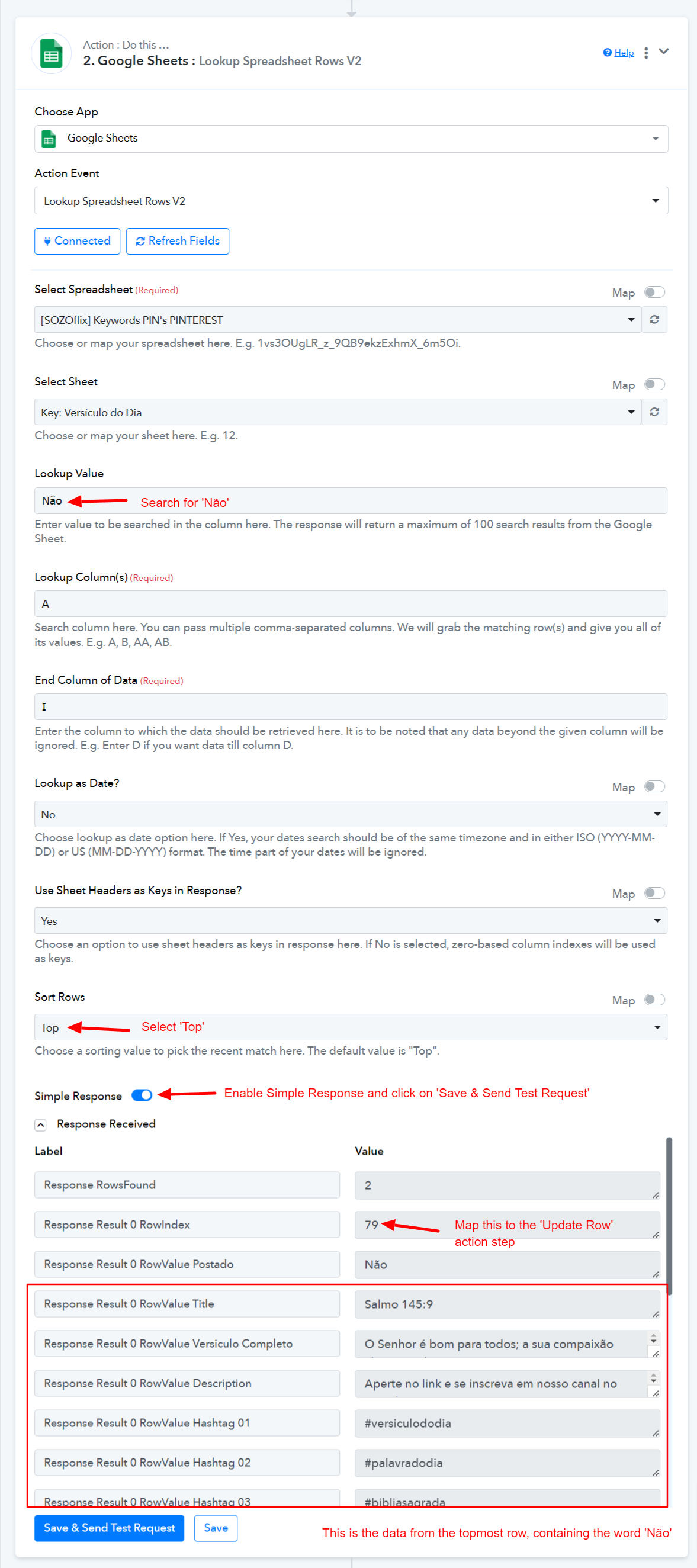
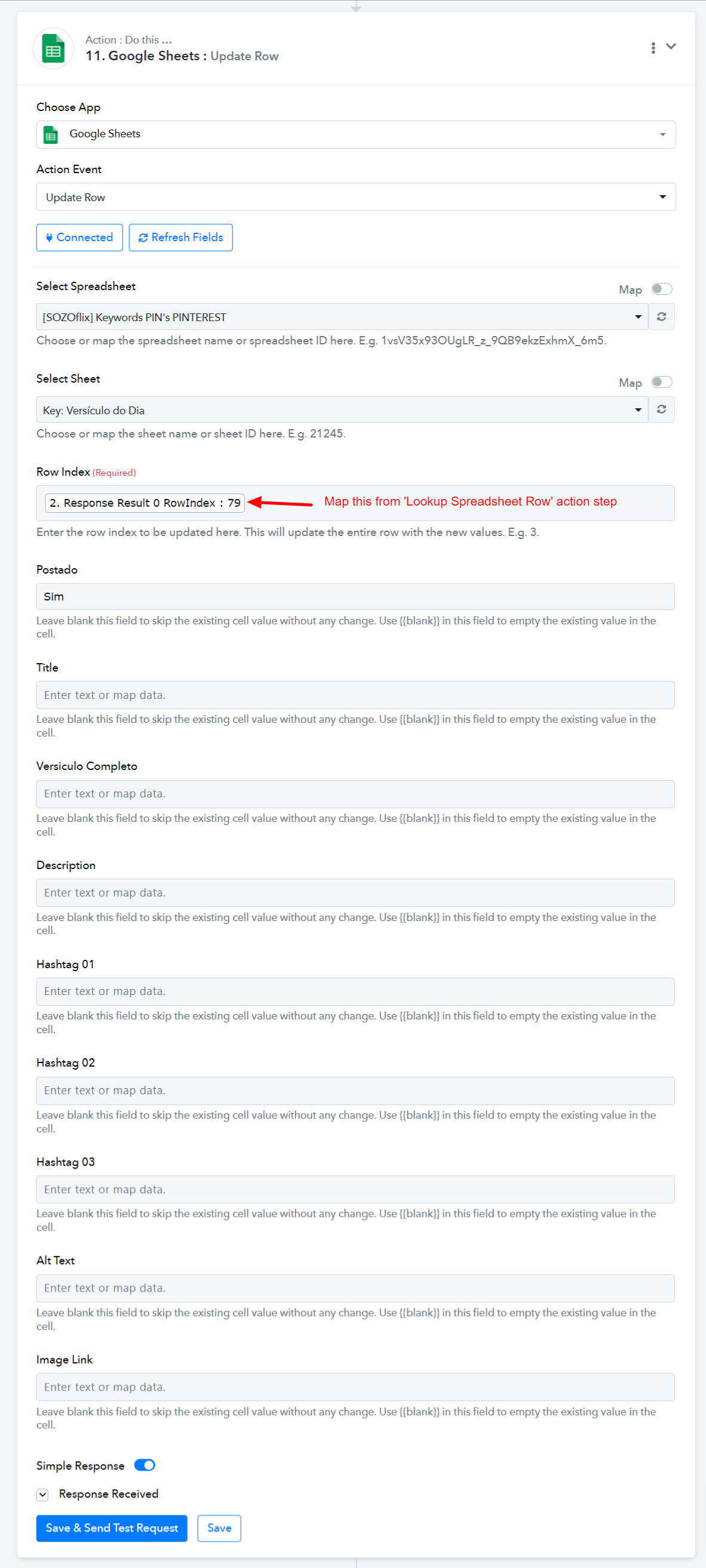
This workflow will trigger every day at 6 AM, search for the topmost row containing the word 'Não', make a post using the data captured from that row, and update 'Não' to 'Sim'. The next day, it will trigger again at 6 AM, search for the next row containing the word 'Não', and so on.
Hello @ArshilAhmad , I made the changes indicated in the flow, follow the flow link above.
Could you confirm if this way it will work correctly?
It doesn't look like you have made any changes to this workflow.
Kindly setup the original workflow in this manner.
https://connect.pabbly.com/workflow/mapping/IjU3NjYwNTZkMDYzNDA0MzM1MjY4NTUzMjUxMzIi_pc
Perfeito @ArshilAhmad
Got it, now I actually did what was recommended.
Here is the link to the updated automation:
https://connect.pabbly.com/workflow/mapping/IjU3NjYwNTZkMDYzNDA0MzM1MjY4NTUzMjUxMzIi_pc
Could you just take a look and tell me if it's ok?
Another question...
If I want this same automation to run every 4 hours from 6 am
And don't ride in the early hours of the morning from 00:00 to 5:59
How do I do it?
Hello @Marcos Assis
Just for some clarification please let us know from 6:00 AM up until what time you want to run this workflow, like 6:00 - 12:00 or 6:00 - 2:00.
Perfeito @ArshilAhmad
Got it, now I actually did what was recommended.Here is the link to the updated automation:
https://connect.pabbly.com/workflow/mapping/IjU3NjYwNTZkMDYzNDA0MzM1MjY4NTUzMjUxMzIi_pcCould you just take a look and tell me if it's ok?
Your workflow is correctly setup to execute everyday at 6 AM.
Another question...If I want this same automation to run every 4 hours from 6 am
And don't ride in the early hours of the morning from 00:00 to 5:59
How do I do it?
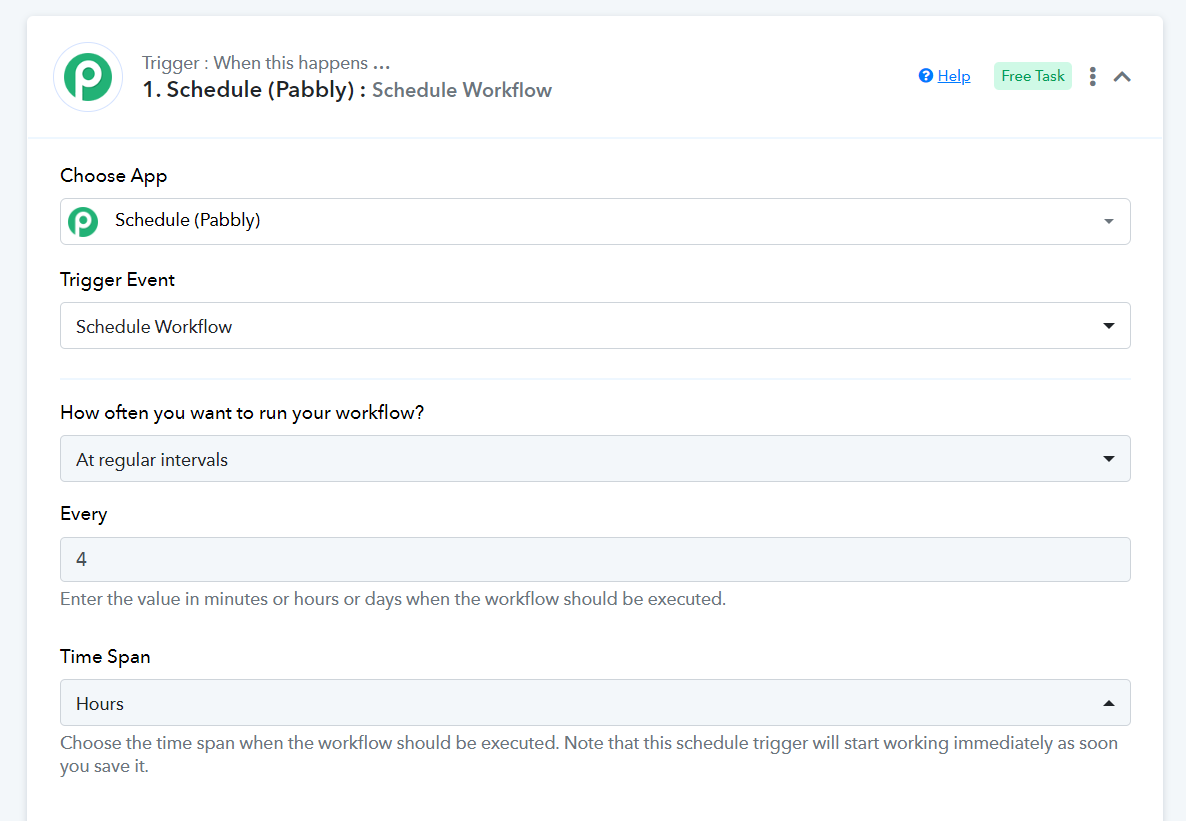
To achieve this use case, you need to make this change to the trigger step of your existing workflow. This will allow you to trigger your workflow every 4 hours.
If you want your workflow to be enabled and disabled at a particular time automatically, you can follow the steps shared in this thread: https://forum.pabbly.com/threads/time.15949/#post-75509.
Thank you very much! @ArshilAhmad
Hello @Marcos AssisJust for some clarification please let us know from 6:00 AM up until what time you want to run this workflow, like 6:00 - 12:00 or 6:00 - 2:00.
Hello @Preeti Paryani
Thank you in advance for your assistance...
I will detail how my automation is now:
Every day at 6 am it runs.
Read my spreadsheet and identify in the posted column if there is a cell with the text "No"
In order from top to bottom, when it finds the first cell, it takes the data from the row and creates the post and publishes it on Pinterest.
This is all working perfectly.
My question is:
If I want to make more than one post per day?
If instead of reading the spreadsheet only at 6 am, it was read every 4 hours
Example:
at 9am
at 1pm
at 5pm
at 9pm
I know that if I duplicate and change the date of each automation I can get this result, but is it possible to do it another way?
To achieve this use case, you need to make this change to the trigger step of your existing workflow. This will allow you to trigger your workflow every 4 hours.
If you want your workflow to be enabled and disabled at a particular time automatically, you can follow the steps shared in this thread: https://forum.pabbly.com/threads/time.15949/#post-75509.
This will help you achieve the exact use case you are describing. It will allow you to start your workflow automatically at 6 AM every morning, make a new post every 4 hours, and automatically disable your workflow at 12 AM. The workflow will then be enabled again at 6 AM the next day, and this cycle will continue.