Receiving error email from Pabbly every few days
Status: Closed · Asked by basslion on · 0 views
We are getting email from Pabbly titled "A quick notice about recent task execution"
In the email it mentions the same error details
Task Error Detail:
{
"type": "Failed",
"result > status": false,
"result > keys > 0": "text",
"result > msg": "Required params"
}
The workflow seems to be doing ok, but can someone tell me what this means exactly?
Thanks
Hey @basslion,
Could you please provide us with the Workflow URL where you are facing this issue? This will help us investigate the problem more effectively and assist you accordingly.
Please be aware that to assist you effectively, we may need to access your Pabbly Connect account. If you're comfortable with this, please grant us permission by stating in your next reply:
"You have my permission to log into my Pabbly Connect account and edit the workflow, if required. Here is the registered email address associated with it."
Looking forward to assisting you further.
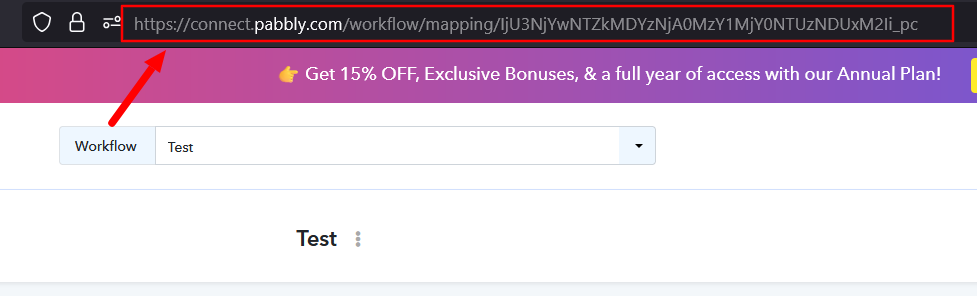
Hey @basslion,Could you please provide us with the Workflow URL where you are facing this issue? This will help us investigate the problem more effectively and assist you accordingly.
Please be aware that to assist you effectively, we may need to access your Pabbly Connect account. If you're comfortable with this, please grant us permission by stating in your next reply:
"You have my permission to log into my Pabbly Connect account and edit the workflow, if required. Here is the registered email address associated with it."
Looking forward to assisting you further.
Hello. the URL would be https://connect.pabbly.com/workflow/mapping/IjU3NjYwNTY0MDYzMzA0MzY1MjZhNTUzMzUxMzIi_pc
Thank you. :)
You have my permission to log into my Pabbly Connect account and edit the workflow, if required. Here is the registered email address associated with it. [email hidden] Thanks
Hello @basslion ,
Thank you for sharing the workflow details and granting us permission to access your account.
We have reviewed the task history of your workflow “When Order status COMPLETED Import to WAVE” and would like to clarify the error notification you received.
The error mentioned in the email corresponds to the following task execution:
- Task History ID: IjU3NjUwNTY1MDYzNzA0M2Q1MjZmNTUzZDUxMzY1MTZhNTQzMzBmMzYi_pc
- Executed on: December 17, 2025 at 14:39:11 (UTC-05:00, America/New_York)
Upon checking this task, we found that the failure occurred at the step:
Text Formatter (Pabbly) → Split Text
In this step, the “Date Completed” field was mapped from the trigger WooCommerce: Order Updated. However, for this particular execution, the Date Completed value was not received in the trigger response. Since the Split Text action requires an input value, the absence of this parameter caused the step to fail with a “Required params” error.
After this execution, the workflow has been running successfully, and there are no ongoing issues with the automation.
Hello @basslion ,Thank you for sharing the workflow details and granting us permission to access your account.
We have reviewed the task history of your workflow “When Order status COMPLETED Import to WAVE” and would like to clarify the error notification you received.
The error mentioned in the email corresponds to the following task execution:
- Task History ID: IjU3NjUwNTY1MDYzNzA0M2Q1MjZmNTUzZDUxMzY1MTZhNTQzMzBmMzYi_pc
- Executed on: December 17, 2025 at 14:39:11 (UTC-05:00, America/New_York)
Upon checking this task, we found that the failure occurred at the step:
Text Formatter (Pabbly) → Split TextIn this step, the “Date Completed” field was mapped from the trigger WooCommerce: Order Updated. However, for this particular execution, the Date Completed value was not received in the trigger response. Since the Split Text action requires an input value, the absence of this parameter caused the step to fail with a “Required params” error.
After this execution, the workflow has been running successfully, and there are no ongoing issues with the automation.
We actually received 3 emails like this (exact same) with same error on the following dates: Dec 1st, Dec 9th and Dec 17th.
If there was such errors, how are all the orders successfully imported into Wave regardless?
Regarding the error that occurred on December 17th, your workflow was triggered again for the same order. Since the trigger step is Order Updated, it gets triggered for every update made to the order. This time, the Date Completed was received, and therefore the invoice was successfully created in Wave.
Task History ID - IjU3NjUwNTY1MDYzNzA0M2Q1MjZmNTUzZDUxMzc1MTYyNTQzMjBmMzIi_pc
Thanks & Regards,
Arshil Ahmad
Customer Support Associate
? Pabbly.com
?Rate your support
Regarding the error that occurred on December 17th, your workflow was triggered again for the same order. Since the trigger step is Order Updated, it gets triggered for every update made to the order. This time, the Date Completed was received, and therefore the invoice was successfully created in Wave.
Task History ID - IjU3NjUwNTY1MDYzNzA0M2Q1MjZmNTUzZDUxMzc1MTYyNTQzMjBmMzIi_pcThanks & Regards,
Arshil Ahmad
Customer Support Associate
? Pabbly.com
?Rate your support
Ok so seeing as it wasnt received intially and then was finally received on another run without any user interaction, we can safely assume it was an internal time out or network issue causing this?
WooCommerce’s team is best suited to explain why the data was sent again or why the Date Completed was not sent initially, since the trigger is based on descriptive webhooks. If the data is sent from their end, your workflow will be triggered.
Thanks & Regards,
Arshil Ahmad
Customer Support Associate
? Pabbly.com
?Rate your support
What we can do is add a Filter condition in step 2 of your workflow, along with the existing one, to ensure that the next steps are executed only when the Date Completed is received in the trigger step. This will prevent the error you encountered in the Split Text action step.
Thanks & Regards,
Arshil Ahmad
Customer Support Associate
? Pabbly.com
?Rate your support
What we can do is add a Filter condition in step 2 of your workflow, along with the existing one, to ensure that the next steps are executed only when the Date Completed is received in the trigger step. This will prevent the error you encountered in the Split Text action step.Thanks & Regards,
Arshil Ahmad
Customer Support Associate
? Pabbly.com
?Rate your support
If you add this, then when this happens again it will wait until Date completed is received, therefore it wont trigger the error? Sure if you can do that, it would be great, much appreciated :)
We have added a Filter condition to your workflow, which should help you with this issue.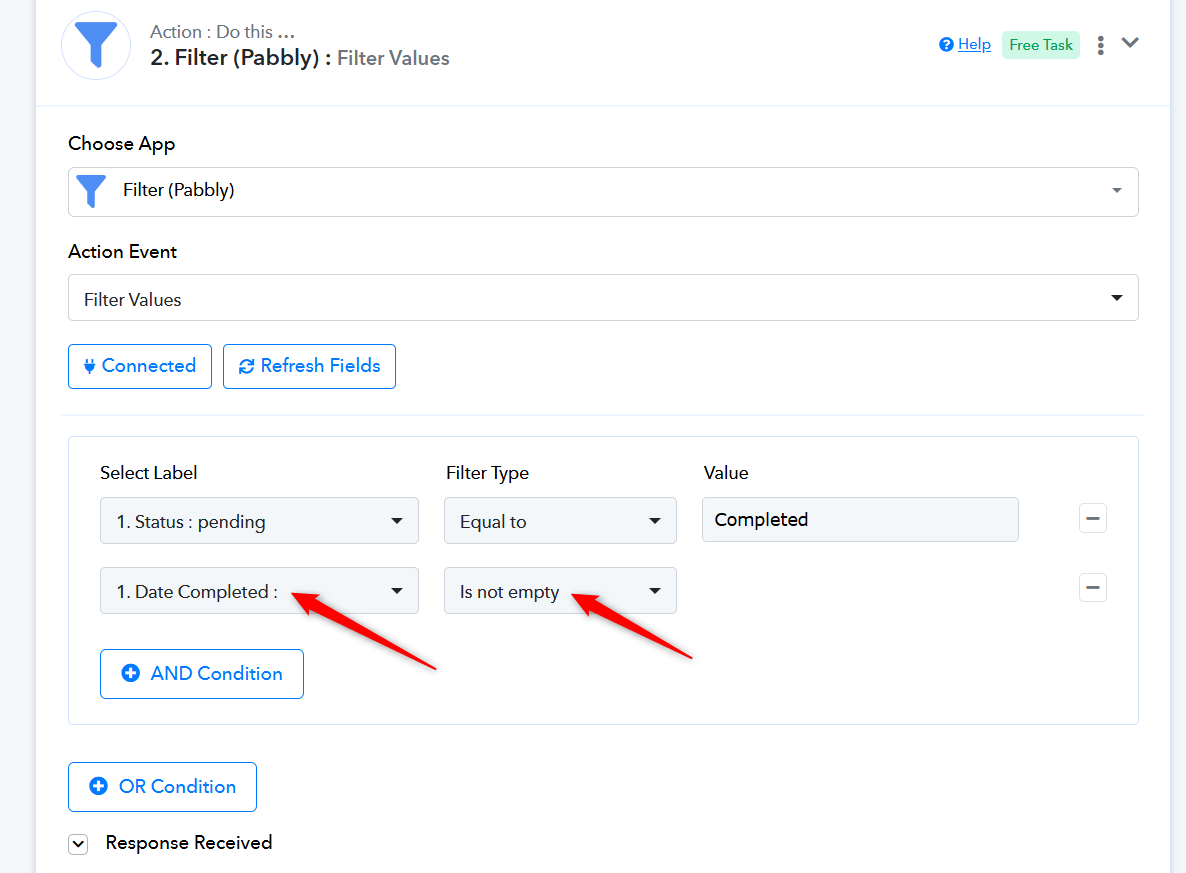
Thanks & Regards,
Arshil Ahmad
Customer Support Associate
? Pabbly.com
?Rate your support
We have added a Filter condition to your workflow, which should help you with this issue.Thanks & Regards,
Arshil Ahmad
Customer Support Associate
? Pabbly.com
?Rate your support
As always, top notch support. Appreciate your team very much. All the best!
Hello @basslion,
As your issue has been resolved, we’d appreciate it if you could share quick feedback on the support received:
https://forms.gle/GAjS4wdPYKuhnEYV9
Thank you for your time.
PS: We are closing this thread as the issue is resolved. Please feel free to reach out to us if you face any issues in the future.