Receiving Error in filter mapping detected
Status: Open · Asked by Billy Edmunds on · 0 views
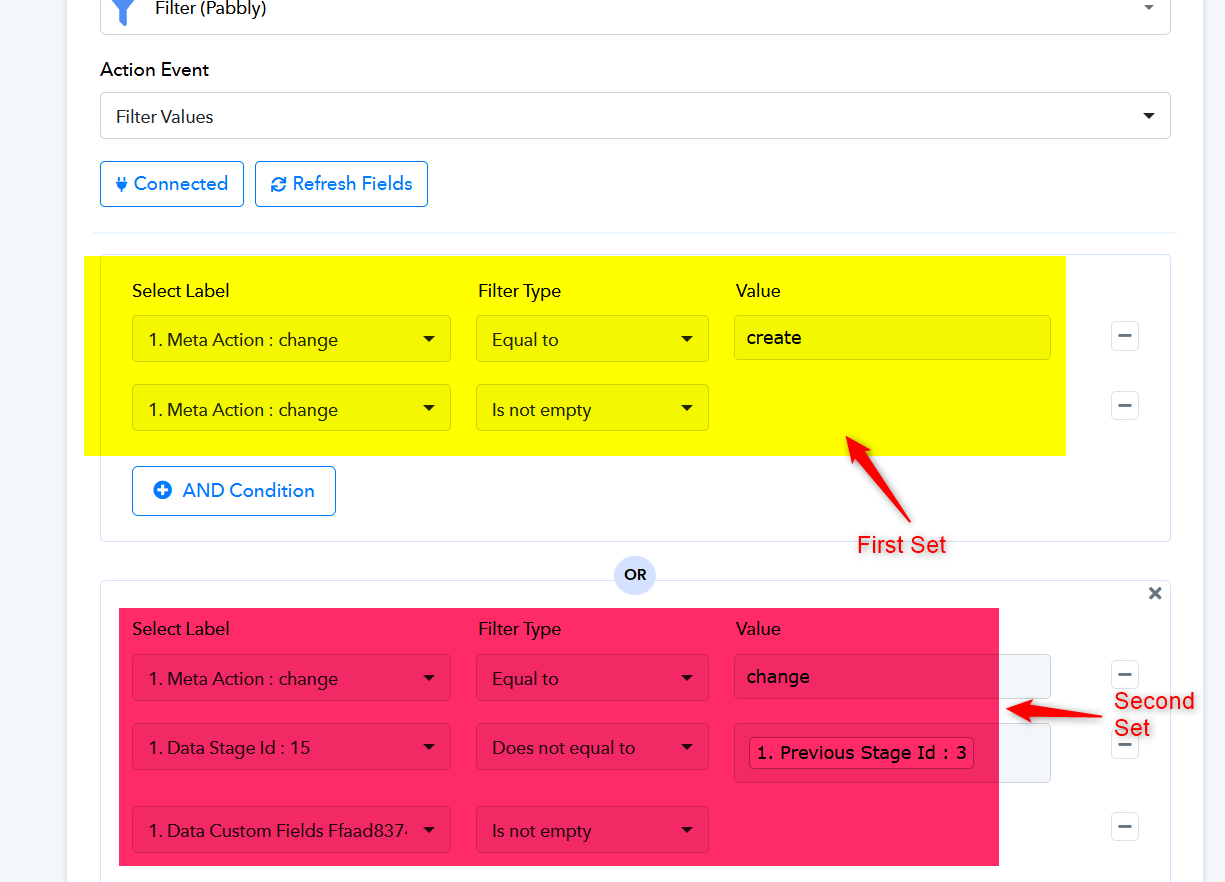
We have a workflow that syncs data between 2 CRM's under certain conditions, for example, a deal changes stage or a deal changes status. We do this by firing a webhook to Pabbly and having a filter that checks to see if "Stage ID does not equal the Previous Stage ID" OR "Deal Status doesn't equal Previous Deal Status", update the record. Here's the dilemma.
When the deal changes stages, "Previous Deal Status" variable is not sent in the webhook, or when Deal Status is changed, a "Previous Stage ID" is not sent. This causes a warning that says:
Warning:
Error in filter mapping detected. Possible causes include deletion of the mapped data step or changes in the response for the mapped key. You can remap the select label field to correct the filter condition or ignore to keep the existing filter condition.
We've tried mapping the data using a webhook that contains each type of response, and mapping the filtering conditions accordingly, but because of this warning, we're unable to save the workflow.
What can we do to work around this?
Hi @wonders83,
You won’t be able to set up a Filter step for this. Instead, you will need to add a Router to your workflow and create a separate route for each OR condition. This way, each OR condition will be handled in its own route.
You can then change the response in your trigger step, and even if the mapping disappears in one route, you will still be able to save the filter condition in another route without any issues.
P.S. You won’t be able to replace the Filter step with a Router directly, as the Router needs to be the last step of the workflow. So, you will need to add it at the end of the workflow, then create one route with the first set of filter conditions. After that, add Steps 3 to 7 of your workflow to this route (you will need to redo the mapping in these steps). Remove Steps 3 to 7 that are outside the Router.
Once the first route is set up, you can simply copy it, then configure the second set of OR filter conditions in route 2. You can repeat this process for additional conditions as needed.
Thanks & Regards,
Arshil Ahmad
Customer Support Associate
? Pabbly.com
?Rate your support
Thanks for the prompt response.
If I have to setup a router step for each one, is that going to use paid tasks? There's a ton of changes that happen on the first platform that we don't want to do anything with, hence the filters. We're able to do this type of filtering in Zapier and I believe we were able to do this at one point in Pabbly. It would be great if Pabbly would update the workflows to able to support this. It's a very common issue when you're dealing with webhooks from 3rd parties and you don't control the data being passed.
If I have to setup a router step for each one, is that going to use paid tasks?
You would need to set up the Router conditions in such a way that only one route’s filter conditions are met during a single workflow execution. Since only one Router condition will be satisfied, only one route will execute. Thus, the task consumption will remain the same as when using a Filter step.
It would be great if Pabbly would update the workflows to able to support this. It's a very common issue when you're dealing with webhooks from 3rd parties and you don't control the data being passed.
That is indeed a good suggestion. You can share your suggestion of being able to "Save" the Filter step even if the data from the previous response is not visible in the filter step.
https://roadmap.pabbly.com/b/Feature-Request
Our development team will look into it.
Thanks & Regards,
Arshil Ahmad
Customer Support Associate
? Pabbly.com
?Rate your support