Running error on Router, cant meet the condition
Status: Open · Asked by Lee Hong Xiang on · 0 views
Im using google sheet trigger to help me automate create invoice in Quickbooks. Currently i met a problem, before running the router, i created a find a customer action using quickbooks to check the existing customer either is old or new customer. When a new customer have one order in the same time, it is normal. It will create the customer first then open the invoice, only if the new customer have few order in the same time, the router doest work to do the condition, it will run twice to create the customer.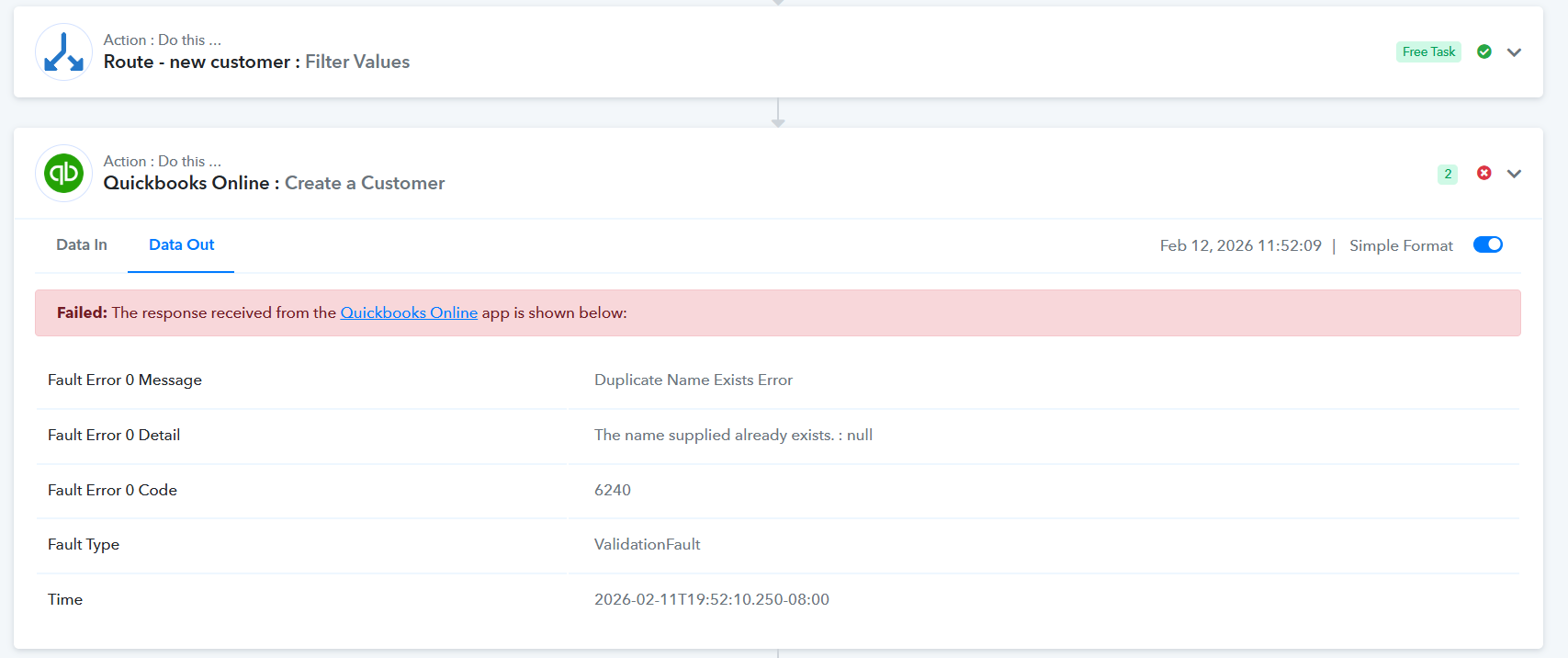
Hi @Lee Hong Xiang,
Thank you for sharing the details.
Upon checking the task history, we noticed that the Create Customer action was executed twice (re-executed). It appears that during the first attempt, QuickBooks may not have responded within 25 seconds, causing a timeout error. However, the customer might have been created at the backend. Then, during auto re-execution, the system tried to create the same customer again, resulting in a duplicate-related issue.
This seems to be execution-related and can be ignored.
However, we are currently seeing errors because the Display Name from Google Sheets is not being passed correctly to the Find Customer action. Please ensure the correct name field from Google Sheets is properly mapped so it is always sent to QuickBooks.
Kindly update this and test again.