Salesforce Lead Record Type
Status: Open · Asked by Nitita on · 0 views
Hello! Is there a way to assign Salesforce Lead Record Types in a workflow? I don't see a Lead Record Type field to map to.
Hi @Nitita,
In the Salesforce: Create Record action step, the Salesforce Object field determines the record type. You can enable mapping and then map the record type to this field.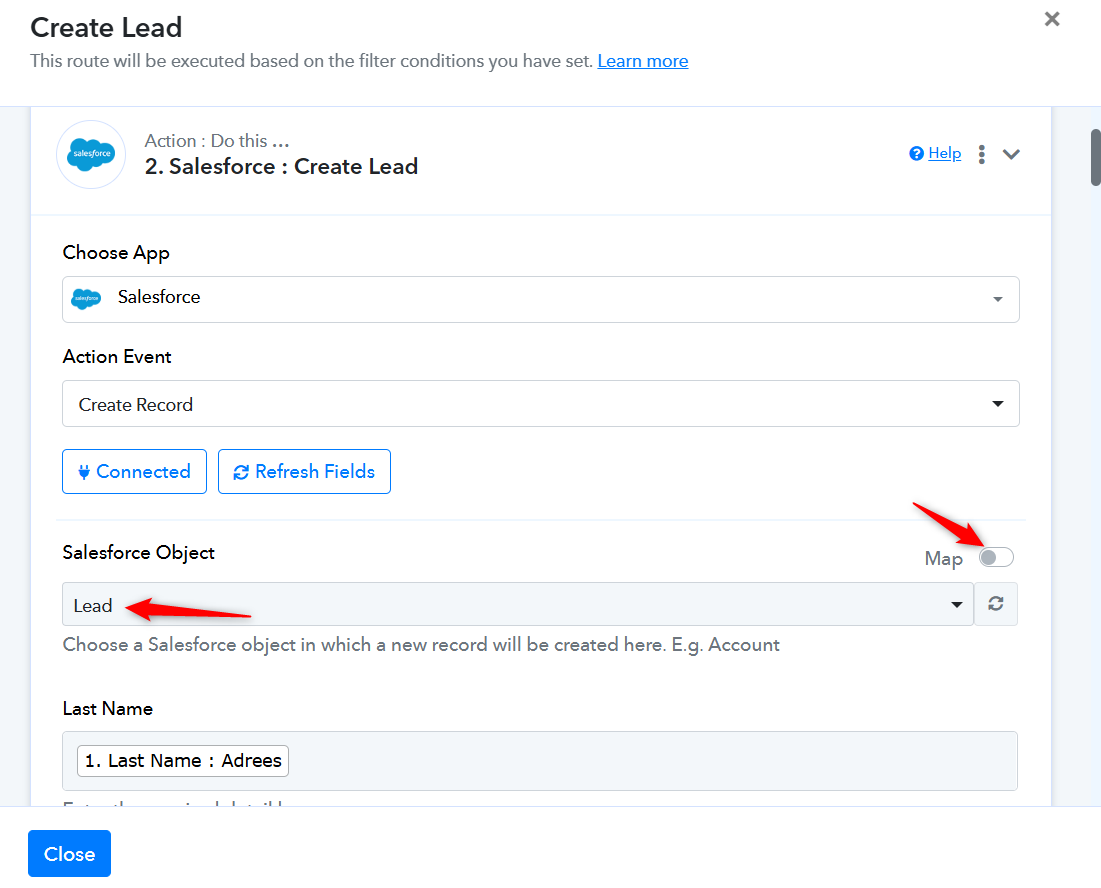
Thanks & Regards,
Arshil Ahmad
Customer Support Associate
? Pabbly.com
Thank you, Arshil. Nothing happens when I click on "Map". I created a custom Lead Record Type in Salesforce. So the Salesforce Object = Lead, but the Lead Record Type = "New Academy" for example.
Could you please confirm whether the “Lead Record Type” field in your Salesforce account is a default Salesforce field or a custom-created field?
Thanks & Regards,
Arshil Ahmad
Customer Support Associate
? Pabbly.com
Hi Arshil, a Record Type is not a field. It's an administrative feature that is available in all the Standard Salesforce objects (Leads, Opportunities, Contacts, Accounts). It allows for differentiation of business requirements where different record types can have different page layouts, picklist values, and sales processes. Here's more info: https://www.salesforceben.com/salesforce-record-types/
Hi @Nitita,
Thanks for sharing the details and clarification.
Yes, you are correct — the RecordTypeId is a standard Salesforce property available for the Lead object and is supported in the Salesforce API documentation for Lead creation.
We have escalated this to our development team for further review and for adding support for the specific RecordTypeId field in the “Salesforce : Create Lead” action.
Once the field gets added in the action, we will let you know.
Thanks for your patience and understanding.
Hi @Nitita,
Our team has now added the specific field within the action.
Please open the “Salesforce : Create Lead” action, click on the “Refresh Fields” button, and you should now be able to see the “Record Type ID” field there.
Please test it once and let us know how it goes.
That was fast! Thank you so much for the quick turnaround!
Glad we were able to help.
Thanks & Regards,
Arshil Ahmad
Customer Support Associate
? Pabbly.com