Same Gmail Message Triggering Workflow Twice
Status: Open · Asked by Tamosukas on · 0 views
Hi,
I am experiencing an issue with a Gmail-triggered workflow.
The same Gmail email is sometimes triggering the workflow twice, even though it is the exact same message.
For example, both workflow executions contain identical values:
- Gmail Message Id: same value
- ThreadId: same value
- InternalDate: same value
- Gmail Message-ID header: same value
The second execution usually starts 2–4 seconds after the first one.
To prevent duplicates, I already added the following logic at the beginning of the workflow:
- Google Sheets Lookup using Gmail Message Id.
- Filter: continue only if rowsFound = 0.
- Google Sheets Add Row storing the Gmail Message Id.
The workflow structure is:
Gmail Trigger
→ Google Sheets Lookup (Message Id)
→ Filter (rowsFound = 0)
→ Google Sheets Add Row
→ Rest of workflow
Despite this, duplicate executions still occur and duplicate Message Id values are being written to Google Sheets.
This suggests that two workflow executions may be starting almost simultaneously before the first execution has completed the Google Sheets write operation.
Can you please confirm:
- Is this a known issue with Gmail triggers?
- Can the same Gmail message trigger multiple workflow executions?
- Is there any built-in deduplication mechanism available?
- Is there a recommended way to prevent duplicate executions for the same Gmail Message Id?
5. Is there other sulution to prevent dulicate emails to enter to workflow
Thank you.
Hello @Tamosukas,
Thank you for sharing the detailed explanation.
One common reason for duplicate trigger events is that the trigger may have been configured multiple times while setting up or testing the workflow. For example, clicking the "Save and Send Test Request" button multiple times during trigger setup can sometimes result in duplicate trigger registrations, which may cause the same event to be captured more than once.
As a troubleshooting step, we recommend:
- Cloning the workflow or creating from scratch
- Re-establishing the Gmail trigger connection.
- Clicking the "Save and Send Test Request" button only once during setup.
- If you need to capture another sample response, use the "Recapture Webhook Response" option instead of saving the trigger again.
Please test the cloned workflow and see if the issue persists.
Additionally, could you share a few example Task History IDs where the same Gmail message triggered the workflow twice? This will allow us to review the executions and confirm whether the behavior is being caused by duplicate trigger registration or another issue.
Once we have the task history examples, we'll investigate further and assist you accordingly.
Hi,
IjU3NjYwNTZkMDYzZjA0MzE1MjZlNTUzMzUxM2E1MTZhNTQzMjBmMzQi_pc
IjU3NjYwNTZkMDYzZjA0MzE1MjZlNTUzMzUxM2E1MTZhNTQzMjBmMzUi_pc
IjU3NjYwNTZkMDYzZjA0MzE1MjZkNTUzMDUxMzM1MTZhNTQzNzBmMzki_pc
IjU3NjYwNTZkMDYzZjA0MzE1MjZkNTUzMDUxMzM1MTZhNTQzODBmMzAi_pc
IjU3NjYwNTZkMDYzZjA0MzE1MjZkNTUzNDUxMzU1MTZhNTQzNTBmMzki_pc
IjU3NjYwNTZkMDYzZjA0MzE1MjZkNTUzNDUxMzU1MTZhNTQzNTBmMzci_pc
IjU3NjYwNTZkMDYzZjA0MzA1MjY0NTUzNTUxMzQ1MTY1NTQzMjBmMzEi_pc
IjU3NjYwNTZkMDYzZjA0MzA1MjY0NTUzNTUxMzQ1MTY1NTQzMjBmMzIi_pc
Thank you for the explanation.
This could be related.
Previously I also had an issue where an old Gmail trigger ID remained registered in your system even after deleting workflows, and your team instructed me to manually remove the trigger.
Because of that, I suspect there may still be a duplicate trigger registration associated with this Gmail connection.
To help investigate, here are some examples where exactly the same Gmail message triggered the workflow twice:
Message Id: 19e962e4a8f16218
Message Id: 19e9730b67a6334b
Message Id: 19e974d07d04454c
In each case:
- Gmail Message Id was identical
- ThreadId was identical
- InternalDate was identical
- Gmail Message-ID header was identical
I also added a Google Sheets deduplication check using Gmail Message Id, but duplicate workflow executions still occurred, which suggests that the same Gmail event may be reaching the workflow more than once.
Before I rebuild the entire workflow from scratch, could you please verify whether multiple trigger registrations currently exist for this Gmail connection or for this workflow?
If duplicate trigger registrations are present on your side, I would prefer to remove them rather than rebuilding the workflow.
Thank you.
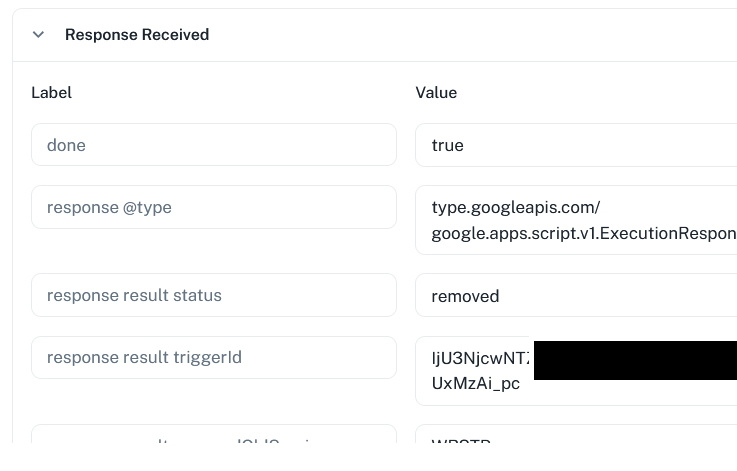

++++
I duplicated, then delited tend checked then aded one moretime, captured email, retested all workflow, now waiting what will be
++++
I duplicated, then delited tend checked then aded one moretime, captured email, retested all workflow, now waiting what will be
I am assuming that you have disabled the old workflow where you were encountering the duplicate task issue. Based on your response it appears that you cloned the workflow, removed the Gmail connection from the old workflow, and then set up the Gmail connection in the new workflow. Is that correct?
If so, could you please confirm whether it is now working correctly, with only one task being created for each email?
Thanks & Regards,
Arshil Ahmad
Customer Support Associate
? Pabbly.com
Hi after all thease changes I hawe the same situation, some ( not all) some email still are trigered 2 times

Ok I just recreated all logick and used pabbly email parser, and thats it, so I hope it will stop duplicate emails, as in inbox I hawing only 1 uniq email. so yes this can be closed
Thank you for sharing the update. We are glad that you were able to achieve your use case using Email Parser.
We are now closing this thread. If you need assistance with anything else, please feel free to contact us.
Thanks & Regards,
Arshil Ahmad
Customer Support Associate
? Pabbly.com