Schedule Workflow (Once) Triggers 3 Times Automatically — Bug or Misconfiguration?
Status: Open · Asked by 松本昭彦 on · 0 views
Hello Pabbly Team,
I am experiencing a critical issue with the "Schedule Workflow" trigger set to "Once".
Every time I schedule the workflow to run just once at a specific date and time (e.g., 2025/07/04 15:41 JST), it gets triggered **three times**, at short intervals, without any manual resubmission or automation duplication.
Key points:
- Trigger type is set to "Once", not recurring.
- Workflow is enabled only once and not duplicated.
- All executions happen with the exact same configuration.
- This causes the same content to be processed and posted multiple times, leading to **task waste** and **data duplication**.
Why is the workflow being triggered multiple times?
Is this a known issue, or am I missing something in the configuration?
Please advise. This is impacting task quota and creating unwanted duplicate posts.
Thank you.
Hello @tokyo2025,
Could you please share the workflow where you’re experiencing this issue? This will help us review it and assist you more effectively.
Thank you for your reply.
Below is the workflow URL.
https://connect.pabbly.com/workflow/mapping/IjU3NjYwNTZiMDYzMTA0M2M1MjZmNTUzMjUxM2Ei_pc
Hello @tokyo2025,
Thank you for sharing the details.
Our team has resolved the issue, and it should not occur again. We sincerely apologize for the inconvenience caused.
Please feel free to run a few test cases on your end and let us know if you encounter any further issues—we’ll be happy to assist.
I ran some tests, and so far, it seems that the duplicate workflows are no longer occurring.
If the issue happens again, I’ll reach out with another question.
Thank you for your support and prompt response.
That said, I would appreciate it if you could share the root cause of this issue, as I am concerned about the workflow credits that were consumed unnecessarily.
It would be helpful to understand what happened so I can avoid similar issues in the future.
I’m still facing an issue where a workflow scheduled to run once at a specific time ends up running twice.
Could this be caused by a Router with conditional branching that includes a Google Sheets - Delete Row task?
Is it possible that the row deletion is somehow triggering an unexpected re-execution?
Would appreciate any insight. Thank you.
I’m still facing an issue where a workflow scheduled to run once at a specific time ends up running twice.Could this be caused by a Router with conditional branching that includes a Google Sheets - Delete Row task?
Is it possible that the row deletion is somehow triggering an unexpected re-execution?Would appreciate any insight. Thank you.
Could you please share the workflow URL where you're currently encountering this issue?
Sure. Here's the workflow URL where I encountered the issue:
https://connect.pabbly.com/workflow/mapping/IjU3NjYwNTZiMDYzMTA0M2M1MjZmNTUzMjUxM2Ei_pc
Just to clarify, the issue seems to occur when using a Router with a Google Sheets “delete row” task inside. When I moved the delete row task outside the Router, the problem disappeared. I’m still monitoring, but this seems to be the likely cause.
The actions or any routers within a workflow do not have any effect on the Scheduler—it is independent of all other steps. You have set your workflow to trigger every 4 hours, and based on your recent Task History, we can see that the workflow is triggering as expected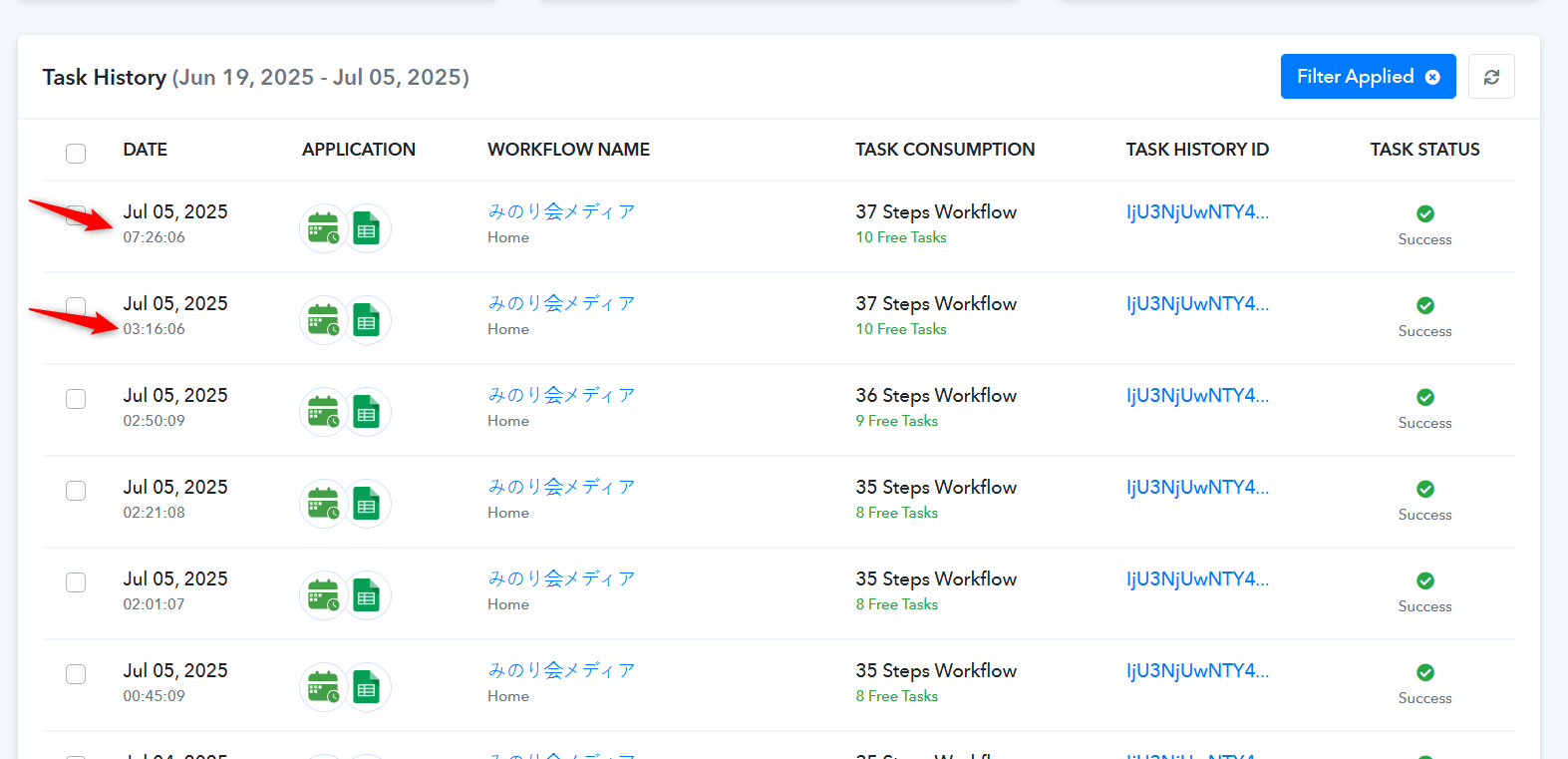
Thank you for your response.
The current Task History reflects the state after we adjusted the workflow, so no issues appear now.
We’ll continue monitoring for a while to confirm stability.
Appreciate your support.
Thanks for the update.
Thank you for your response.
The current Task History reflects the state after we adjusted the workflow, so no issues appear now.
We’ll continue monitoring for a while to confirm stability.
Appreciate your support.
hello, I got the same issue today, before is normal.
It has duplicated many times the workflow.
Can you pls share what you did adjusted on the workflow?
hello, I got the same issue today, before is normal.
It has duplicated many times the workflow.Can you pls share what you did adjusted on the workflow?
Your concern is being addressed here:
https://forum.pabbly.com/threads/duplicate-process-the-workflow-why.35202/
Thanks & Regards,
Arshil Ahmad
Customer Support Associate
? Pabbly.com
?Rate your support
Your concern is being addressed here:
https://forum.pabbly.com/threads/duplicate-process-the-workflow-why.35202/Thanks & Regards,
Arshil Ahmad
Customer Support Associate
? Pabbly.com
?Rate your support
I think it may not caused by webhook since not every groups have duplicated messages. I will try turn off the Auto reexecutive function.
I think it may not caused by webhook since not every groups have duplicated messages. I will try turn off the Auto reexecutive function.
You can disable auto re-execution and monitor your workflow. However, based on the task history, the issue appears to be related to the data sent from the source application.
Thanks & Regards,
Arshil Ahmad
Customer Support Associate
? Pabbly.com
?Rate your support
You can disable auto re-execution and monitor your workflow. However, based on the task history, the issue appears to be related to the data sent from the source application.Thanks & Regards,
Arshil Ahmad
Customer Support Associate
? Pabbly.com
?Rate your support
I checked this workflow also duplicated sent out message, no webhook, just schedule, pls check the workflow URL:
https://connect.pabbly.com/workflow/mapping/IjU3NjcwNTZkMDYzZTA0Mzc1MjZmNTUzNDUxMzEi_pc
it looks that is pabbly issue.
I checked this workflow also duplicated sent out message, no webhook, just schedule, pls check the workflow URL:
https://connect.pabbly.com/workflow/mapping/IjU3NjcwNTZkMDYzZTA0Mzc1MjZmNTUzNDUxMzEi_pcit looks that is pabbly issue.
Can we change the Schedule time in this workflow for testing?
Thanks & Regards,
Arshil Ahmad
Customer Support Associate
? Pabbly.com
?Rate your support
Can we change the Schedule time in this workflow for testing?Thanks & Regards,
Arshil Ahmad
Customer Support Associate
? Pabbly.com
?Rate your support
ok, I changed on tomorrow (Wednesday 15:38 GMT+8)
Will check the result, thanks!
Sure, let us know how it goes.