Sending automated Response.io welcome message via WhatsApp API
Status: Open · Asked by Josh GKS on · 0 views
Hi, I have an active Whatsapp Business API that is integrated into my new Respond.io account.
I need to connect these in Pabbly so an automated WhatsApp welcome message is sent to my customer when they enquire, and I can then talk to them via Respond.io.
I cant find the correct settings to do this, can somebody please let me know how this is configured? I have all previous steps in my workflow up and active without issue, this is the last step to work out.
Many thanks
Hello @Josh GKS
We have checked your workflow at our end and we found that your access has been revoked from Respond.io's end.
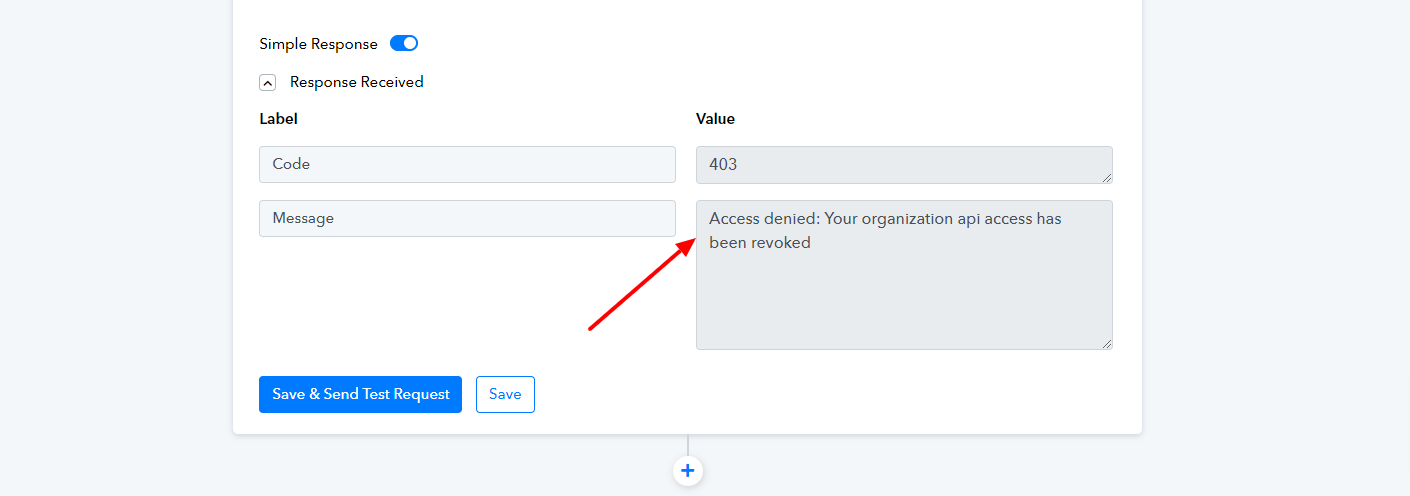
Please contact the Respond.io team regarding the issue or try setting up your account again.
Please let us know if this gets resolved.
Hello @Josh GKSWe have checked your workflow at our end and we found that your access has been revoked from Respond.io's end.
Please contact the Respond.io team regarding the issue or try setting up your account again.
Please let us know if this gets resolved.
Thankyou Preeti, I will contact respond.io re this issue first.
Can you please also advise what I need to do in my workflow to get the WhatsApp API to trigger Respond.io automations? Do I need WhatsApp API in my Pabbly workflow for instance, or just Respond.io?
I cant find any instructions on this bit online.
Many thanks
Hello @Josh GKS
As of now, "Send WhatsApp Template Message" using Respond.io will not work until the API access issue is resolved. Alternatively, you can use "WhatsApp Cloud API" to perform the Send the Whatsapp message using the "Send Template Message" action event, if it suits your use case.
Please refer to this tutorial from 8:00 to set up the Whatsapp Cloud API action step -