Shopify Create Product doesn’t include pricing or inventory tracking information.
Status: Closed · Asked by CarmenS on · 0 views
Hi! I could finally create a product in Shopify. However it creates it superficially given that there are no price, compare at price, cost values to be mapped. The same with stock and inventory tracking, the product is always created without inventory tracking and stock 0. I thought I would find it in the Update Product selection, but these fields are not included there either.
I’m exporting all of this from a google sheets. And the idea is to create products in bulk with this automation. Is there a way to automate the creation of product description with chatgpt? And update the images to create the product with if they are stored in google drive?
Hello @CarmenS,
Have you tried using the Shopify V2: Create Product action?
Please give it a try and let us know if it includes the required fields and functions as expected.
If it doesn’t meet your requirements, kindly share the specific details you’re looking for so we can assist you further.
Hi, i've been trying to configure the creation of products using this function, but it is giving me the following error:
Variable $productSet of type ProductSetInput! was provided invalid value for productOptions.0.values.0 (Expected "Default Title" to be a key-value object.), variants.0.optionValues.0 (Expected "Default Title" to be a key-value object.) This is a product with no variants. I tried creating a product with variants as well but i get the same errors. Do you have any documentation on how to fill this in? Please, i kindly ask for your support
How can i solve it? Maybe i'm putting the information incorrectly. This is my workflow: https://connect.pabbly.com/workflow/share/CEBYal8IUDMFT1A6D1BXcAoeCg4DWQE8Bh9WRAAPAnpbFVMWUxIMZgtHV3VVGlIzURhSOFUJBDxbT1VRAVcDcFFLCApdXgB6AUxSKQBZDzwIVlhwXz4#
Hello @CarmenS,
We’ve recorded a short video walkthrough to guide you through the correct configuration of the action.
Please refer to the video and update your setup as suggested. Once done, let us know if everything works as expected or if you need any further assistance.
https://www.awesomescreenshot.com/video/39000859?key=148b435e42ff21e84b66a4ad1a0862a1
Hi! Thank you for your reply, it did work for a simple product (without variants) using the format you helped me with. Now my second question is, how should i work with products that have variants? 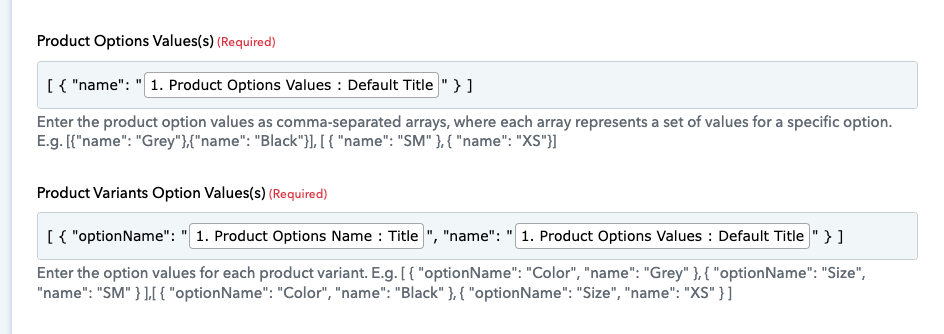
For Products with variants I complete the Google Sheet with a different row per variant, but when I extract the information I only get the information for the first row. How should it be concatenated in this fields? Or maybe I should fill in the Google Sheets information differently? This is the same product with just color variants. Is there a way to concatenate everything in the field without having to manually type in [{"name": "Grey"},{"name": "Black"}] Because if I have to do this manually its hard to see the benefits of automating this process. Some products may have 2 colors, others, 5 etc etc
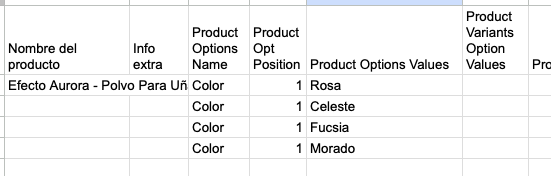
Add all the colors in a single cell, separated by commas like this.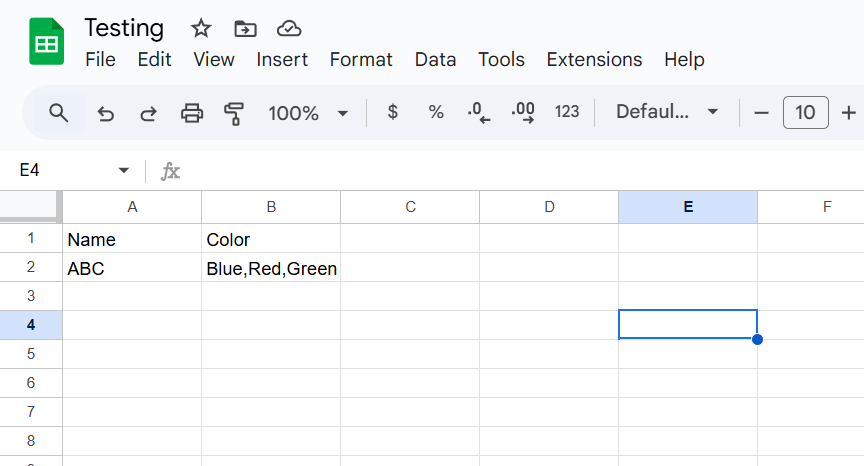
Capture that response in your Google Sheets trigger step, and use the Text Formatter and Code by Pabbly to transform the color variants into the desired format. Please check out the workflow shared below to understand how to set up the Text Formatter and Code by Pabbly module.
https://connect.pabbly.com/workflow/mapping/IjU3NjYwNTY4MDYzNDA0M2Q1MjY1NTUzMTUxMzMi_pc
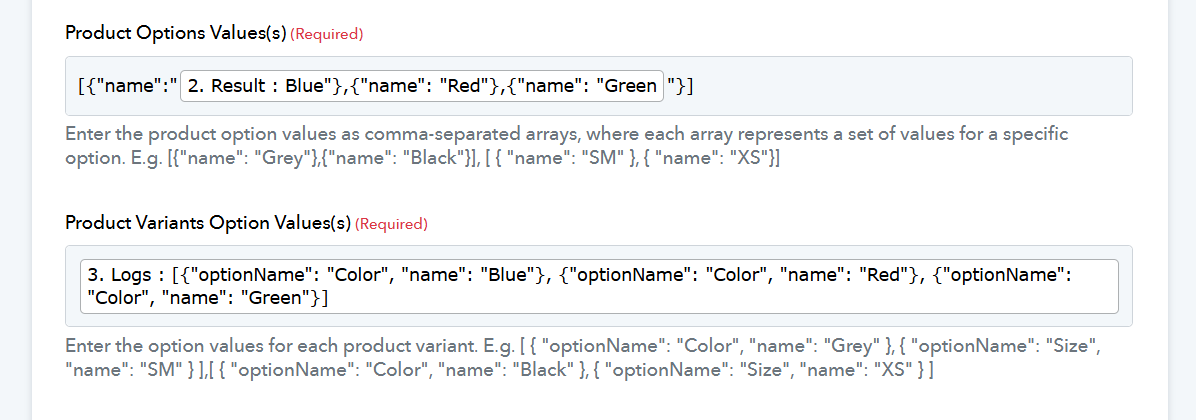
import jsondef convert_colors_to_options(color_string):
colors = [color.strip() for color in color_string.split(',')]
result = [{"optionName": "Color", "name": color} for color in colors]
return json.dumps(result)
# Example usage
color_input = "blue,red,green"
json_output = convert_colors_to_options(color_input)
print(json_output)
Hi, I'm thankful for your support. I changed my Google Sheets to fit the example you gave me. I tried the text formatted, and added Code by Pabbly. I tried your code, and then others to get the same output in Product Variants Option Values. But I am still getting an error:
Variable $productSet of type ProductSetInput! was provided invalid value for variants.0.optionValues.0 (Expected "[{\"optionName \":\"Color\",\"name \":\"Rosa\"},{\"optionName \":\"Color\",\"name \":\"Celeste\"},{\"optionName \":\"Color\",\"name \":\"Fucsia\"},{\"optionName \":\"Color\",\"name \":\"Morado\"}]\n" to be a key-value object.)
This is the workflow URL: https://connect.pabbly.com/workflow/share/AEhUZlYBBGdUHgdtVglTdA4aAgYCWAM-XUQAEl1SVS0GSAhdDE0MZgxAUXMEVwZnVx5TOQFdVG8LHwYCVwEFdlxGACwAA1wmUB1TKAVcXG8AXlR8Vjc#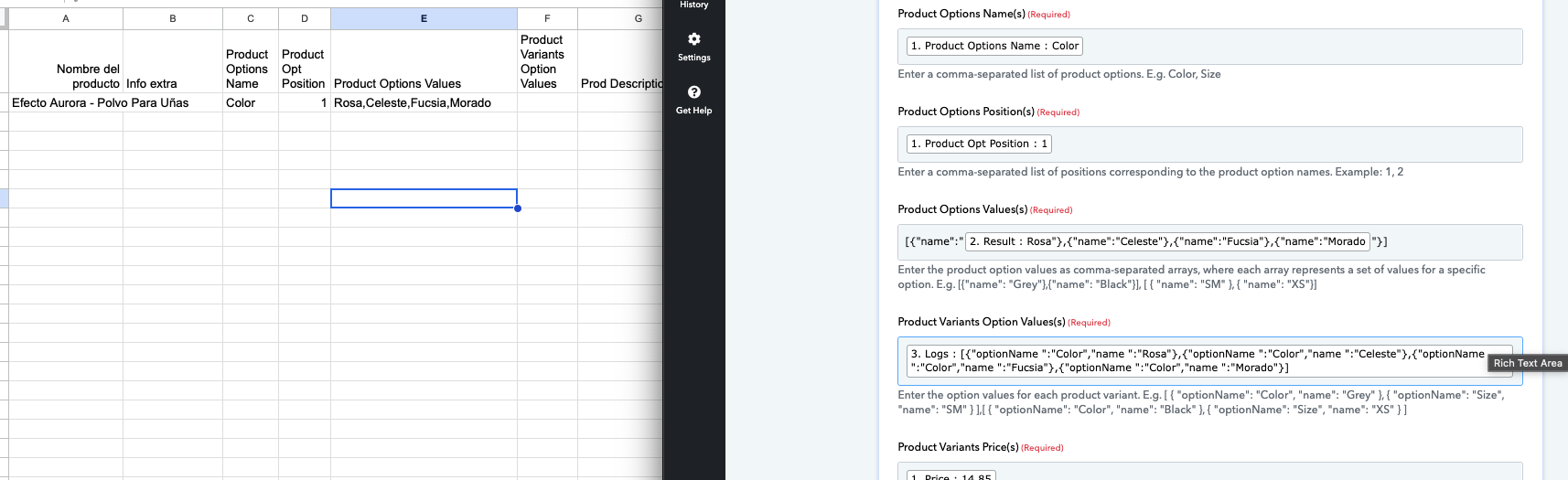
Hello @CarmenS,
Please allow us some time to look into the issue. We will get back to you with the updates as we have some.
Greetings!
We checked the issues you were facing, and they were caused due to two primary reasons:
The Code by Pabbly step was returning \n, which caused formatting issues.
➔ We have added a step to replace \n with a blank space to fix this.
When creating 4 variants, you must mention 4 prices and compare-at prices accordingly.
➔ Please ensure each variant has its own pricing details filled correctly.
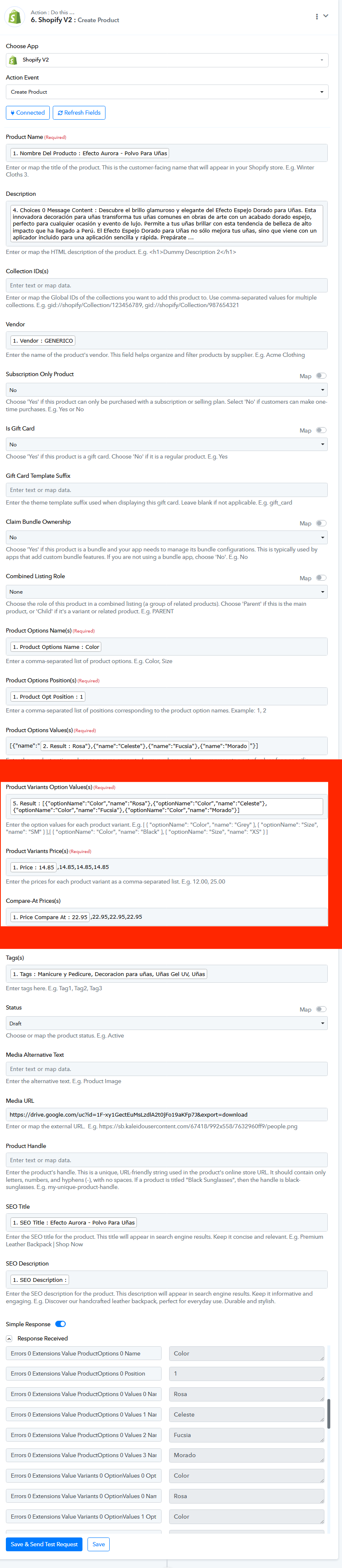
Hello @Resham!! I corrected all of this but is still giving me the following error :cry:.
Variable $productSet of type ProductSetInput! was provided invalid value for variants.1.optionValues.0 (Expected "" to be a key-value object.), variants.2.optionValues.0 (Expected "" to be a key-value object.), variants.3.optionValues.0 (Expected "" to be a key-value object.)
Please allow us some time to look into this concern. We will get back to you with an update soon.
Thank you
Hello @CarmenS,
Greetings!
We have made some changes in your workflow in the Product Variants Option Values(s), all the variant values are to be passed in separate array. Can you please make some test submission and confirm if it is working for you.
IT WORKS!!! Both for simple products and with variants!! AMAZING, thank you so much for the help. ???????
Thank you for the update! We’d love to hear your feedback, and it would mean a lot if you could leave us a quick review on Google.