Shopify Product Creation with multiple images
Status: Closed · Asked by CarmenS on · 0 views
Hello! Is there a way to add multiple images to a Shopify product during its creation? I am sending comma separated URLs to create the product, but it's only considering the first image.
Additionally:
- is there a way to create the products with inventory tracking policy ON?
- Is there a way to upload stock (quantity) per product?
- How to create products already assigned to all my sales channels?
Now they arrive with no sales channels and no inventory tracking
Thanks
Hi @CarmenS,
Hello! Is there a way to add multiple images to a Shopify product during its creation? I am sending comma separated URLs to create the product, but it's only considering the first image.
Additionally:
- is there a way to create the products with inventory tracking policy ON?
- Is there a way to upload stock (quantity) per product?
- How to create products already assigned to all my sales channels?Now they arrive with no sales channels and no inventory tracking
Thanks
Please allow us some time to look into the possibility of all these requirements. We will get back to you with an update soon.
Hi! Thank you so much, also if it is possible to include the cost of the product. Thanks in advance, I hope this is all possible!
We have forwarded this request to our team as well. We will get back to you shortly.
Hello @CarmenS,
We’re happy to inform you that our team has added the Inventory Tracking Policy and Variant Image Upload options to the Shopify: Create Product action. You can now also upload multiple product images when creating a product.
Regarding your request for the Cost of Product field, we could not locate a direct field for this in Shopify’s API documentation.
Currently, the available cost-related fields are Variant Price and Compare at Price.
For more detailed information, you can refer to Shopify’s official API documentation here:
https://shopify.dev/docs/api/admin-graphql/latest/mutations/productSet
Thank you so much! I was looking into this right now to start using it, but it is still not showing on the fields on the Shopify V2 Create Product action. I hard reset the webpage, but nothing new to find here. Maybe I need to use something different?
Hello @CarmenS,
Apologies for the inconvenience. During testing, our team encountered an issue which is currently under review. Once the issue is resolved, we will update you, and you will be able to access the required fields.
Thank you for your patience.
ok no problem, thank you!
Hello! Are there any updates on this thread? I just saw the version of Create Product on Shopify is now Deprecated. Should I switch to a new one?
Please allow us some time. We will get back to you shortly.
Hello @CarmenS,
We are pleased to inform you that the Create Product action is now available. Please try using it at your end and let us know if it works fine for you.
Hi! I'm trying to configure this new Create Product function. It is succesfully creating several images per product, however, it's not clear for me on how should i fill the inventory quatities. I'm sending Deny on inventory tracking, but it is still arriving without inventory tracking to shopify. How should i fill the inventory details, product variant inventory quantities and product variant image? Please if you have any notes or documents o how to fill this in it will be highly appreciated. Additionally, how can i set to publish the products in all sales channel in Shopify?
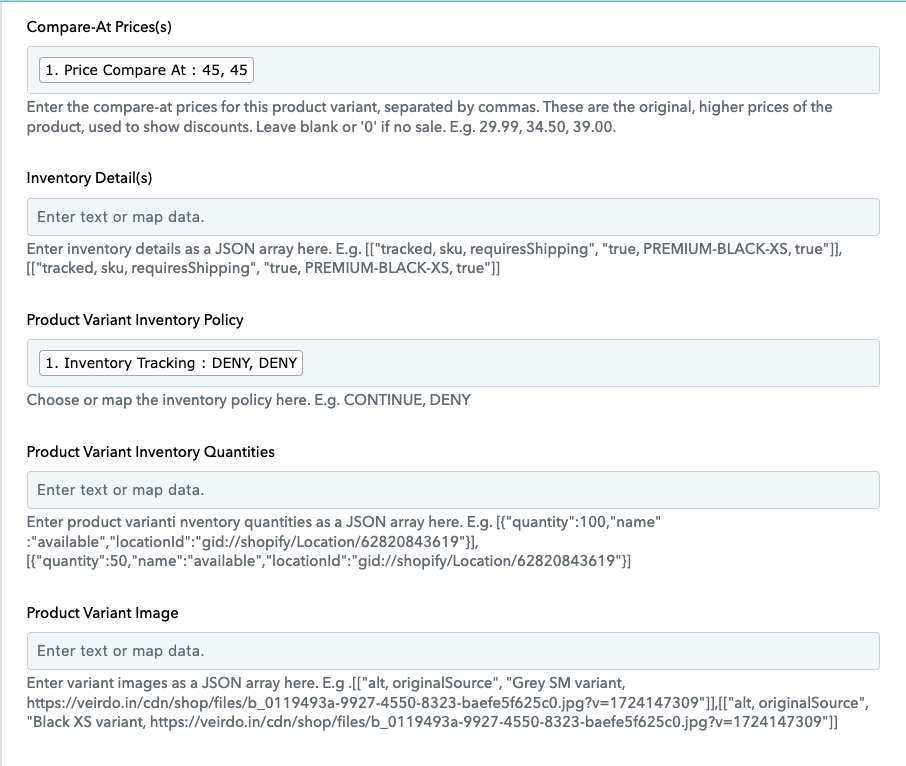
Could you please try setting the Product Variant Inventory Policy to 'Continue' and check if it comes through with inventory tracking enabled?
Hello, it worked but it needed inventory details to be written. Now, to put the quantity amount of each product variant, I am asked to insert locationID. Where do I get this from if this product is being created? Thanks in advance for your response. 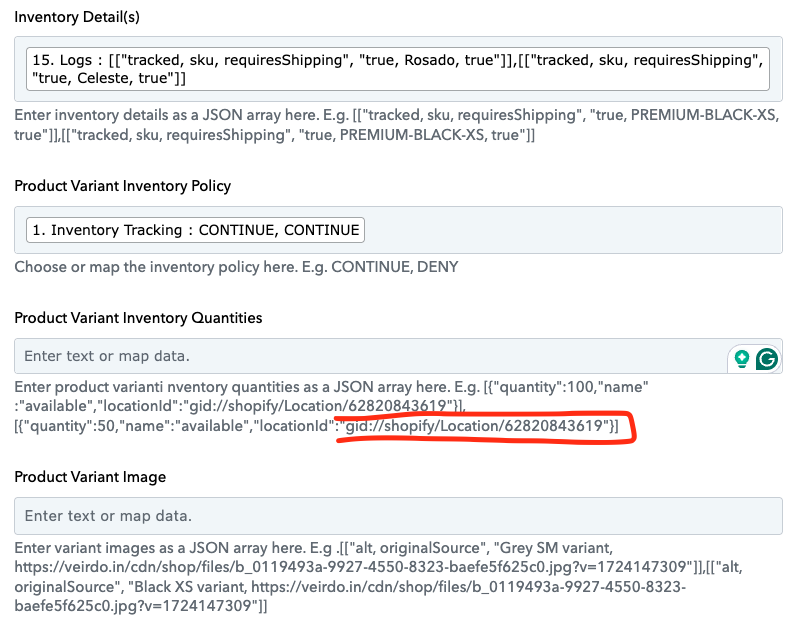
Hello @CarmenS,
To find a Shopify inventory location ID, navigate to Settings > Locations in your Shopify admin. Select the specific location you want to find the ID for, and the ID will be displayed in the URL of the page, after /locations/.
Hello @CarmenS,To find a Shopify inventory location ID, navigate to Settings > Locations in your Shopify admin. Select the specific location you want to find the ID for, and the ID will be displayed in the URL of the page, after /locations/.
Hello! Thanks for your reply! I found it.
I'm using python code to generate this automatically, seems, the product variant quantities aren't working for me, either for products with variants, and without variants.
This is my workflow url: https://connect.pabbly.com/workflow/share/D0dQYgBXVTZSGAhiVQoEIw0ZUlYEXlRpVE1URlNcUChaF1UQBUQPZVgUBCYCRQBhAksHbVIOADsJHQUBUgQCcQEMAS1SUVErUB1UL1c0XG8PUVB4AGE#
For a product with variants I'm receiving the following error message:
originalSource is too short (minimum is 1)
This is Shopify's response for a product without variants.
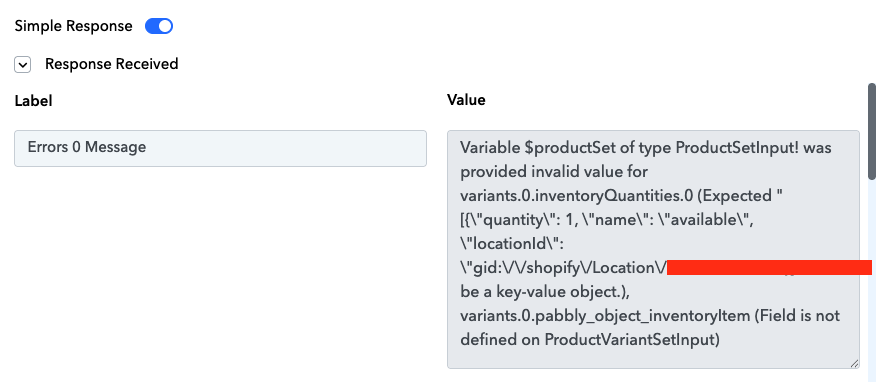
Thank you in advance for your support.
Hello!! Just to let you know its working now!! ? ? ?
I had to add formatter with replace \n in my new python codes.
Thank you so much for your help!!! It's working wonderfully.
Thank you for the update! We're glad it's working now. We’d love to hear your feedback, and it would mean a lot if you could leave us a quick review on Google.