Shopify Tags added to matching Kartra Tags
Status: Closed · Asked by Alisha on · 0 views
Hey there
We have set up a workflow withing Shopify to show the tags in the customer order. As show on the righthand side.
My aim is for those tags to be assigned in Kartra. I already have a flow where a new lead is created in Kartra when the customer makes an order in Shopify.
However, when I create a webhook for Shopify:New Order with it setup as a Order Creation in Shopify the tags are not appearing when I run a capture.
Is there a workaround for this? Also is there a way to get all these tags to be added in one go within a workflow in KArtra?
TIA
Alisha 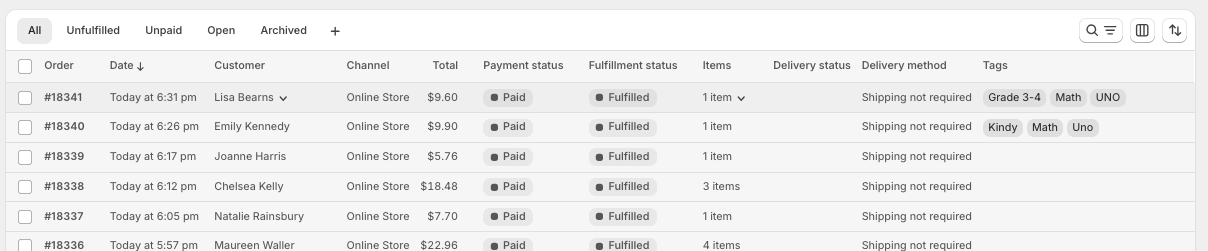
Hi @Alisha,
Thank you for reaching out.
Could you please confirm whether the tags are being added at the time of order creation in Shopify? The New Order trigger only captures the data available at the moment the order is created. If tags are added later, they will not appear in the trigger response.
As a workaround, we recommend:
- Using the Order ID from the trigger
- Adding a step to Get Order by Order ID in Shopify
- Checking if the tags are returned in that step
Also, please share your workflow URL so we can review your setup and assist you more effectively.
Hey @Preeti Paryani
Thanks for that info. I haven't done much of the workflow but here it is - https://connect.pabbly.com/v2/app/workflow/mapping/IjU3NjcwNTZmMDYzMzA0MzI1MjZiNTUzNzUxMzMi_pc
Regarding Shopify, I have a workflow running there that adds the tags after order creation, so yes, that explains why the tags are not appearing when Pabbly immediately captures the order.
I'm a little stuck on specifically how to set up the Order ID trigger.
Also, I have added a delay since I need this flow to run after another flow has completed, which adds the new customer order to Kartra.
Your help with this is much appreciated.
Hi @Alisha,
Thank you for sharing the workflow details.
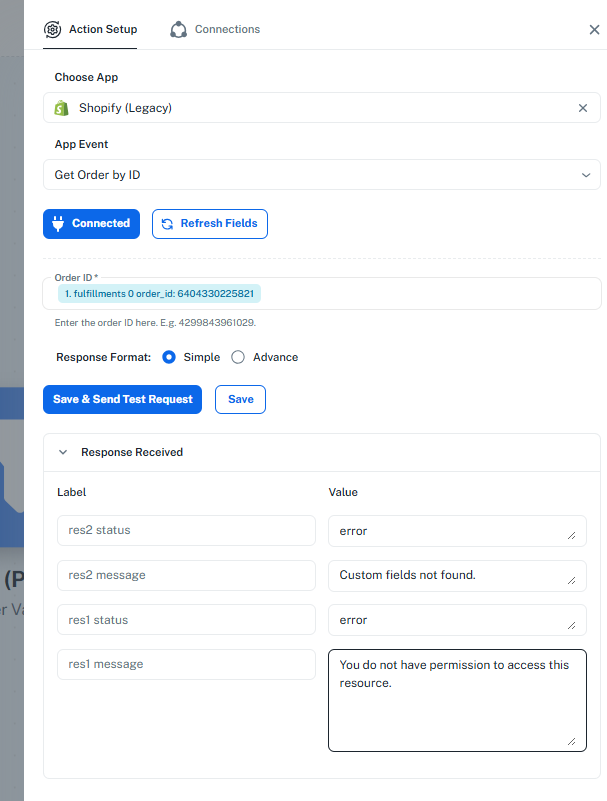
We have reviewed your setup, and it appears that you are currently using Shopify (Legacy). Please note that the legacy version is deprecated and no longer actively maintained, which can lead to issues in the future.
From your test, the error:
- “You do not have permission to access this resource.”
indicates that the required scopes (permissions) were not granted while creating the Shopify (Legacy) connection. Due to this, the Get Order by ID action is unable to fetch complete order details (including tags).
Recommended Solution
We strongly recommend switching to Shopify V2 for both trigger and actions.
Steps to proceed:
- Create a new connection using Shopify V2
- Use:
- Trigger: New Order (Shopify V2)
- Add an action:
- Get Order by ID (Shopify V2)
- Map the Order ID from the trigger step
- This action will fetch complete order details, including tags (once they are added in Shopify)
Since your tags are added after order creation, your approach of adding a Delay step is correct. This ensures tags are available when the “Get Order by ID” step runs.
Important Note:
Shopify V2 handles permissions more reliably, so you should not face the same access issue once the connection is properly created(make sure to select all scopes while setting up the connection).
Reference:
Please follow the Shopify V2 connection setup documentation:
https://forum.pabbly.com/threads/how-to-find-client-id-client-secret-and-scopes-in-shopify.34226/
Once you have updated the workflow to Shopify V2, please let us know. We will be happy to guide you further, including mapping tags to Kartra in bulk.
Hey @Preeti Paryani
Thanks so much for your help thus far!
Okay, I am now using Shopify V2 and followed the steps to create my Client ID scope, etc. in Shopify.
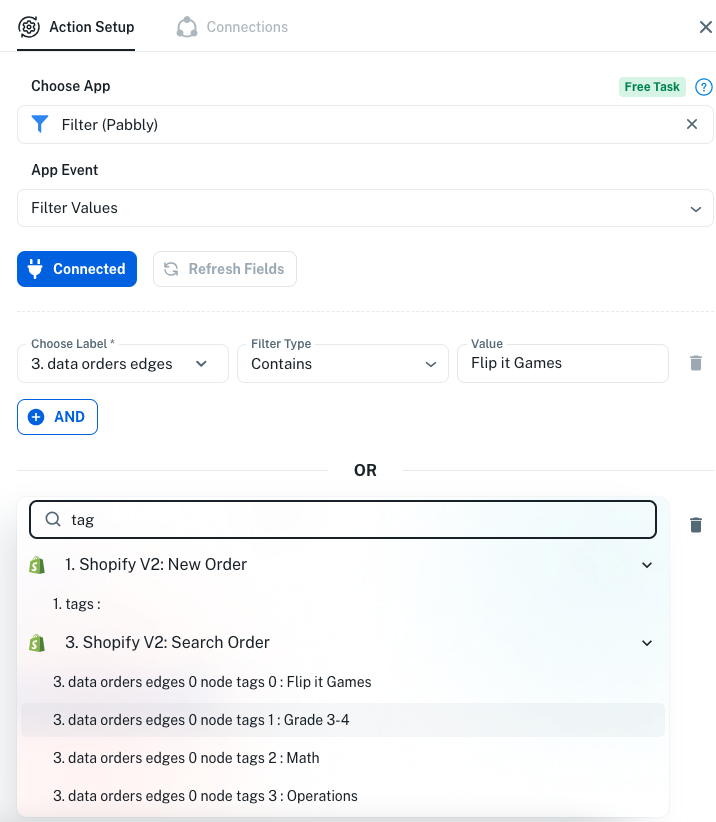
Good news! I have managed to get the tags to appear. Now this is where my brain hurts - we have 18 tags that customers can be assigned depending on what resources they purchase.
I see I can set up a router to trigger for each tag, but before I get too invested, I need to be sure I understand this.
Each tag assigned is placed on a new line. Tags 0, Tags 1, and Tag 2, depending on the purchase, these tags could appear in ANY order.
Can you provide some clarity on next steps.
Thanks again for your ongoing support on this workflow. ?
Hi @Alisha,
Thank you for sharing the detailed update. We’re glad to know that you have successfully set up the trigger correctly and are now able to retrieve the tags for a specific order.
Regarding your query on handling multiple tags:
Please note that the assignment of tags cannot be controlled in a fixed number or predefined order, as the tags may appear dynamically and in varying sequences. Due to this, using a Router will not be a suitable or scalable approach in this case.
Recommended Approach:
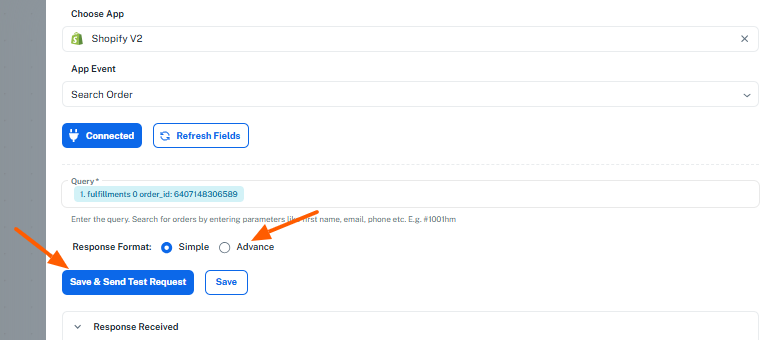
- In the Get Order by ID (Shopify V2)action:
- Enable Advanced Format.
- Click on Save & Send Test Request.
- This will return the tags in an array format.
- Add an Iterator step:
- Pass the tags array from the previous step into the Iterator.
- This will allow you to process each tag individually.
- After the Iterator:
- Add the Assign Tag to Lead (Kartra) action.
- In the Tag field, enable the Map option.
- Map the tag value received from the Iterator step.
This approach ensures that all tags—regardless of their number or order—are processed and assigned correctly to the respective lead in Kartra.
If you need any assistance while setting this up, please feel free to reach out. We’ll be happy to guide you further.
Hi @Alisha,
I hope our previous response helped you with setting up the workflow for assigning Shopify tags in Kartra.
Please let us know if you’ve had a chance to review the steps and whether the workflow is now set up correctly. If you are still facing any issues, feel free to share the details—we’ll be happy to assist you further.
Hey @Preeti Paryani
Good news the Iterator worked and then I set up a router with all the tags which assigned each Shopify tag to the right tag in KArtra.
THANK YOU so much! A massive project that will make a positive impact for us and SAVE us time.
Alisha :)
Hi @Alisha,I hope our previous response helped you with setting up the workflow for assigning Shopify tags in Kartra.
Please let us know if you’ve had a chance to review the steps and whether the workflow is now set up correctly. If you are still facing any issues, feel free to share the details—we’ll be happy to assist you further.
Hi @Alisha,
Glad to hear everything is working smoothly now! ?
Since your concern has been resolved, we’d really appreciate your feedback:
PS: We are closing this thread as the issue is resolved. Please feel free to reach out to us if you face any issues in the future.