Squarespace connection errorring after some weeks
Status: Open · Asked by electricganesha on · 0 views
Hello,
I have a workflow using a Squarespace new order as an input, but for some reason after a couple of weeks running, I start getting the following errors (see attachment) which suggest that the connection tokens are expired. Is there a way to keep this connection running without having to manually re-connect all the time?
Hello @electricganesha,
The Squarespace trigger you are using is OAuth-based and relies on a user refresh token. In certain instances, when the internal refresh request is still in progress, the trigger may attempt a call using the older token, which results in the “expired token” error you are seeing. This can occur intermittently.
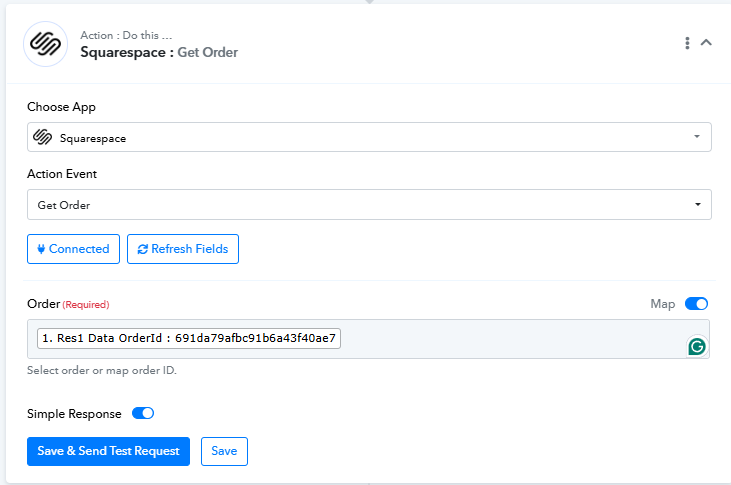
To avoid such failures, you can add a Squarespace: Get Order action immediately after the trigger. Map the Res1 Data OrderId from the trigger response (even in failed trigger cases), and this action will reliably pull the full order details. You can then use that data for the remaining steps in your workflow, ensuring it continues to run without interruption.
Thank you for the swift response Preeti!
I tried adding this extra step now, let's see if it helps :)
Regards and have a nice week(end)!
Sure, let us know how it goes.
You too have a nice weekend!!
Hello @electricganesha,
Thank you for your patience.
We would like to inform you that the issue related to the OAuth errors encountered in certain task histories has now been resolved. This was occurring due to a temporary conflict during the token refresh process, where some tasks were executed while the token was still being refreshed or had just expired.
Our team has addressed and fixed this behavior.
We recommend that you kindly monitor your task histories for some time and check if everything is working as expected. If you continue to face any OAuth-related issues, please feel free to reach out to us with the relevant task history details, and we will assist you further.