Still Pulling Some of the test data
Status: Closed · Asked by colmac1000 on · 0 views
I have set a workflow to take a lead from a Facebook Leads ad via a text formatter into a Brevo List
I am now running the ad for real but some of the test data is being collected - so I am getting new email addresses but the name is always mine which I used to test.
And emails coming through as to be blocked like a test
What might be the problem.
tia
Colin
Hi @colmac1000,
You have mapped the email address in the Email field, while in the First Name and Last Name fields, you’ve entered static data that doesn’t change with the lead details. The way your workflow is currently set up, it will create a contact with the same name each time the workflow is triggered.
To fix this, make sure to map the First Name and Last Name fields from the data above.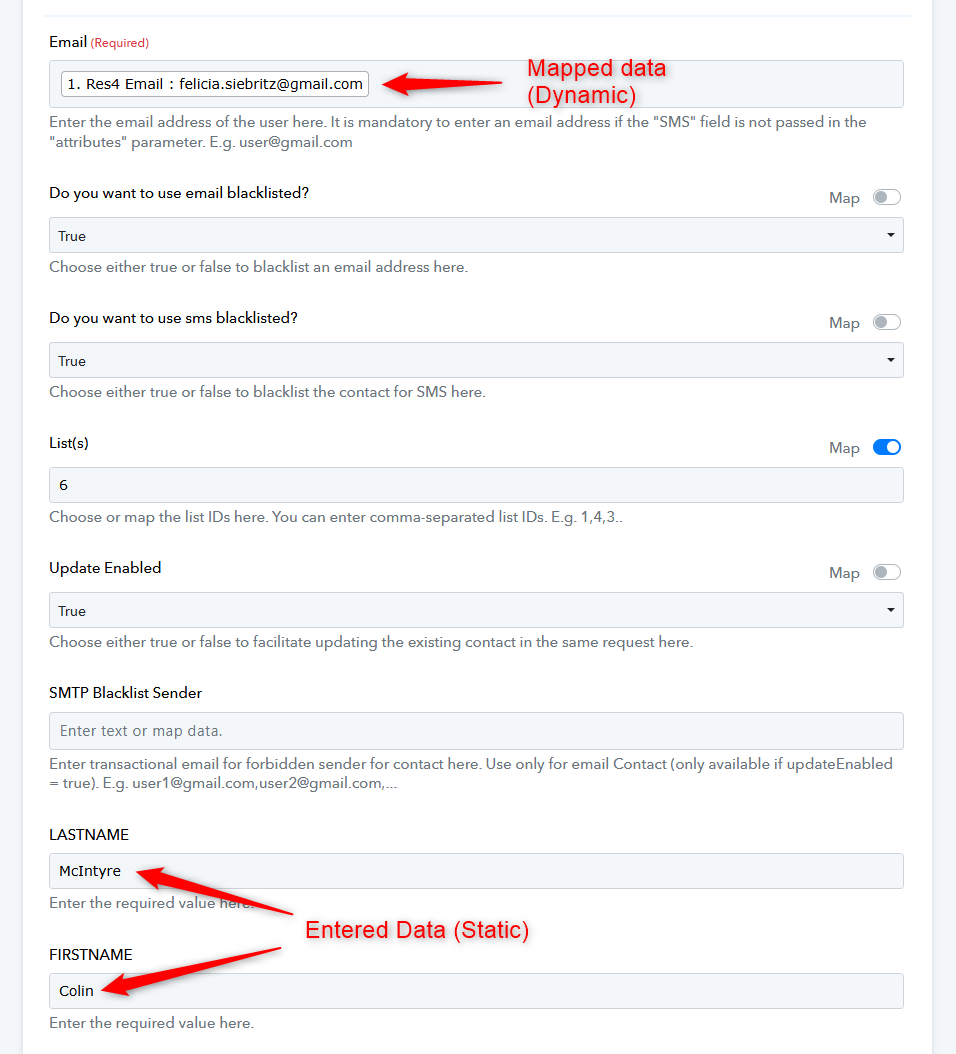
Thanks & Regards,
Arshil Ahmad
Customer Support Associate
? Pabbly.com
?Rate your support
Hi @colmac1000,You have mapped the email address in the Email field, while in the First Name and Last Name fields, you’ve entered static data that doesn’t change with the lead details. The way your workflow is currently set up, it will create a contact with the same name each time the workflow is triggered.
To fix this, make sure to map the First Name and Last Name fields from the data above.
Thanks & Regards,
Arshil Ahmad
Customer Support Associate
? Pabbly.com
?Rate your support
Hi Arshil,
I am brand new to Pabbly. Please tell me exactly what I need to change - I understand your reply but do not know how to implement. Thank you Colin
Hi @colmac1000,
Thanks for your reply.
To pass the correct first and last names into Brevo, please remove the static text you added in the First Name and Last Name fields and instead map the dynamic values from Step 2 (Text Formatter – Split Text)—the same way you mapped the email. Once mapped, save the step.
Here’s a short video showing exactly where to map the fields:
https://www.awesomescreenshot.com/video/46383440?key=e8be31e9dc078eb246c5631a9a475da2
Hi @colmac1000,Thanks for your reply.
To pass the correct first and last names into Brevo, please remove the static text you added in the First Name and Last Name fields and instead map the dynamic values from Step 2 (Text Formatter – Split Text)—the same way you mapped the email. Once mapped, save the step.
Here’s a short video showing exactly where to map the fields:
https://www.awesomescreenshot.com/video/46383440?key=e8be31e9dc078eb246c5631a9a475da2
Thank you Preeti, just waiting for a facebook lead to check I have edited correctly!
Hi @colmac1000,
Sure, please let us know how it goes.
In the meantime, you can try deleting the existing test lead from the Facebook Lead Ads Testing Tool and then create a fresh test lead using the Preview Form option. This will help ensure that only the latest and correct test data is passed into your workflow.
Let us know if you need any further assistance.
all good thank you
Thank you for the update. We're glad we were able to help.
As your issue has been resolved, we’d appreciate it if you could share quick feedback on the support received:
https://forms.gle/GAjS4wdPYKuhnEYV9
Thank you for your time.
PS: We are closing this thread as the issue is resolved. Please feel free to reach out to us if you face any issues in the future.
Thanks & Regards,
Arshil Ahmad
Customer Support Associate
? Pabbly.com
?Rate your support