Team Members
Status: Open · Asked by Gaëlle Baldassari on · 0 views
Hi
I added 2 emails address as team members with the correct workflews. The 2 emails address didnt get any email to join my pabbly account. I tried several times.
What did I miss ?
Hello @Virginie,
Thank you for reaching out.
Please note that team members do not receive a separate email invitation to access shared workflows. Instead, they can access the shared workflows directly from their Pabbly Connect account.
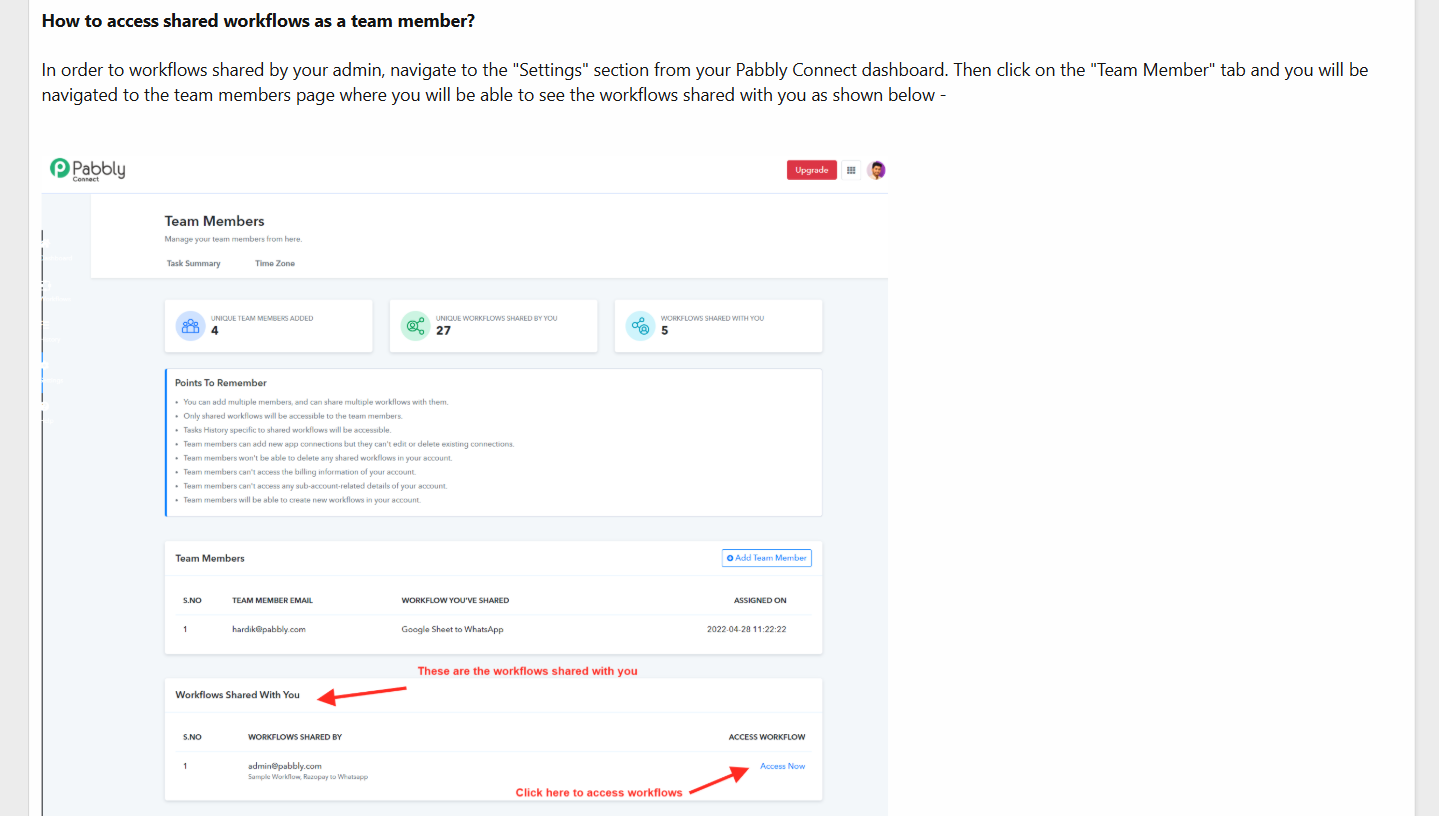
Kindly ask your team members to follow the steps below:
- Log in to their Pabbly Connect account.
- Navigate to the Team Member section from the dashboard.
- Scroll down to the “Workflows Shared With You” section.
- Click on the “Access Now” button to open the shared workflow.
For better understanding, please refer to the screenshot and the detailed guide:
https://forum.pabbly.com/threads/how-do-add-team-members-in-pabbly-connect-account.5336/
Please let us know if you still face any issues.