Thrivecart --> systeme.io
Status: Open · Asked by Andrew Low on · 0 views
Integrating Thrivecart with Systeme.io using Pabbly Connect because my sales form is in Thrivecart.
Objective: When someone purchases a product in Thrivecart, add the contact into systeme.io, then tag the contact.
Workflow: Thrivecart (Product Purchase) --> systeme.io (Create Contact) --> systeme.io (Add Tag to Contact)
When does it work: It works when the contact I'm trying to add does not already exist in systeme.io.
When it doesn't work: It doesn't work when the email (contact) already exists in systeme.io because systeme.io (Create Contact) throws an exception that the email value already exists.
What I've tried: Thrivecart (Product Purchase) --> systeme.io (Search Contact by Email) --> Then use a Router. This doesn't work because systeme.io (Search Contact by Email) does not return a status flag "Found" or "Not Found". It actually returns a different set of fields when the contact is found vs when the contact is not found, so there is no consistent field that I can use in the workflow to feed into the Router.
Can you please help? Thanks, Andrew
Hi @andrewlowcoach,
You can try setting up your workflow in this manner to achieve your use case:
https://connect.pabbly.com/workflow/mapping/IjU3NjUwNTY0MDYzZTA0Mzc1MjZjNTUzMDUxMzYi_pc
Thank you so much!
Muito obrigado!
Hi andrewlowcoach, how are you?
I'm experiencing the same problem. Did you manage to solve it? If so, could you tell me what you did and, if possible, send me a screenshot of your flow on Pabbly?
Hi @andrewlowcoach,You can try setting up your workflow in this manner to achieve your use case:
https://connect.pabbly.com/workflow/mapping/IjU3NjUwNTY0MDYzZTA0Mzc1MjZjNTUzMDUxMzYi_pc
My question is the following:
When I update my registration on systeme.io, it asks for the user ID, and I only have their email address for this action.
How can I solve the problem in this case?
I didn't find this solution in the video indicated
When I update my registration on systeme.io, it asks for the user ID, and I only have their email address for this action.How can I solve the problem in this case?
Can you please share the workflow URL once you have tried it so that we can look into it?
Você pode compartilhar a URL do fluxo de trabalho depois de testá-lo para que possamos analisá-lo?
https://connect.pabbly.com/workflow/share/C0NTYVAHAmFUHgZsVgUFIgoeUlYGXAU8BB1WRAcIVCxVGFUQVhcNZw9DAiBVHlQ1VB0Fb1EODWgNGQcDAlQIe1ZPBwVRUlQuAE1SKVQBDzwLVVN7UDE#
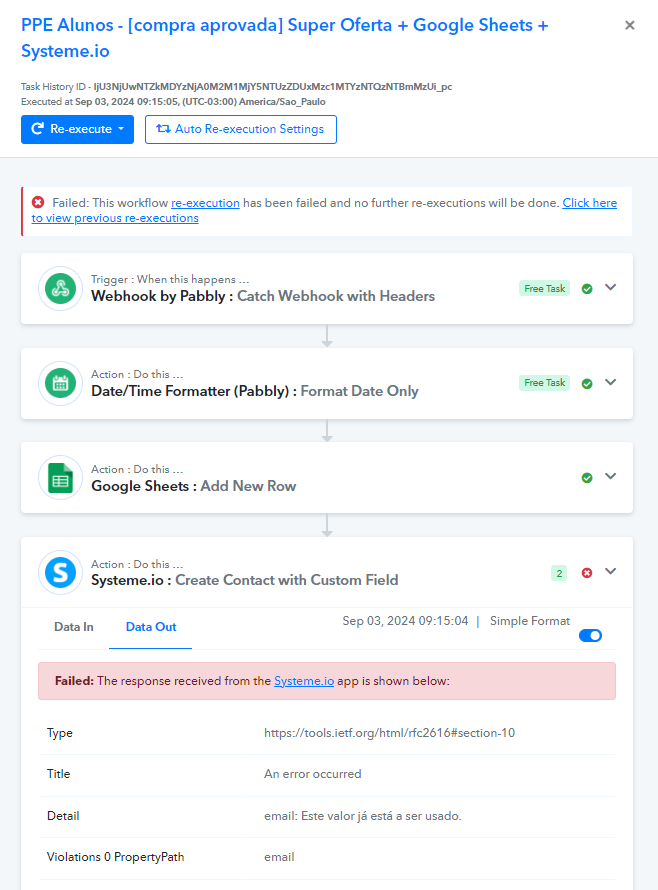
Hey @Marcos Assis
We’ve observed from our end that when using the "Create Contact with Custom Field" action event in Systeme.io, an error occurs indicating that the email is already in use. Please check on your side and let us know if you have any concerns or need further assistance.
Manthan
P.S. - Do check our Pabbly YouTube Channel where we have more than 7400+ automation tutorials.
Yes, this is an email already registered in my account!
My question is...
How to update this registration without having its ID? Is it possible to do it via email?
How to update this registration without having its ID? Is it possible to do it via email?
I will recommend you use the following video lesson's logic in the workflow where it will avoid the workflow hitting the error with the existing kind and will create/update the contact accordingly.
(Please watch the second part of the video after the trigger event configuration, whereas we have used other application for the logic you can do the same with Systeme.io)
Hi, Pabbly Connect support sent me a new workflow that works for me. I've since tried to replicate it for client, but I'm getting the same errors.
I've tried reaching out to support again, but they haven't been helpful.
Pabbly Connect, can you create a video showing Thrivecart --> systeme.io? Or Calendly --> systeme.io?
Once we all learn this once for adding a new contact into systeme.io, and updating an existing contact in systeme.io, we'll be fine.
We just need to see how your router handles adding a new contact for when a contact does not exist.
I'm experiencing the same problem. Did you manage to solve it? If so, could you tell me what you did and, if possible, send me a screenshot of your flow on Pabbly?

Hey @andrewlowcoach
To set up a workflow in Pabbly Connect for adding or updating contacts in Systeme.io using triggers from ThriveCart or Calendly, you start by creating a trigger for the relevant event (like a new purchase in ThriveCart or a new invitee in Calendly). Then, use Pabbly's "Router" to branch the workflow.
(Watch the first part of the video)
youtube.com/watch?v=9Mz90i2awr4
And for a better understanding on the Router action step, you can refer to the following one -
youtube.com/watch?v=6XDASZVv3tw
The first route should check if the contact already exists in Systeme.io by using the "Search Contact" event.
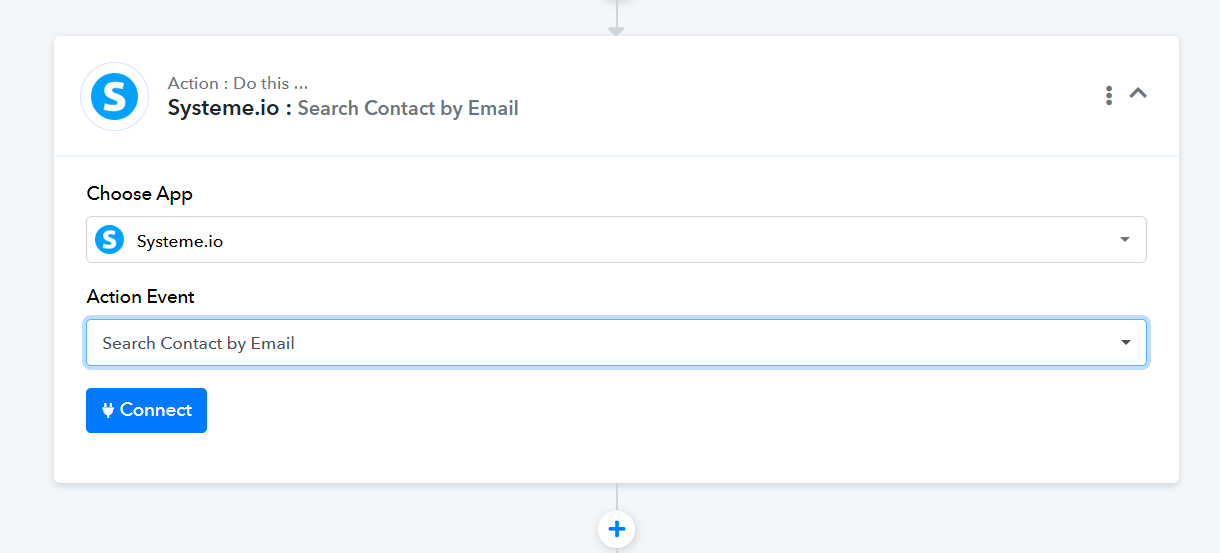
If the contact doesn't exist, you'll set up a second route to add a new contact using the "Add Contact" action. If the contact exists, use the third route to update the contact information with the "Update Contact" event. This setup ensures that new contacts are created when necessary, and existing ones are updated, preventing duplicates. Once configured, test the workflow to confirm it works as expected.
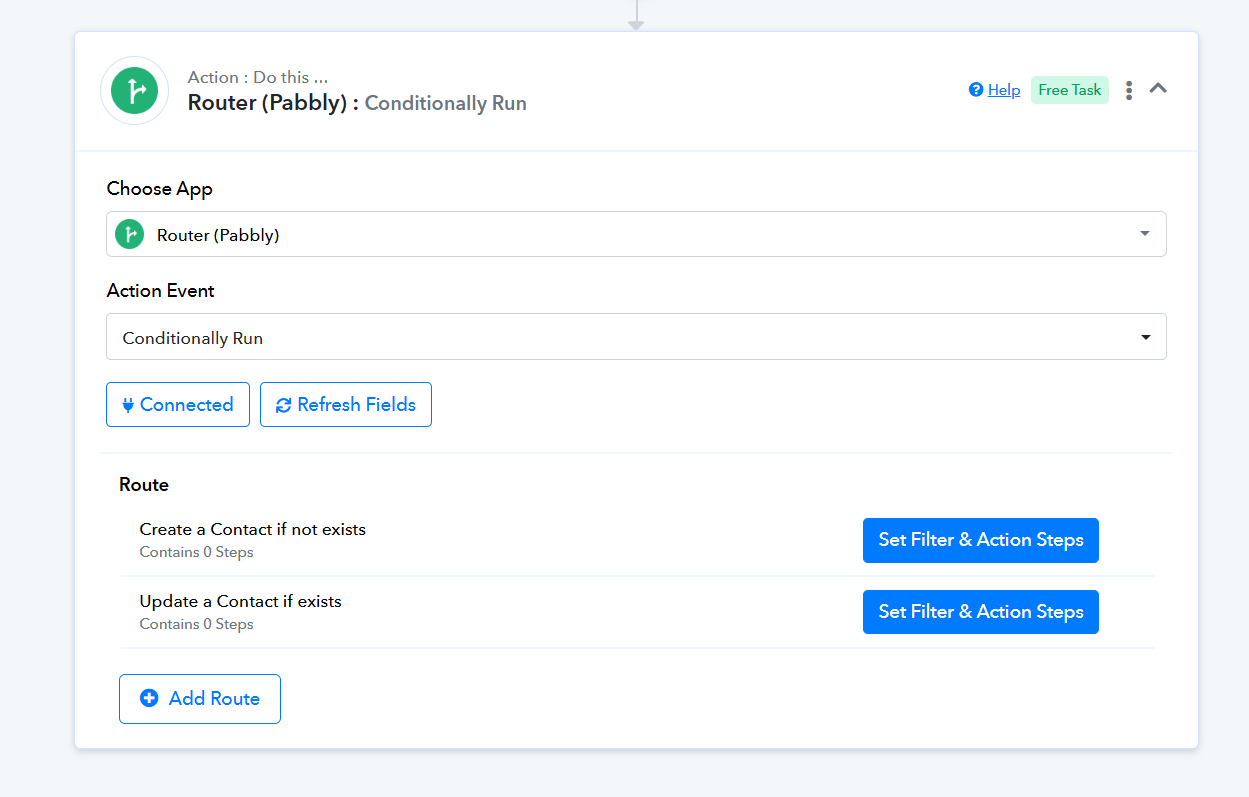
Already done that but it's not working. See images. See error message.
There is something not quite right. If you can show the step after the router, for contact that already exists in systeme.io, add a tag to the contact.
Attachments
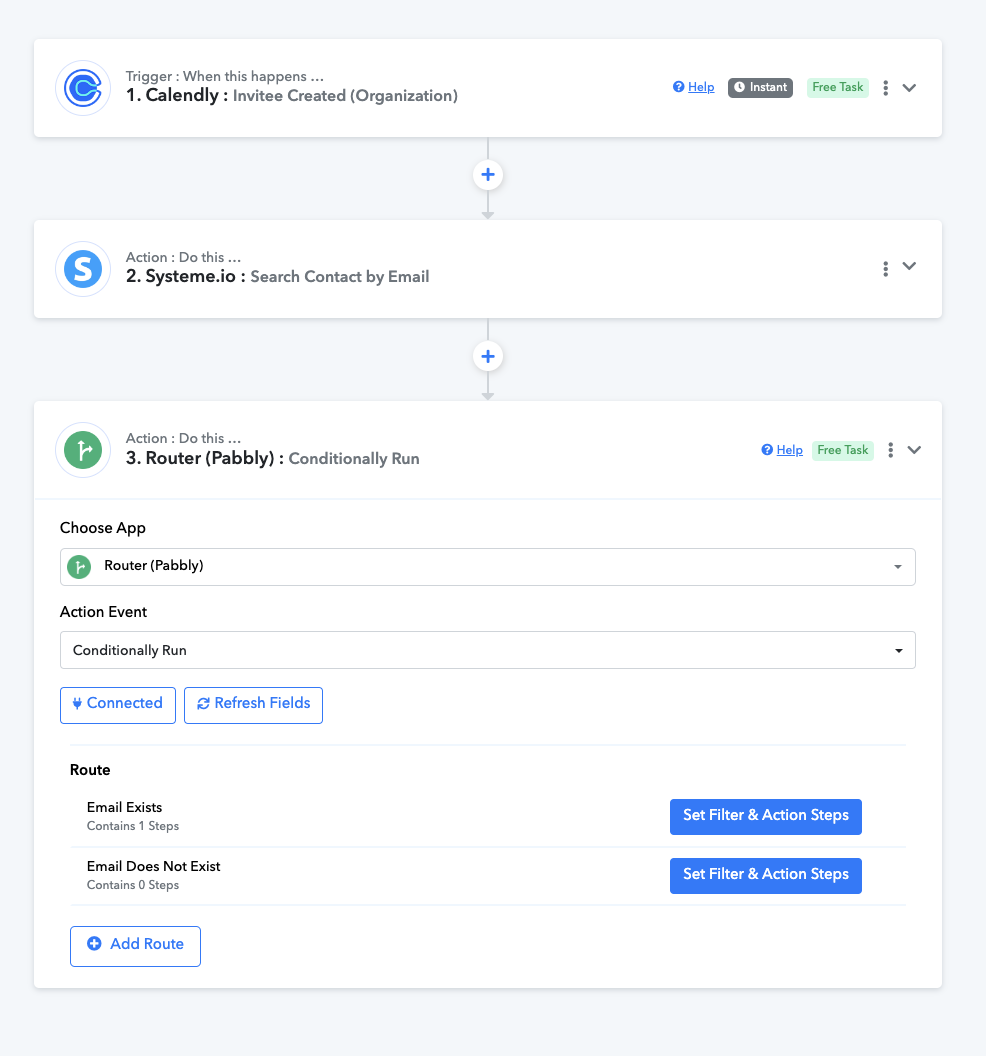
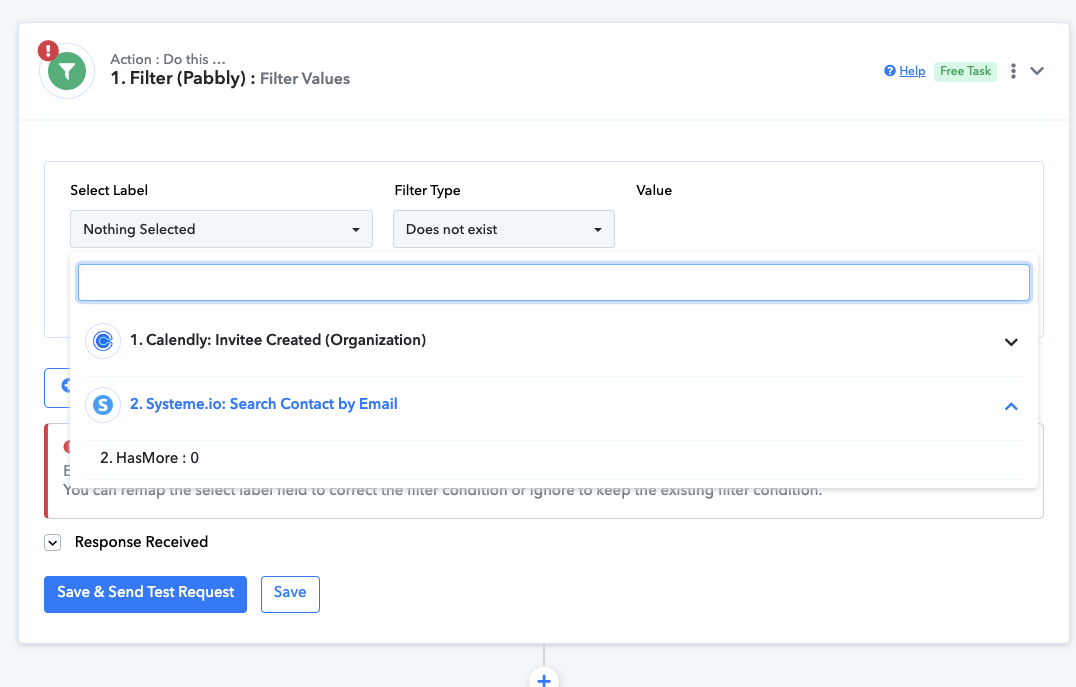

Could you please share the URL of the workflow you tried to set up by following the instructions mentioned above?
The filter conditions used in this workflow are correct. The entire workflow has been set up correctly. Please enable this workflow and schedule a new meeting in Calendly using dummy details to check if your workflow works correctly. Kindly avoid making any changes to the setup of this workflow, and simply create a dummy invitee.
https://connect.pabbly.com/workflow/mapping/IjU3NjYwNTZkMDYzNTA0MzU1MjZlNTUzNTUxMzIi_pc
Hi there, unfortunately it's still not working. Would you mind checking again?
The filter conditions used in this workflow are correct. The entire workflow has been set up correctly. Please enable this workflow and schedule a new meeting in Calendly using dummy details to check if your workflow works correctly. Kindly avoid making any changes to the setup of this workflow, and simply create a dummy invitee.https://connect.pabbly.com/workflow/mapping/IjU3NjYwNTZkMDYzNTA0MzU1MjZlNTUzNTUxMzIi_pc
Please do not make any changes to the setup of your workflow (do not click on 'Save & Send Test Request' in any step). Simply enable your workflow and create a meeting using dummy details.
https://connect.pabbly.com/workflow/mapping/IjU3NjYwNTZkMDYzNTA0MzU1MjZlNTUzNTUxMzIi_pc
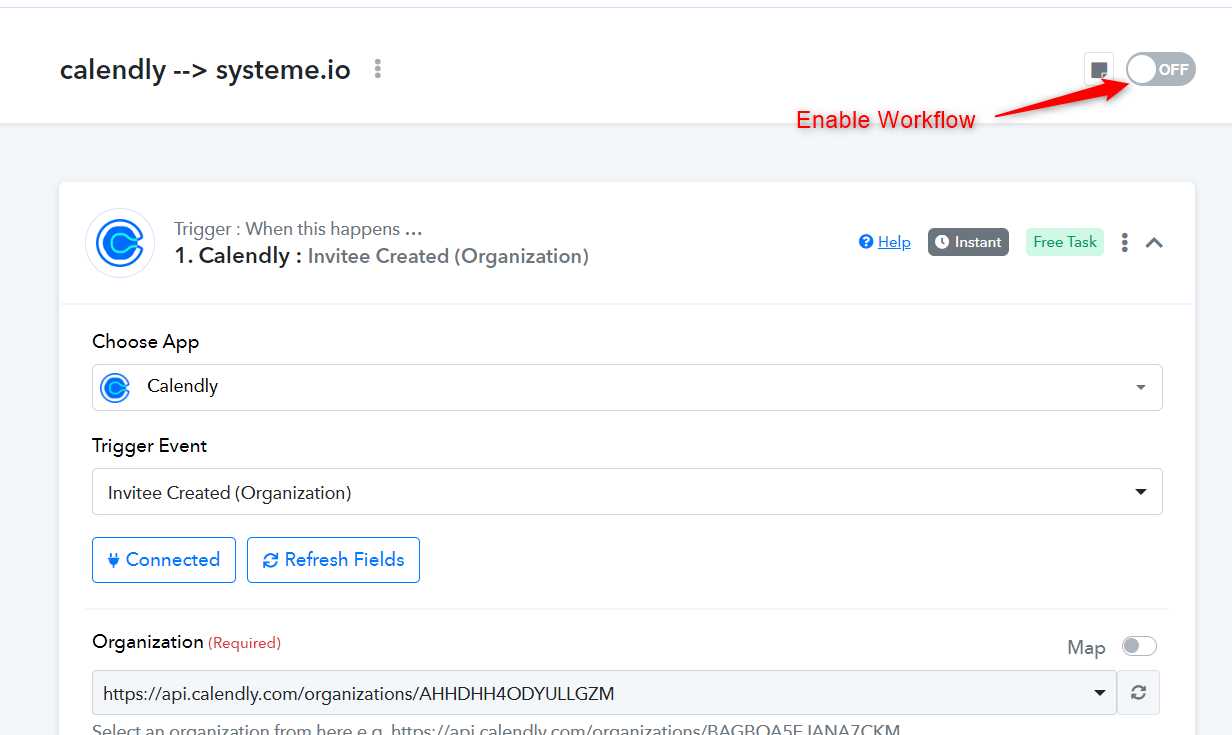
Please do not make any changes to the setup of your workflow (do not click on 'Save & Send Test Request' in any step). Simply enable your workflow and create a meeting using dummy details.https://connect.pabbly.com/workflow/mapping/IjU3NjYwNTZkMDYzNTA0MzU1MjZlNTUzNTUxMzIi_pc
Hi there, thanks for this. Working now. Did you have to do something on the back-end?
I'm asking because I will have many more integrations into systeme.io into the future, and it looks like I'm not the only one.
Are you able to teach us how to do this properly so we can work on it ourselves for future integrations? This will save you having to support us for every single integration into systeme.io.
Alternatively, maybe systeme.io can add another field that helps us better filter new or existing contacts?
I look forward to "learning how to fish" with systeme.io integrations.
Thanks, Andrew
We didn't make any changes on the backend.
While setting up your workflow, in the 'Search Contact by Email' action step, ensure you search for a contact that already exists in your Systeme.io account. This will provide you with the Contact ID, which you can then use in the Filter step. If you search for a contact that doesn't already exist in your Systeme.io account, the response will be '0', and you won't be able to set up the Filter step.
All we did was add the contact with the provided email address to your Systeme.io account, which gave us a Contact ID that we then used in setting up the Filter conditions.
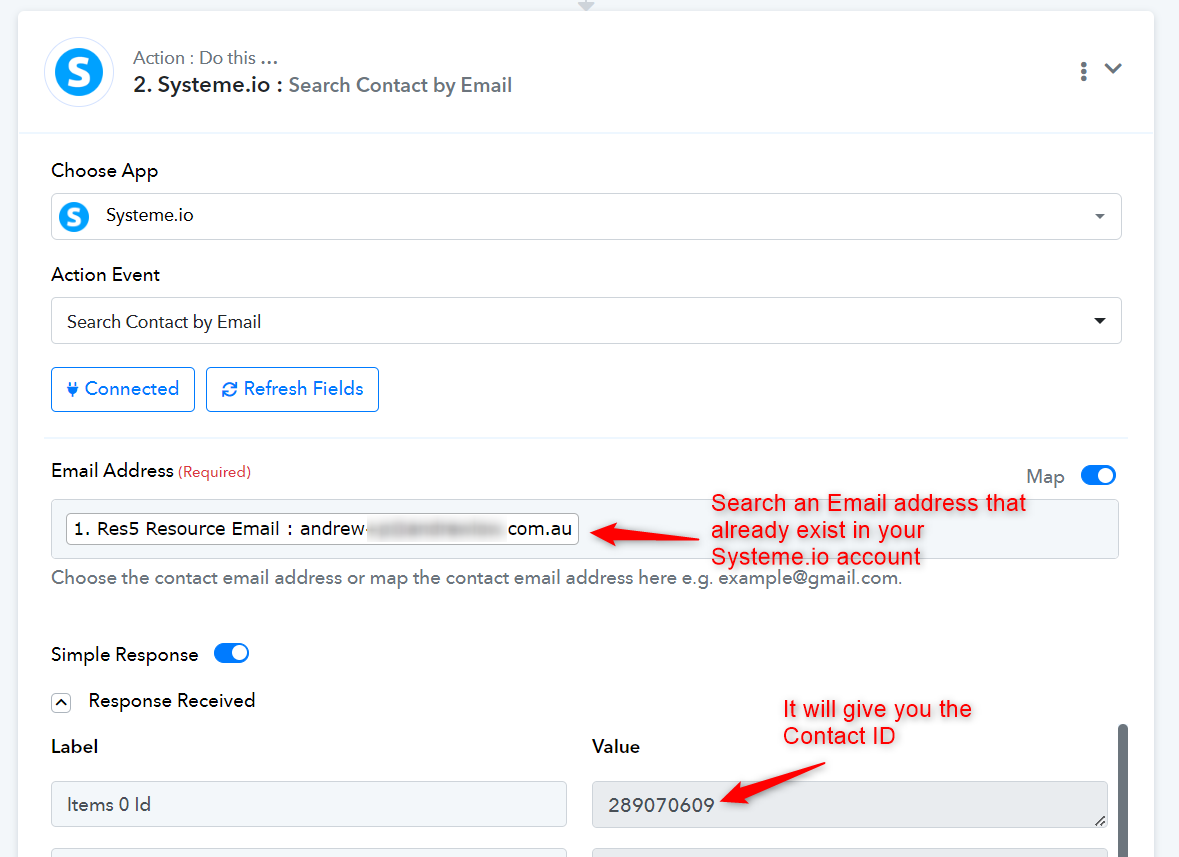
We didn't make any changes on the backend.While setting up your workflow, in the 'Search Contact by Email' action step, ensure you search for a contact that already exists in your Systeme.io account. This will provide you with the Contact ID, which you can then use in the Filter step. If you search for a contact that doesn't already exist in your Systeme.io account, the response will be '0', and you won't be able to set up the Filter step.
All we did was add the contact with the provided email address to your Systeme.io account, which gave us a Contact ID that we then used in setting up the Filter conditions.
Ok thanks, I'll try this out.