Timeout while downloading
Status: Open · Asked by apremierdj on · 0 views
Hello Support Team,
I keep encountering a “Timeout while downloading” error message when running tasks in OpenAI Vision. Interestingly, if I manually input the URL into OpenAI Vision, the download completes successfully. However, when I run the scheduled task automatically, it frequently times out.
Is there any way to resolve this issue?
Thank you for your assistance!
Hi @apremierdj,
Please make sure you are passing a valid image URL to OpenAI. The current URL you are trying to use appears to be invalid.
https://drive.google.com/file/d/1r4olvhxnedHZWwulKslHql3YGnxPN0dD/view?usp=sharing
yes. It was a valid image at the time as I checked as soon as I received the task error but as you can see that the image was deleted at the end of the automation
Please remove the 'Delete File or Folder' action step from your workflow, then make another submission. If you encounter the same error, share the Task History ID with us in this thread, and we will look into it.
IjU3NjUwNTZjMDYzNjA0MzU1MjY4NTUzZDUxMzY1MTYwNTQzMzBmMzUi_pc
Hello @apremierdj
As we were checking the issue, we tried re-executing the task histories one of which got successfully re-executed and another didn't (we were unable to open the image URL), refer to the attached image.
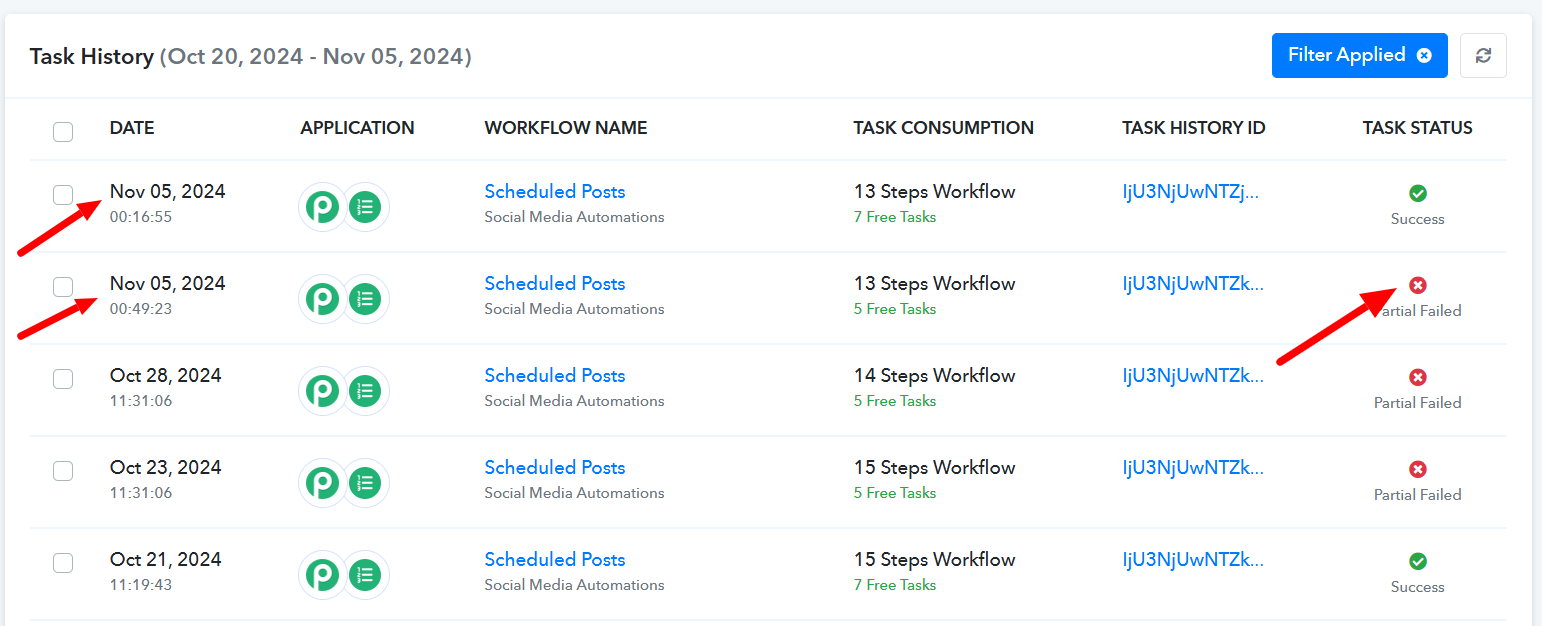
Kindly add a few more test and see if the same issue persists as the issue seems to be from the API's end.
failed again: IjU3NjUwNTZjMDYzNjA0Mzc1MjZkNTUzYzUxMzE1MTYwNTQzMTBmMzAi_pc
Hello @apremierdj
The application with which you are facing the issue is a third-party application. We would recommend you contact them regarding the issue you are facing. You can contact them at the below email.
Email Address: [email hidden]