Timeout with Google Gemini Studio API - Only with Specific Data
Status: Open · Asked by Phil Good on · 0 views
I'm getting a timeout error when referencing data (a transcription from Deepgram) in my Google Gemini Studio block.
If I remove this transcription data from Deepgram, the automation works.
This happens in Google Gemini and OpenRouter.
I'm not seeing any error in Google Gemini in their API section.
This error started today.
It was working as expected for several weeks until this morning.
Here are two examples (task history) with this error:
IjU3NjUwNTY5MDYzNzA0M2Q1MjZhNTUzMTUxMzI1MTY3NTQzMTBmMzIi_pc
IjU3NjUwNTY5MDYzNzA0M2Q1MjZmNTUzMjUxMzE1MTYzNTQzMjBmMzci_pc
Hello,
Greetings!
The content generation step using Google AI Studio (Gemini) did not complete within the expected time. As a result, no response was received within 60 seconds, causing a timeout.
This led to the subsequent step not being executed.
You can learn more about this timeout limitation here:
? Pabbly Connect Timeout Limit – Error Response Not Received in 25 Seconds
Yes. I understand that.
I'm not confused by that.
Let me show you a picture of the problem.
This causes a timeout:
https://share.powerfunnels.com/E0uBj4zb
This doesn't cause a timeout:
https://share.powerfunnels.com/mXu4K56d
The difference is that I reference data (text) returned from the Deepgram API. It times out when I reference the data, and it doesn't time out (it works) when I remove the reference data. This is just text data (several paragraphs) that Gemini should have no problem processing.
This automation has worked perfectly up until yesterday. Gemini had an update yesterday (when this automation stopped working), so I'm assuming that Pabbly needs to reevaluate the integration.
I cloned the workflow and switched it over to OpenAI, and it works as expected, but I really want to use the Gemini API.
Here's the workflow:
https://connect.pabbly.com/workflow/mapping/IjU3NjYwNTY4MDYzMzA0M2M1MjY4NTUzZDUxM2Ii_pc
Please try adding a Delay step between the two 'Generate Content' action steps to see if that resolves the issue.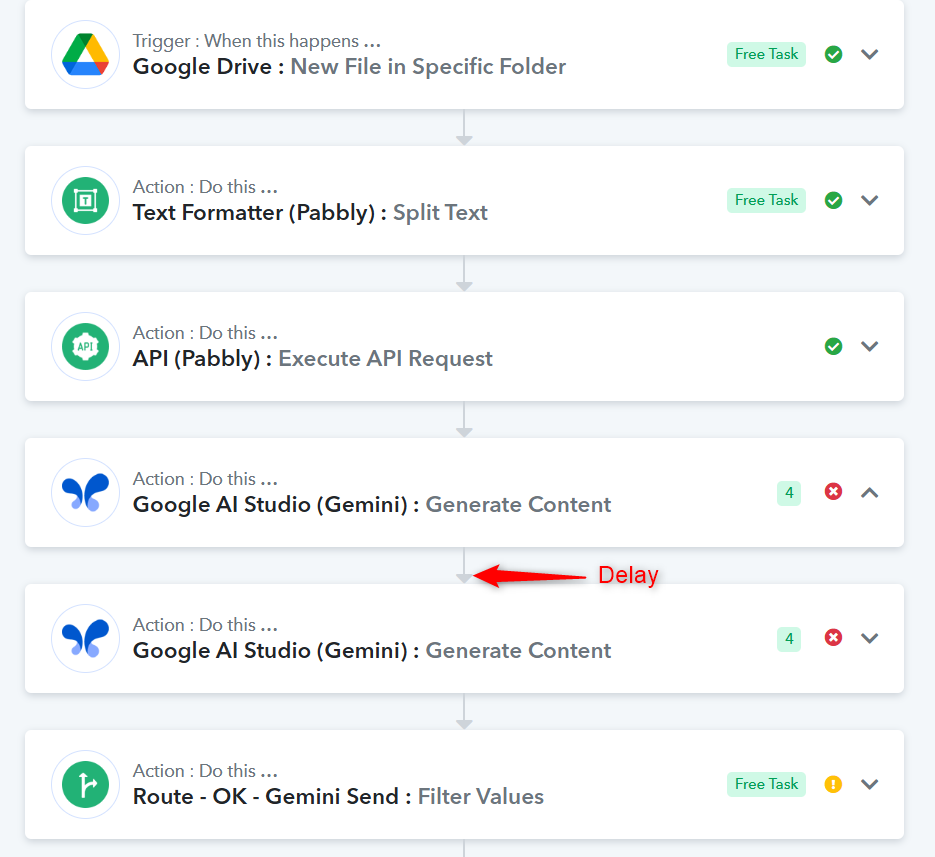
The delay didn't work.
Please note that I'm testing this Google AI Studio block with the 'Save & Send Test Request', so the delay has nothing to do with this problem.
What's next?
Can you please try and reproduce my error?
Pabbly Connect waits 60 seconds to receive a response from any Gemini application. The issue you are describing occurs when Gemini takes more than 60 seconds to process a request. In your case, due to the large amount of data provided, it is taking more than 60 seconds to analyze the data and generate content. As a result, Pabbly Connect does not receive a response within the 60-second window, leading to this error. Unfortunately, there is currently no fix for this issue, other than reducing the amount of data being sent or having the Gemini API process the data faster — which is beyond our control.