Trello + Google Drive
Status: Open · Asked by Alisha on · 0 views
Hey there
I am trying to create a workflow where, when a Trello task card is created, it creates a new folder in Google Drive. The downside is that I can't get past the second step. I have created an API Token in Trello and connected Trello to Pabbly Connect. Then, when I go to create the action Filter By Pabbly Set the App Event to Filter Values there isn't an option to choose the label and show in the image below?
I'm not sure what to do to trouble shoot this one.
TIA Alisha :)
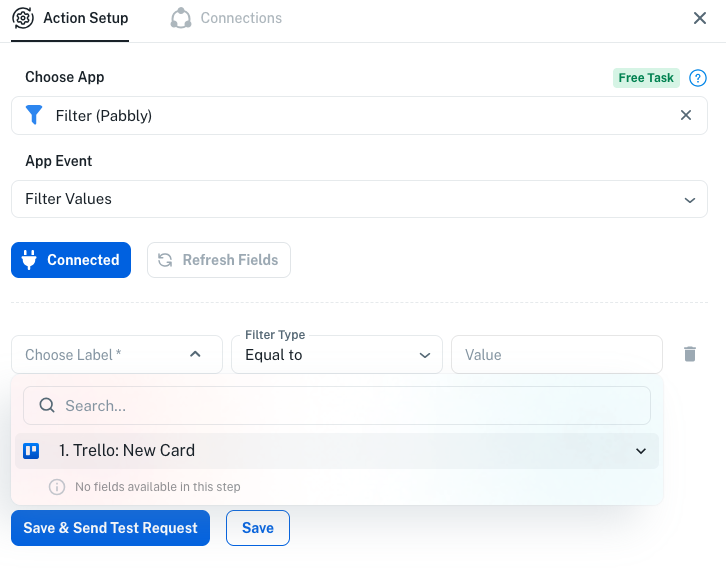
Hey thereI am trying to create a workflow where, when a Trello task card is created, it creates a new folder in Google Drive. The downside is that I can't get past the second step. I have created an API Token in Trello and connected Trello to Pabbly Connect. Then, when I go to create the action Filter By Pabbly Set the App Event to Filter Values there isn't an option to choose the label and show in the image below?
I'm not sure what to do to trouble shoot this one.
TIA Alisha :)
youtube.com/watch?v=xVXA8lSRBOI:18
Watch this video. and intead of google sheet use google drive create folder action.
FYI I'm not from Pabbly Connect team, just a freelancer who helps other Pabbly users.
Hi @Alisha,
Thanks for reaching out.
It appears that the trigger has been set up, however a response has not yet been captured from the trigger step. Due to this, the subsequent steps are not showing the fields required for mapping.
Please follow the steps below:
- Go to the Trello trigger step in your workflow.
- Click on the "Save & Send Test Request / Capture Webhook Response" button.
- Then, create a new card in Trello in the board you have selected.
Once the new card is created, a response will be captured, and the fields (such as labels and other card details) will appear. After that, you will be able to proceed with the Filter step and mapping.
You can also refer to this tutorial for guidance:
That makes sense - run the test - thank you!
Extra question. Is is possible that once I have the workflow to create the folder from the trello card. that with any folder created in that flow I want another folder to be created called OLD. So it would look Trello Card Google folder and then a Folder inside called 'Old' ??? Any help with that would be AMAZING!
Hello @Alisha ,
Yes, this is possible! You can achieve it using the Google Drive → Create Sub Folder action. Here’s how:
- First, use Google Drive → Create Folder to create the folder for your Trello card.
- Then, add Google Drive → Create Sub Folder.
- In the Folder field of the sub-folder action:
- Turn off the “Map” button.
- Enter the Folder ID from the previous step (the folder created for the Trello card).
- Set the Sub Folder Name as OLD.
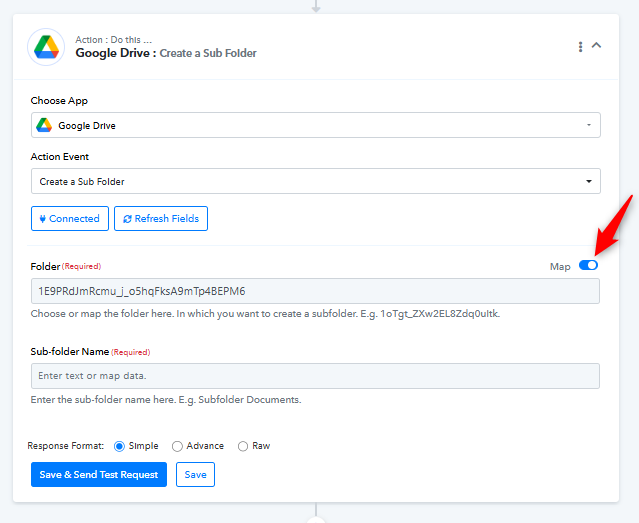
This way, every time a folder is created for a Trello card, a sub-folder called OLD will automatically be created inside it.