Unable to Capture LinkedIn Campaign ID/Name in Pabbly Connect
Status: Open · Asked by IIBM Institute on · 0 views
We are using the same LinkedIn Lead Gen Form for multiple ad campaigns, and leads are being captured in our CRM through Pabbly Connect.
However, during field mapping, we are unable to find the Campaign ID or Campaign Name fields. We want to capture leads in our CRM based on the campaign they came from.
Could you please let us know why these fields are not available and how we can capture campaign-wise lead data in Pabbly Connect?
Thank you.
Hello,
Thank you for reaching out to us with your query.
In LinkedIn Lead Gen Forms, lead data can be captured in two different ways:
Test Lead Submission – Used for testing the workflow setup.
Real Lead Submission – Generated when an actual user submits the lead form.
The Campaign ID and Campaign Name fields are typically available only with real lead submissions. If the sample data in your workflow was captured using LinkedIn's Test Lead feature, these fields may not be included in the response, which is why you are unable to see them during field mapping.
We recommend waiting for a real lead to be generated from your campaign and then capturing that lead in your workflow. Once the workflow receives data from an actual lead submission, the Campaign ID and Campaign Name fields should become available (if provided by LinkedIn), and you can use them for mapping in your CRM.
Please let us know once a real lead has been captured, and we'll be happy to assist further if needed.
Thanks and Regards,Preeti Paryani
Customer Success Associate,
Pabbly.com
Yes, actual users are submitting the leads. However, the campaign name is still not being captured. Could you please check and let us know why this is happening?
Hello,
Thank you for the update.
Since you are receiving actual leads and the Campaign Name is still not being captured, could you please share the workflow URL with us?
Once we have the workflow URL, we'll review the trigger response being received from LinkedIn and check whether the Campaign ID/Campaign Name fields are being provided in the payload.
We look forward to your response.
Thanks and Regards,Preeti Paryani
Customer Success Associate,
Pabbly.com
please find the attached link...
https://connect.pabbly.com/v2/app/workflow/mapping/IjU3NjcwNTY5MDYzMTA0Mzc1MjZiNTUzNDUxMzYi_pc
Regards
Rakhi Gupta
Hello Rakhi,
Thank you for sharing the workflow URL.
Upon reviewing the workflow and researching the LinkedIn Lead Notifications trigger, it appears that LinkedIn does not directly return the Campaign Name in the trigger response. Instead, it provides the sponsored campaign identifier within the lead metadata, as shown in your workflow data.
To capture the campaign details, you can follow the approach below:
Use a Text Formatter by Pabbly → Text Parser step after the LinkedIn trigger to extract the Campaign ID from the lead metadata field.
Once the Campaign ID is extracted, use the LinkedIn → Get Ads Campaign action and pass the extracted Campaign ID.
This action will return the campaign details, including the Campaign Name, which can then be mapped to your CRM along with the lead information.
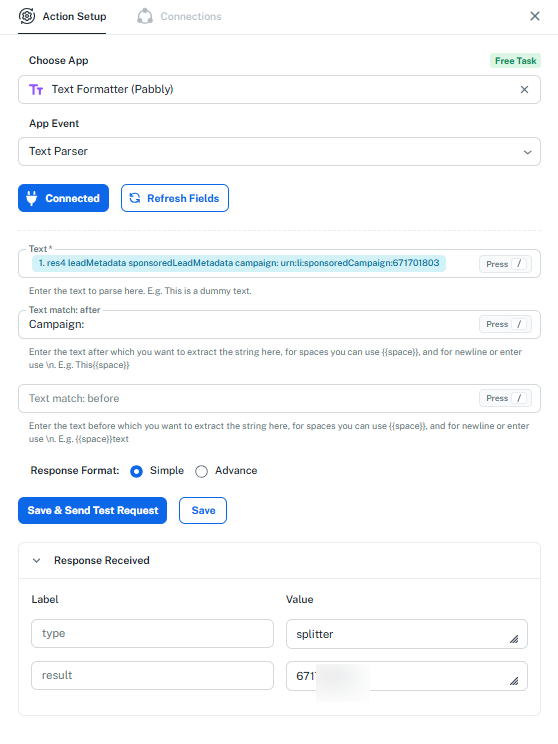
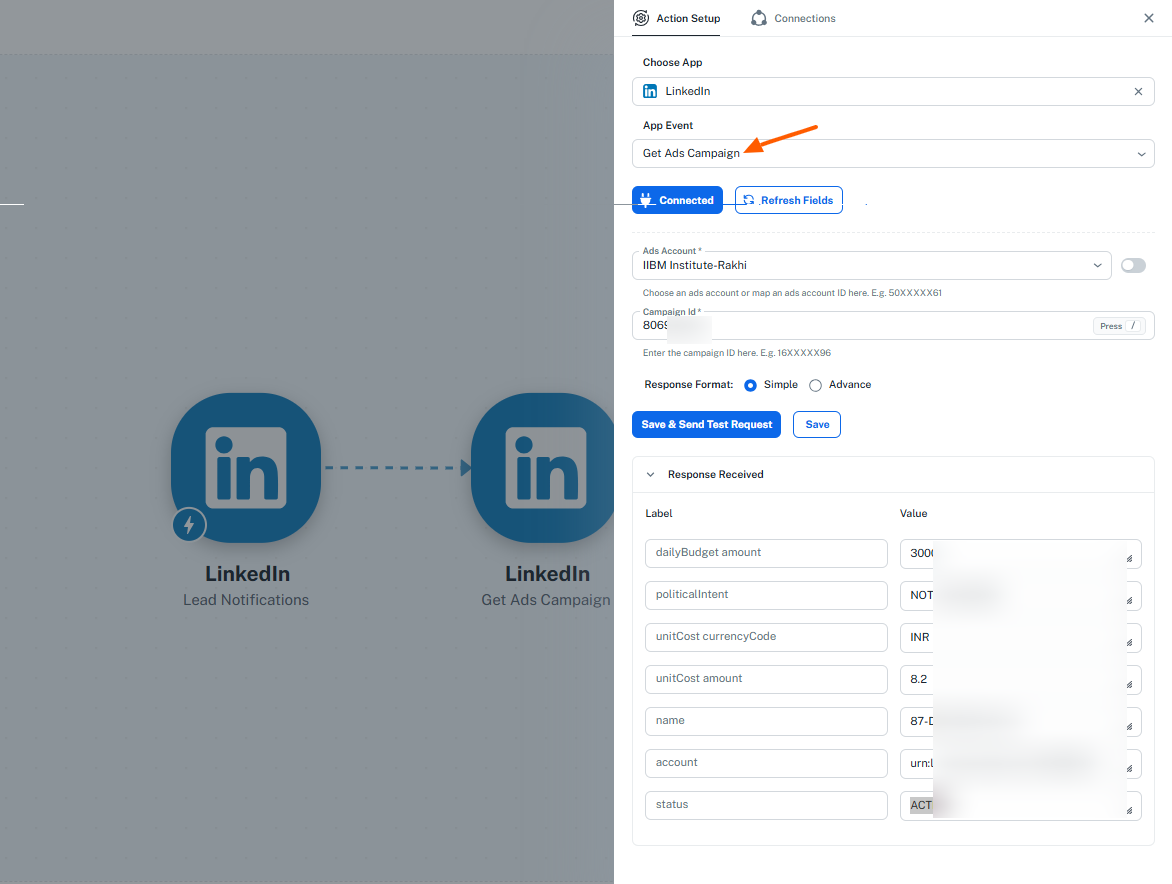
This will allow you to identify which campaign generated the lead and route/store the lead accordingly in your CRM.
Please implement the above steps and let us know if you need any assistance with the configuration.
please find the attached link...
https://connect.pabbly.com/v2/app/workflow/mapping/IjU3NjcwNTY5MDYzMTA0Mzc1MjZiNTUzNDUxMzYi_pc
Regards
Rakhi Gupta
Thanks and Regards,
Preeti Paryani
Customer Success Associate,
Pabbly.com

we follow all steps but its showing false value... plz check once
plz reply
Hello Rakhi,
Thank you for the screenshot.
We checked your workflow, and the configuration appears to be set up correctly.
In the LinkedIn → Get Ads Campaign action, the campaign details are being fetched successfully. You simply need to scroll down to the very bottom of the response section in that action step. There, you will be able to see additional fields such as the Campaign Name, Status, and other campaign-related details.
As highlighted in the screenshot, the campaign name is already being returned in the name field, and the campaign status is available in the status field.
Please scroll down in the response and map the required fields to your CRM accordingly.
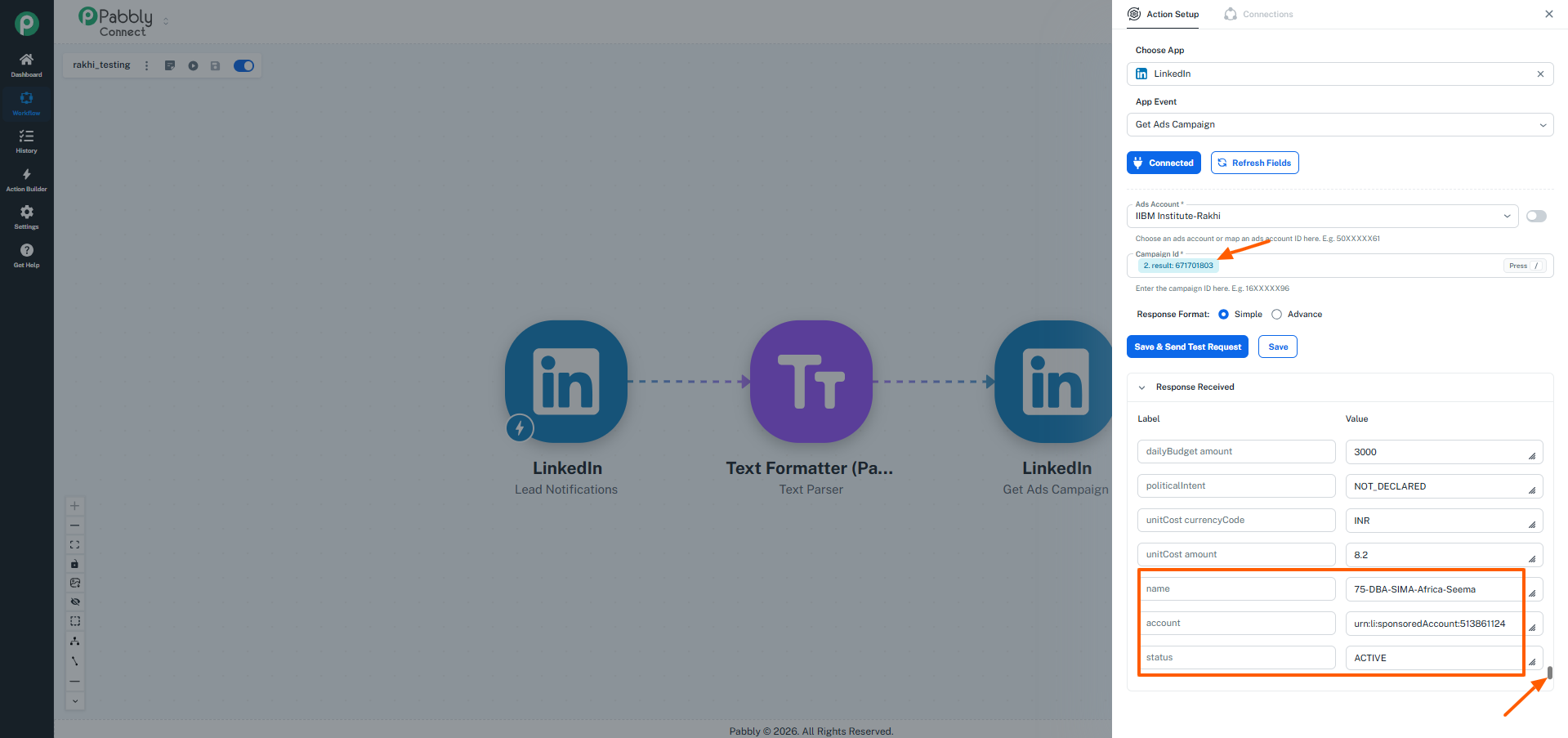
Let us know if you need any further assistance.
plz reply
Thanks and Regards,
Preeti Paryani
Customer Success Associate,
Pabbly.com
Hello Rakhi,
I hope you're doing well.
We just wanted to follow up regarding the LinkedIn campaign issue.
Could you please let us know if it is working correctly now after following the suggested steps? If you're still facing the same issue, kindly let us know, and we'll be happy to investigate it further.
We look forward to your response.
Hello Rakhi,
Thank you for the screenshot.
We checked your workflow, and the configuration appears to be set up correctly.
In the LinkedIn → Get Ads Campaign action, the campaign details are being fetched successfully. You simply need to scroll down to the very bottom of the response section in that action step. There, you will be able to see additional fields such as the Campaign Name, Status, and other campaign-related details.
As highlighted in the screenshot, the campaign name is already being returned in the name field, and the campaign status is available in the status field.
Please scroll down in the response and map the required fields to your CRM accordingly.
Let us know if you need any further assistance.
On Jul 22, 2026, 6:11 AM, IIBM Institute <[email protected]> wrote:plz reply
Thanks and Regards,
Preeti Paryani
Customer Success Associate,
Pabbly.com
Thanks and Regards,
Preeti Paryani
Customer Success Associate,
Pabbly.com