Unable to Open Attachment from Gmail
Status: Open · Asked by IT from De Comate on · 0 views
I've included a public file from my Google Drive to be attached in my workflow. Tested the link in an incognito page & I was able to view the file.
The file is ~13MB in size.
However, upon attaching & sending the file via a Gmail trigger - my attachment becomes corrupted. The file is incredibly small compared to its original size. Only of about ~94KB.
The workflows are:
1. IjU3NjUwNTZmMDYzMTA0M2M1MjZlNTUzNzUxMzY1MTYxNTQzMTBmMzUi_pc
2. IjU3NjUwNTZmMDYzMTA0M2M1MjZlNTUzMzUxMzM1MTYzNTQzNzBmMzUi_pc
There are no issues in sending the Emails. Only the attachments are corrupted. File names & formats are correct as well. I've tried attaching a .pdf & .mp4. Neither worked.
I've also tried using a Limewire link for the public URL. It didn't work, either.
Hello @HelpMeLearn,
Please try using the Send Email V2 action instead and add the attachment URL as below:
https://drive.google.com/uc?export=download&id=[map the file id here]
Hello @HelpMeLearn,Please try using the Send Email V2 action instead and add the attachment URL as below:
https://drive.google.com/uc?export=download&id=[map the file id here]
Thank you for the swift reply, Preeti. I appreciate it. It's working now.
May I know what the difference between V1 & V2 is? I've tried it on both, and there were no issues.
The one thing I noticed is that V2 does not parse emojis. Why is that?
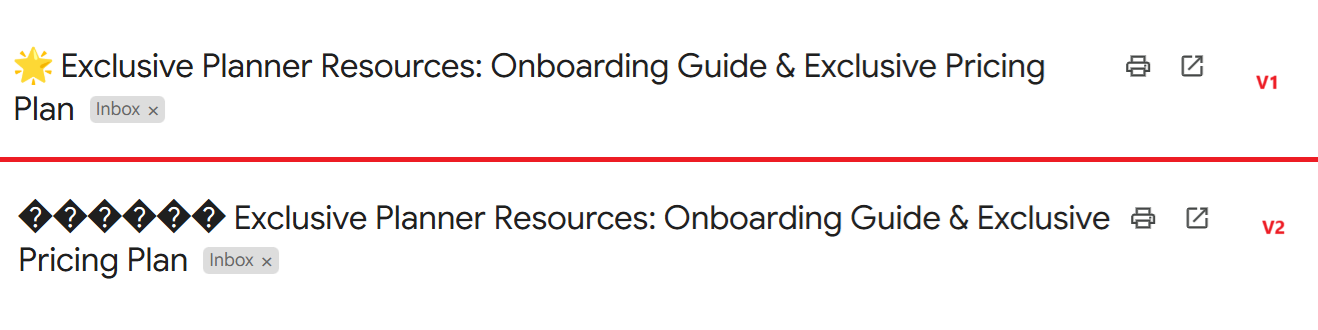
If I were to continue using V1 because of this reason - would this be an issue in the future?
Hello @HelpMeLearn,
The difference between "Send Email V1" and "Send Email V2" is minimal, but V2 allows you to add labels and signatures to emails, whereas V1 does not.
If V1 works fine for you, you can continue using it without any issues. Let us know if you need further clarification!
Hello @HelpMeLearn,The difference between "Send Email V1" and "Send Email V2" is minimal, but V2 allows you to add labels and signatures to emails, whereas V1 does not.
If V1 works fine for you, you can continue using it without any issues. Let us know if you need further clarification!
Check user's reply again, issue with Send Email v2 is that it doesn't send Emojis properly.
But Send Email v1 sends emojis properly.
So something definitely needs to changed from pabbly connect team side.
For your reference I will leave a workflow with both v1 and v2 here - https://connect.pabbly.com/workflow/mapping/IjU3NjYwNTZlMDYzMzA0M2Q1MjY0NTUzMzUxMzEi_pc
Try it on your email ids and you will see that v2 doesn't work with emojis like v1 does.
Thank you for pointing it out and for helping, @Fagun Shah.
@Preeti Paryani I can confirm that this is still happening in V2 - although the case is slightly different than before.
Previously, the subject line didn't parse the emoji (as shown in my previous post). My other test showed that the emojis in subject line works fine, but emojis in the body section doesn't parse.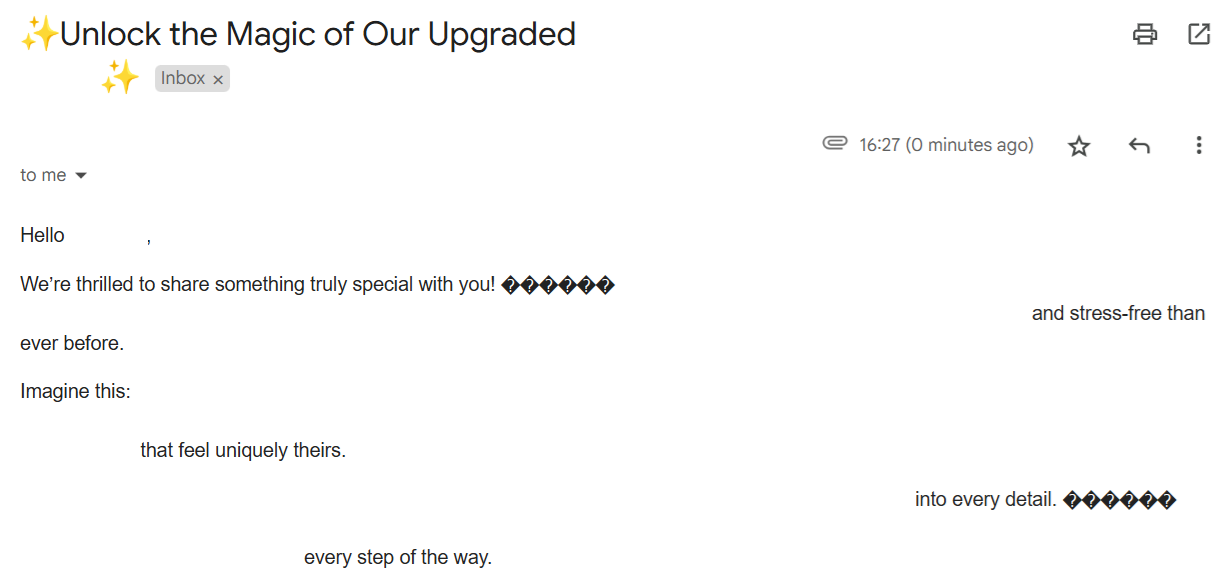
Hello @Fagun Shah and @HelpMeLearn,
Currently, we do not support passing emojis via the Send Email V2 action. However, we have escalated the request to our technical team to explore the possibility of implementing this feature.
We will update you as soon as we have more information.
Bumping this in case there is any updates.
On a similar topic - is there a way for me to send a follow-up E-mail in response to an E-mail I've previously sent?
For example: I send an E-mail today, and an E-mail 3 days after, but in response to my first E-mail. So, it would appear as an RE: (subject) in Gmail?
Yes, you can achieve this using the Reply to Email action event. Please refer to the attached image for more details.
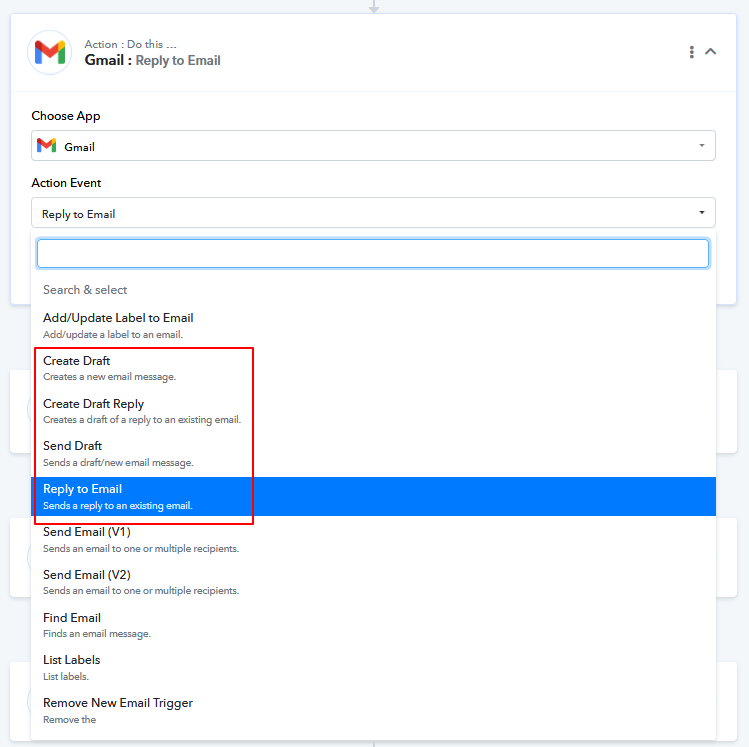
In your current workflow setup, you can add a 3-day delay before the Reply to Email action step and map the necessary details from the Send Email action.
Regarding the emoji issue with the Gmail V2 action, our team has made modifications. You need to select the email content type as HTML and include emojis within the tags. This should help you pass emojis correctly in the email.
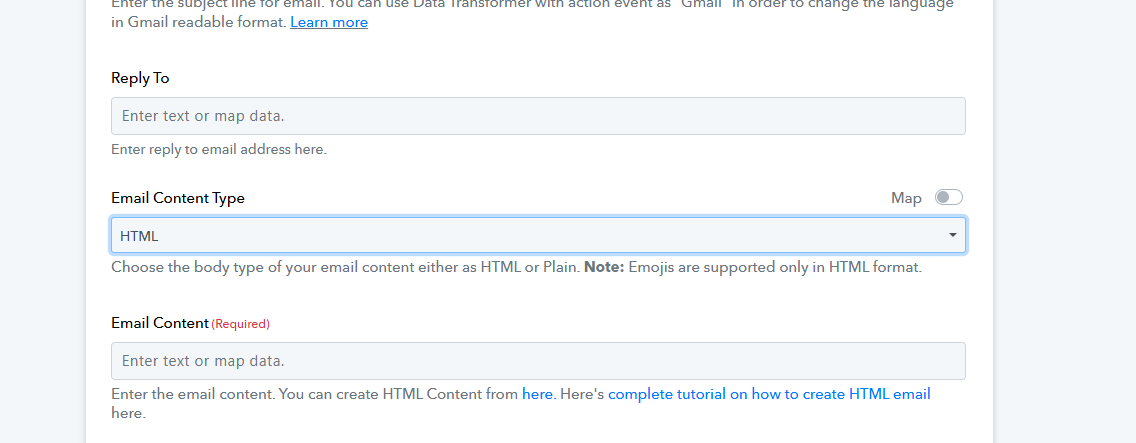
Please try this at your end and let us know if it works fine for you.
Hello @HelpMeLearn,Yes, you can achieve this using the Reply to Email action event. Please refer to the attached image for more details.
In your current workflow setup, you can add a 3-day delay before the Reply to Email action step and map the necessary details from the Send Email action.
Regarding the emoji issue with the Gmail V2 action, our team has made modifications. You need to select the email content type as HTML and include emojis within the tags. This should help you pass emojis correctly in the email.
Please try this at your end and let us know if it works fine for you.
Unfortunately, my subject is still unable to parse emojis.
Emojis in body looks okay, but subject isn't. I think it's a hit & miss. I tried it before, and it worked fine.
Hello @HelpMeLearn,
Currently, we do not support adding emojis in the subject line. However, you can include them in the body section if the content type is set to HTML.
Let us know if you need any further assistance.