Unable to see Template Name , while Configuring WhatsApp Cloud API
Status: Open · Asked by Lucky Studios on · 0 views
Hi Team,
I am using Permanent Token and also have approved template. I tried re-establishing the connection. But still I don't see the Templates.
Please Help!!!
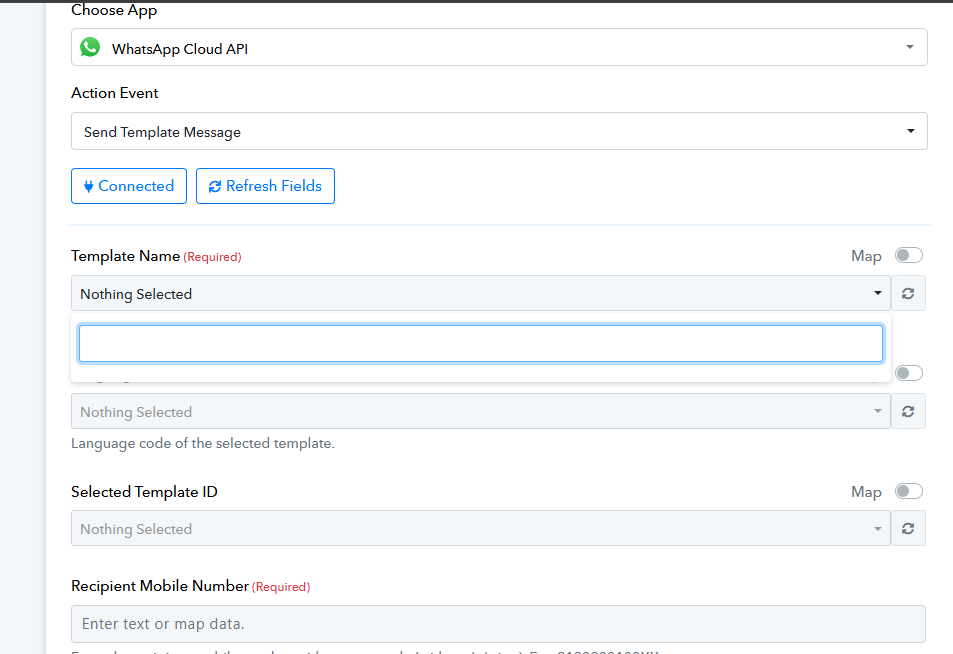
Gave All permissions as required. Re-Established with New Token but . Tried ( Beta ) as Well . Still its the Same.
Hello @Lucky Studios,
Please follow the below attached tutorial to set up the connection with Whatsapp Cloud API using a permanent token and make sure to record the process of setting up the connection. If the issue persists please share the screen recording with us along with the workflow URL so we can better look into the issue and assist you further.
I have already Used the Same Method to Generate the Token.
https://connect.pabbly.com/workflow/mapping/IjU3NjYwNTY5MDYzMjA0MzE1MjZjNTUzYzUxMzMi_pc
Screen Rec : https://drive.google.com/file/d/13-eLMup07SkCFD37FzWsQvCi0blbNJae/view?usp=sharing
Hello @Lucky Studios,
Please allow us some time to look into the issue and we will get back to you as soon as we have any updates.
Hello @Lucky Studios,
Upon reviewing the video you shared, we noticed that it does not fully align with the process outlined in the tutorial above. Please go through the entire tutorial and set up the connection accordingly. If the issue persists, kindly share a screen recording of the complete process so we can investigate further.
Let us know how it goes.