Unable to send campaign for sender approval, no send option available (Pabbly Send with Us)
Status: Open · Asked by Jasper van der Linden on · 0 views
Hi Pabbly team,
I am setting up Pabbly Email Marketing for my business and I am stuck in the sender approval flow for the Pabbly (Send with Us) delivery server.
Current situation:
- Under Settings, Delivery Server, my sender email is fully verified: CNAME1, CNAME2 and DMARC all show green checkmarks. The approval status is Pending.
- When I click "Send For Approval", I get a popup saying: "Please create an email campaign and send it for approval. Once approved, then you can start sending emails with Pabbly (Send with Us)."
- I have created my email in the HTML Email Builder and saved it. However, I cannot find any option anywhere to actually send this email or submit it for approval. The template editor has no send button, and I see no way to complete the approval step from the Campaigns section either.
Hello,
The HTML Email Builder is only used to create and save your email template. It does not have an option to send the email for approval.
To submit your sender for approval, please follow these steps:
Go to Campaigns and click Create Campaign.
Configure the campaign details and select the email template you created in the HTML Email Builder.
Proceed through the campaign setup until the final step.
Click Send for Approval (or schedule the campaign if prompted). This submits both your campaign and sender for review.
Once the campaign is approved, the Pending status under Settings → Delivery Server will be updated, and you will be able to send emails using the Pabbly (Send with Us) delivery server.
If you still do not see the Send for Approval option in the Campaign creation flow, please share:
A screenshot of the final step of your campaign setup.
A screenshot of the Campaigns page.
The email address you have configured as the sender.
We'll check why the approval option is not appearing.
You can also duplicate your existing campaign. It will give you the option to send the email.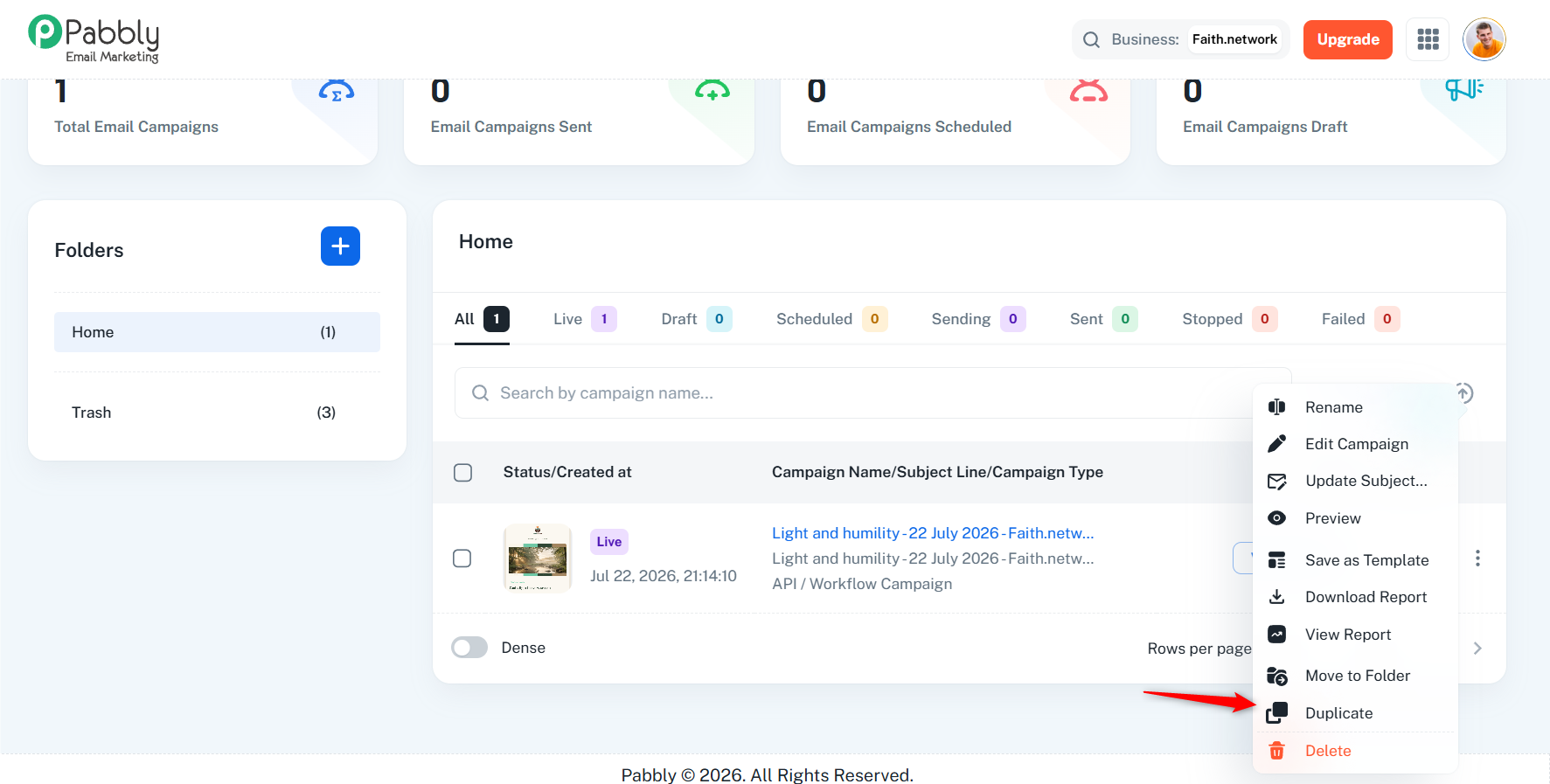
Arshil Ahmad
🌐 Pabbly.com
Met vriendelijke groet,
Jasper van der Linden
***** Disclaimer *****
Dit bericht is uitsluitend bestemd voor de geadresseerde. Het bericht kan vertrouwelijke informatie bevatten. Als u dit bericht onbedoeld heeft ontvangen, wordt u vriendelijk verzocht de afzender te informeren en het bericht te vernietigen.
As per your request, we have disabled the “Sent with Pabbly” footer. This change will reflect in any new templates you create. For existing templates, you will need to edit them and remove the footer manually.
Thanks & Regards,Arshil Ahmad
🌐 Pabbly.com