Understanding the Events History in Pabbly Hook
Status: Closed · Asked by Abhishek Nagar on · 0 views
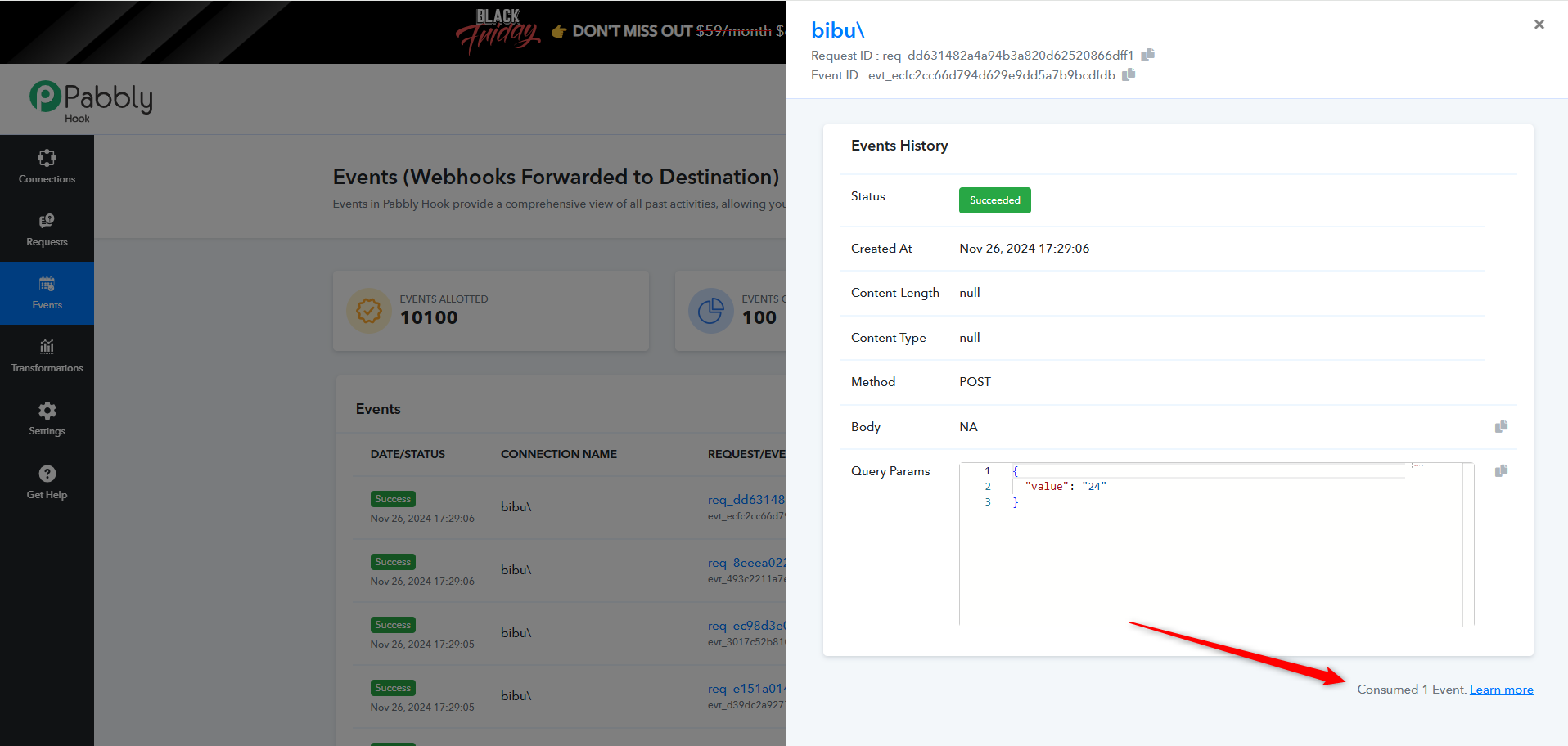
If you're exploring the Events History in Pabbly Hook, here's a breakdown of the details shown in the event log:
Event Details:
- Request ID: A unique identifier for the request. You can copy it by clicking the clipboard icon.
- Event ID: A unique identifier for the event. Similarly, you can copy this for reference.
- Status: Indicates whether the request was successful (Succeeded) or failed.
- Created At: The timestamp for when the event occurred.
- Content-Length and Content-Type: Information about the payload of the request (if available).
- Method: The HTTP method used, such as POST, GET, etc.
- Body: Displays the request body (if applicable). In this case, it's marked as "NA" (Not Available).
- Query Params: Any query parameters sent with the request are displayed here in JSON format.
Notes:
- The Consumed Events counter at the bottom tracks the number of events consumed. For example: "Consumed 1 Event."