Upload to Google Drive with Advance Setting
Status: Open · Asked by IChild Company on · 0 views
Dear Support,
How do i upload a file to a shared folder without allowing download. See attached advance setting: disabled download print and copy for commentors and viewers
Hello @ichilddev,
Could you please confirm whether the folder has been shared with you individually, or if it is part of a shared drive? This will help us better understand the setup and guide you accordingly.
We are the owner of the folder drive.
I have checked with Grok:
The recommended and current way to restrict downloads (along with print and copy) for viewers and commenters via the Google Drive API v3 is to use the downloadRestrictions field in the File resource.API endpointPATCH https://www.googleapis.com/drive/v3/files/{FILE_ID}Request body (JSON) to restrict download
json
{
"downloadRestrictions": {
"itemDownloadRestriction": "restrictedForReaders"
}
}
- This disables download, print, and copy options for readers (viewers) and commenters.
- Buttons are typically hidden or non-functional in the viewer.
Alternative (legacy field, still supported but not recommended for new implementations)
json
{
"copyRequiresWriterPermission": true
}
- This achieves a similar effect (disables copy/print/download for non-writers).
- Official docs recommend migrating to downloadRestrictions for better granularity and future compatibility.
Key notes (as of 2026)
- These restrictions apply only to viewers/commenters—editors/owners can still download.
- Use the full https://www.googleapis.com/auth/drive scope (or per-file equivalent) to update.
- Changes propagate quickly; test by viewing the file as a non-owner.
- Reference: Protect file content guide and Files resource.
The downloadRestrictions approach is the modern, preferred method for precisely this purpose. If you need code samples in a specific language, let me know!
Kindly advise can i use the PAbbly API or pabbly drive to achieve the above?
Hello @ichilddev,
Thanks for sharing the details.
At the moment, this use case is achievable only via a PATCH request to the Google Drive API. Since we currently do not have a dedicated Update File action in the Google Drive integration, this functionality is not available natively.
We have escalated your request to our product team to introduce an Update File action with an option to configure download restrictions (disable download, print, and copy) for uploaded files.
We’ll keep you posted on any updates regarding this enhancement.
Hi
Are we able to use the Pabbly API to achieve this?
Hello @ichilddev,
Yes, you can achieve this using the API (Pabbly) module in Pabbly Connect.
You need to run a PATCH request on the Google Drive API using the files.update method and pass the downloadRestrictions parameter to restrict download, print, and copy for viewers/commenters.
Reference (raw link as requested):
https://developers.google.com/workspace/drive/api/guides/content-restrictions#download-print-copy
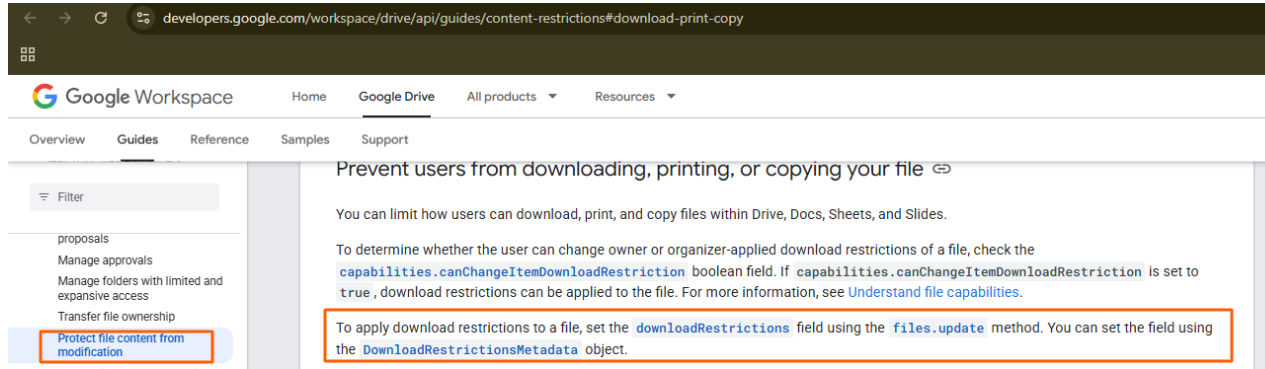
Once this API call is configured correctly inside the Pabbly API module, the restriction will be applied to the uploaded file.
Hi support thanks for the updates. Are you able to do a sample how we can achieve this in a pabbly api call?
Could you please share the cURL of the endpoint you are attempting to execute using API (Pabbly)?
Thanks & Regards,
Arshil Ahmad
Customer Support Associate
? Pabbly.com
?Rate your support
Hello @ichilddev,
Our team has introduced the action named Set File Download Restrictions using which you may acheive this use case.
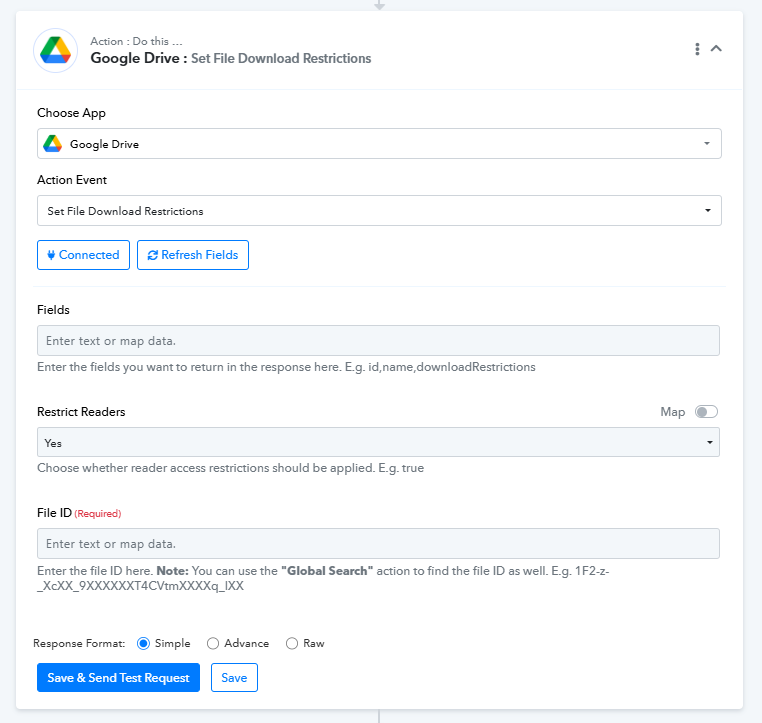
Wow Awesome! Thanks!
Will try this feature with the new functions we are working on and provide feedbacks!
Sure, do let us know how it goes.