Urgent - LeadConnector v2 stopped working
Status: Open · Asked by Ida Ma on · 0 views
All my workflow with leadconnector v2 has stopped working. I tried to update connection and unable to update. Help please!
I have 22 workflows connected to LeadConnector v2, here is one of the workflow examples: https://connect.pabbly.com/workflow/mapping/IjU3NjYwNTY4MDYzMjA0MzE1MjZlNTUzNjUxMzUi_pc
Here is a video showing errors when i tried to update the connection or create a new connection:
All of my 22 workflows have the same error:
[TABLE]
[TR]
[TD]StatusCode[/TD]
[TD]401[/TD]
[/TR]
[TR]
[TD]Message[/TD]
[TD]Invalid JWT[/TD]
[/TR]
[TR]
[TD]OAuthException Error[/TD]
[TD]UnAuthorized![/TD]
[/TR]
[TR]
[TD]OAuthException Error Description[/TD]
[TD]Invalid refresh token[/TD]
[/TR]
[TR]
[TD]OAuthException ErrorTip[/TD]
[TD]Try creating a new connection to resolve the OAuthException error. Learn more: https://forum.pabbly.com/threads/how-to-solve-oauthexception-error.18724/[/TD]
[/TR]
[/TABLE]
I have the same issue. I can't even create or update connection. Here is my thread: https://forum.pabbly.com/threads/urgent-leadconnector-v2-stopped-working.28980/
Not sure if this helps with trouble shotting - I also checked my leadconnector connection in zapier. It's setup the same day as Pabbly lead connector. The status in Zapier is shown as active.
Hello @Idama,
Could you please try updating the connection directly under the Workflow section instead of the Connections section, and let us know if that helps resolve the issue?
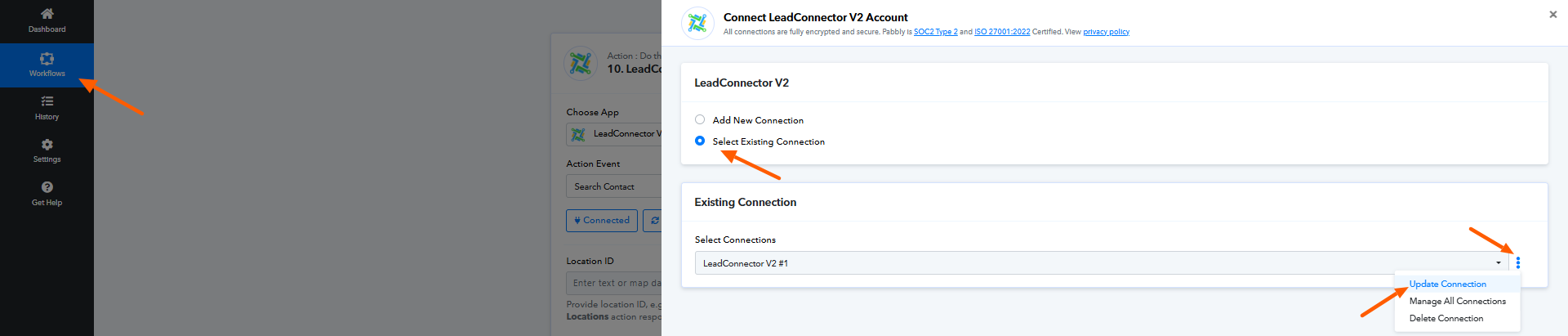
Kindly record the process while attempting this. If the issue persists, please share the recording with us so we can investigate further.
Do I have to do it for all the workflow or just update one of them as they all use the same connection?
Hello @Idama,
Yes, your connection has been successfully updated, and you do not need to repeat this process for every workflow. To verify if the issue is resolved, please try re-executing a Task History and let us know the outcome.
Hello @Preeti Paryani,
Thanks for your help. Your recommended fix worked, and I can update my LeadConnector connection.
Since the fix, I noticed in this workflow that it kept saying the contact ID is missing, despite it being added as an input.
Here is the workflow: https://connect.pabbly.com/task/history/1?filter_status=applied&filter_by_workflow_id=IjU3NjUwNTY5MDYzNjA0M2M1MjY0NTUzMzUxMzIi_pc
Here is a LOOM showing the issue:
https://www.loom.com/share/14664f8d444e42cd82e5c27d96149927?sid=eb3d26c4-a893-46ec-ad6f-527ce8c0ec61T
Thank you!
Hello @Idama,
Upon reviewing the latest task history, it appears that you’ve successfully resolved the issue.
Please feel free to reach out if you encounter any further difficulties or have any additional questions.