Urgent Urgent Urgent !!! Invalid Credentials or Host or Database or Port !!! Again !!!
Status: Open · Asked by Nistel on · 0 views
Good morning,
I haven't been able to connect to MySQL for 3 hours now.
It worked correctly before. I also didn't change the Mysql access credentials.
I tried to reconnect again with no success.
That concerns all my workflows.
Here is one of my workflow link : https://connect.pabbly.com/workflow/mapping/IjU3NjYwNTZjMDYzMjA0MzY1MjZiNTUzMjUxMzEi_pc
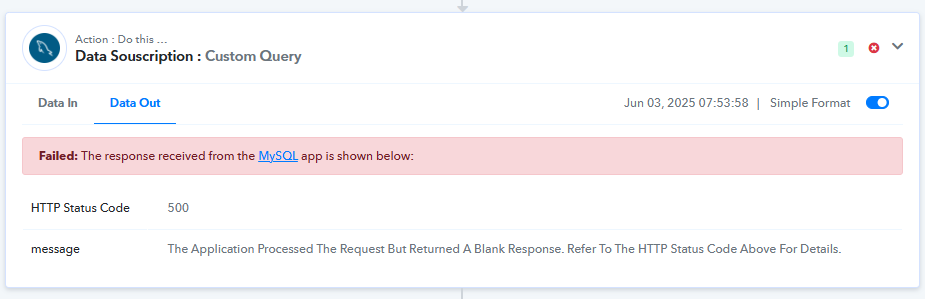
Attached the error message
I've been with Pabbly for years and I know how to connect to Mysql with Pabbly
All my workflows that are connected to My Mysql databases stopped working today although the identifiers have been the same since.
For example, the workflow below had been working correctly for months. But today it no longer works because of the connection to Mysql. I have reconnected several times without success. I also changed the database but still nothing.
I had this problem before and the next day it started working without me doing anything.
Good morning,
I haven't been able to connect to MySQL for 3 hours now.
It worked correctly before. I also didn't change the Mysql access credentials.
I tried to reconnect again with no success.
That concerns all my workflows.
Here is one of my workflow link : https://connect.pabbly.com/workflow/mapping/IjU3NjYwNTZjMDYzMjA0MzY1MjZiNTUzMjUxMzEi_pc
Attached the error message
I've been with Pabbly for years and I know how to connect to Mysql with Pabbly
All my workflows that are connected to My Mysql databases stopped working today although the identifiers have been the same since.
For example, the workflow below had been working correctly for months. But today it no longer works because of the connection to Mysql. I have reconnected several times without success. I also changed the database but still nothing.
I had this problem before and the next day it started working without me doing anything.
Hello @Nistel,
Upon reviewing the task history, we observed that the errors are occurring due to a 500 error code in the response. This typically indicates a server-side issue or a problem with the API itself.
We recommend reaching out directly to the SQL team for more details and assistance regarding this error.
Let us know if there's anything else we can help you with.
We are facing same issue , Mysql Connections are not working. When this will be fixed?
Hello @Nistel,Upon reviewing the task history, we observed that the errors are occurring due to a 500 error code in the response. This typically indicates a server-side issue or a problem with the API itself.
We recommend reaching out directly to the SQL team for more details and assistance regarding this error.
Let us know if there's anything else we can help you with.
just because there is some issue in MYSQL integration. off course this error wil be same for all. We are facing same, sooner you see lots of client about same complaint.
Hello @devwriter,
The 500 error code typically refers to an internal server error, and since this error is being returned by the SQL API, it indicates that the issue likely lies on their end.
We recommend reaching out to the SQL API support team to get more information and clarity on the cause of this error.
Hello @devwriter,The 500 error code typically refers to an internal server error, and since this error is being returned by the SQL API, it indicates that the issue likely lies on their end.
We recommend reaching out to the SQL API support team to get more information and clarity on the cause of this error.
Why cant you simply check with your support team ?
The problem is on your end, not the SQL side, which currently works perfectly with Zapier. So, it's on your end.
I should point out that we've already had this problem twice, and you've fixed it.
Please take action quickly because my clients are currently furious.
Hello @Nistel and @devwriter,
Apologies for the confusion. The issue was on our end and has now been resolved.
Please try re-executing the failed tasks, and they should work fine now. Let us know if you face any further issues.
Yes it works ! Thanks !
Hello @Nistel and @devwriter,Apologies for the confusion. The issue was on our end and has now been resolved.
Please try re-executing the failed tasks, and they should work fine now. Let us know if you face any further issues.
Hello Preeti! We are having this same issue. We are hoping you can resolve this in a similar manner.
We are facing this issue again, our all records are failing also its now allowing "ReExecution Failed steps" , it keep failing again,..... how long to fix this ??
Could you please share the Workflow URL where you are encountering this issue?
https://connect.pabbly.com/workflow/mapping/IjU3NjUwNTZiMDYzZjA0MzA1MjY5NTUzMCI_3D_pc@ArshilAhmad
Have you had any update? We are still unsuccessfully connecting to our database. We have confirmed that this seems to be a pabbly issue as other programs calling from our database are operational with no issues.
We have forwarded this concern to our technical team and will get back to you as soon as we receive any updates from them.
Thanks & Regards,
Arshil Ahmad
Customer Support Associate
? Pabbly.com
?Rate your support
@ArshilAhmad - I work with AshPLF. Please escalate quickly. We have a lot of jobs all failing b/c they are not connecting to our MySQL database.
We use those connections for other processing and tracking and since we haven't been able to connect to our database, a lot of our functionality is critically impacted.
CC: @AshPLF
I have de same issue my sql remote connection fails, 24 hours not working
Failed: The response received from the MySQL app is shown below:
Status: Error
Message: invalid authorization
We are also having this issue!!!
This is not acceptable!
The database is working both manually and via Zapier, just not with Pabbly
Please whitelist the IP address 157.180.81.74 on your servers and check if that resolves the issue. Your MySQL database should allow connections from this IP address, so make sure to add it to your MySQL allowed IPs.
@Stuart, @mcadenas, @kennethsok, @AshPLF, @devwriter,
Please check if that fixes the issue and let us know.
Please whitelist the IP address 157.180.81.74 on your servers and check if that resolves the issue. Your MySQL database should allow connections from this IP address, so make sure to add it to your MySQL allowed IPs.
This has solved the issue thanks!
Resolved! thank you!
Going forward, if there are any changes to your IP configuration or related infrastructure, please ensure that they are communicated to us in advance via email. We’ve observed instances where changes were implemented without prior notice or adequate testing, which has unfortunately impacted our operations.
We strongly encourage improvements in your communication process to avoid disruptions and ensure a smoother experience for your customers.
Still no working for me, can you help me? Connect MySQL Account lost conection with server without made changes, suddenly stopped working
@Stuart, @mcadenas, @kennethsok, @AshPLF, @devwriter,Please check if that fixes the issue and let us know.
Still no working for me, can you help me? Connect MySQL Account lost conection with server without made changes, suddenly stopped working
did you whitelist the IP address 157.180.81.74?
did you whitelist the IP address 157.180.81.74?
Yes, I've contact server support and they added it, and still no working
Still no working for me, can you help me? Connect MySQL Account lost conection with server without made changes, suddenly stopped working
@mcadenas, Whitelisting the IP address on your server should have resolved the issue. We tested it on our end, and it worked, and it appears to have fixed the issue for other users as well. Could you please create a Private Thread and share a screenshot showing the IP address 157.180.81.74 whitelisted on your server so our team can investigate? Also, please share the Workflow URL where you are experiencing this issue.
Going forward, if there are any changes to your IP configuration or related infrastructure, please ensure that they are communicated to us in advance via email. We’ve observed instances where changes were implemented without prior notice or adequate testing, which has unfortunately impacted our operations.We strongly encourage improvements in your communication process to avoid disruptions and ensure a smoother experience for your customers.
Thank you for the update. We apologize for the inconvenience caused and will make sure to inform users in advance in the future.
Thanks & Regards,
Arshil Ahmad
Customer Support Associate
? Pabbly.com
?Rate your support
I have 157.180.81.74 whitelisted and also an earlier IP of 44.224.102.169 whitelisted. But all my MySQL connections are failing. There have been no changes at all on the server side. Please can you tell what to do to fix this? Or fix on your end?
I have 157.180.81.74 whitelisted and also an earlier IP of 44.224.102.169 whitelisted. But all my MySQL connections are failing. There have been no changes at all on the server side. Please can you tell what to do to fix this? Or fix on your end?
Your concern is being addressed here:
https://forum.pabbly.com/threads/mysql-not-connecting.32751/#post-153352
Thanks & Regards,
Arshil Ahmad
Customer Support Associate
? Pabbly.com
?Rate your support