VIDEO GENERATION DELAY RETRIEVAL
Status: Open · Asked by Bananajuice2002 on · 0 views
Hey,
I am struggling with my delay action after sending custom api request to heygen, to generate a vudeo and then retrieve it. I wonder if I can milimalize the chances of mistake or error sand always retrive the video with delay. As of right now, it's super difficult for me to predict when a video from hegen will be ready so sometime my automation delay is too early so the video can not be retrieved so I have airtable automation pronblem bc the firlds is empty.
Can you guide me how to make it smooth, I was thinking about looping the action somehow to continue the workflow when video link is retrieved only...
Can you guide me what is the best way for me to optimalize the workflow.
Hi @Bananajuice2002,
Increasing the delay is the only option available for the issue you’re encountering. Unfortunately, there’s no workaround for this.
Hey,I am struggling with my delay action after sending custom api request to heygen, to generate a vudeo and then retrieve it. I wonder if I can milimalize the chances of mistake or error sand always retrive the video with delay. As of right now, it's super difficult for me to predict when a video from hegen will be ready so sometime my automation delay is too early so the video can not be retrieved so I have airtable automation pronblem bc the firlds is empty.
Can you guide me how to make it smooth, I was thinking about looping the action somehow to continue the workflow when video link is retrieved only...
Can you guide me what is the best way for me to optimalize the workflow.
Why not use webhooks? So when the video is ready it will trigger a webhook in pabbly connect. it will save you time and once video is ready it will immediately trigger webhook, so no time wasting.
Thanks @Fagun Shah, I just finished setting up the webook.
Maybe you can help me with another issue I’m having with the OpenAI custom request used to extract data from my web scrape.
The problem is pretty straightforward:
I’m running into a length limitation with the OpenAI API — is there a maximum input size per call?
I’ve been thinking of some workarounds. For example:
- Formatting the text more efficiently
- Splitting the content into smaller blocks
- Stripping out unnecessary sections before sending the request
Do you think this approach makes sense? Or is there a better way to handle large scraped datasets with OpenAI?
HERE IS THE PICTURE FOR REFERENCE: 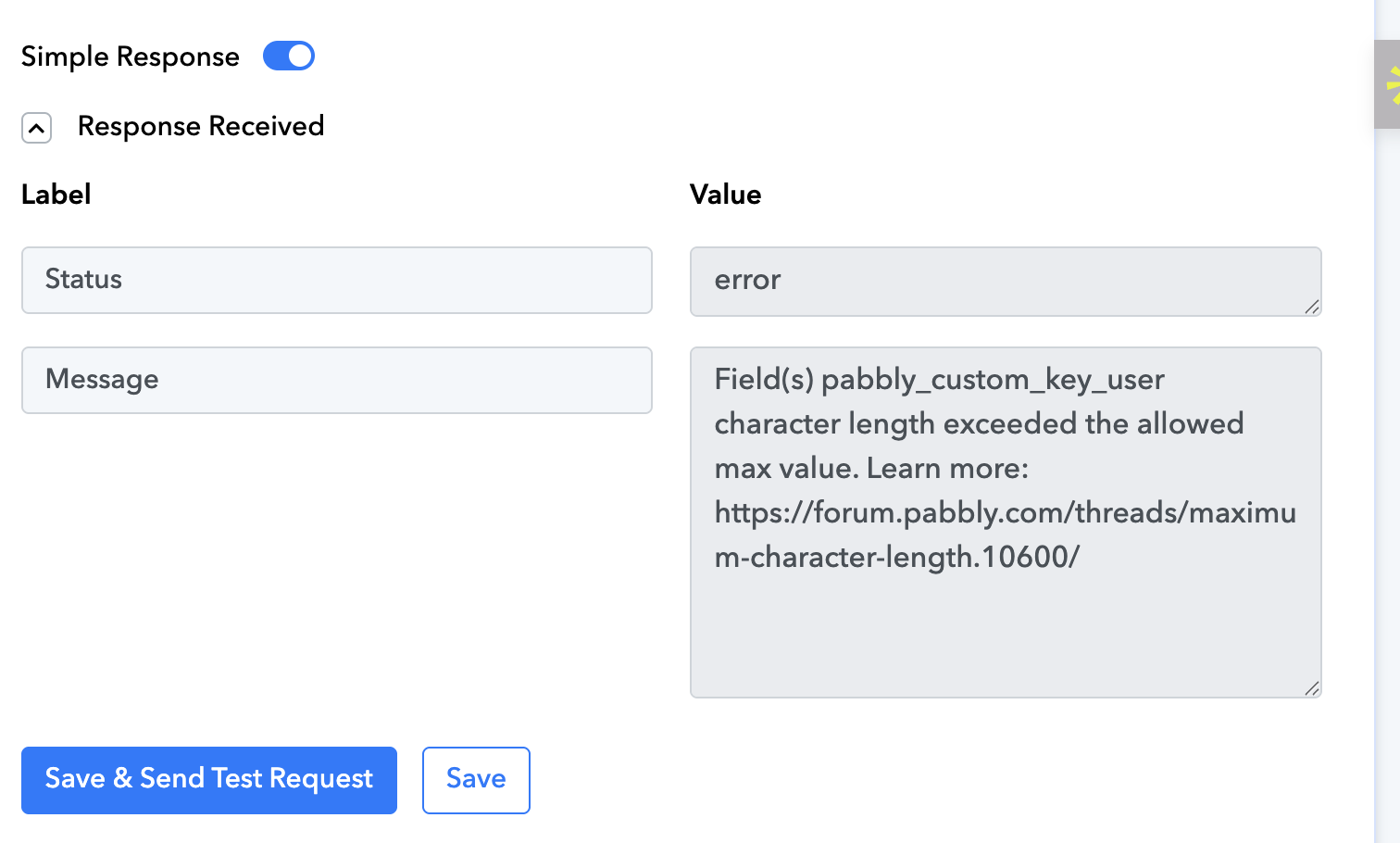
The issue is that you have exceeded the maximum character limit allowed in a field in Pabbly Connect. This cannot be resolved using a Text Formatter, because passing the same data through it will result in the same issue. You need to ensure that the source application sends data within the character limit.
https://forum.pabbly.com/threads/maximum-character-length.10600/
Thanks @Fagun Shah, I just finished setting up the webook.Maybe you can help me with another issue I’m having with the OpenAI custom request used to extract data from my web scrape.
The problem is pretty straightforward:
I’m running into a length limitation with the OpenAI API — is there a maximum input size per call?I’ve been thinking of some workarounds. For example:
- Formatting the text more efficiently
- Splitting the content into smaller blocks
- Stripping out unnecessary sections before sending the request
Do you think this approach makes sense? Or is there a better way to handle large scraped datasets with OpenAI?HERE IS THE PICTURE FOR REFERENCE:
I need to check the request in detail. You can hire me by messaging me on FB messenger. The link is below.