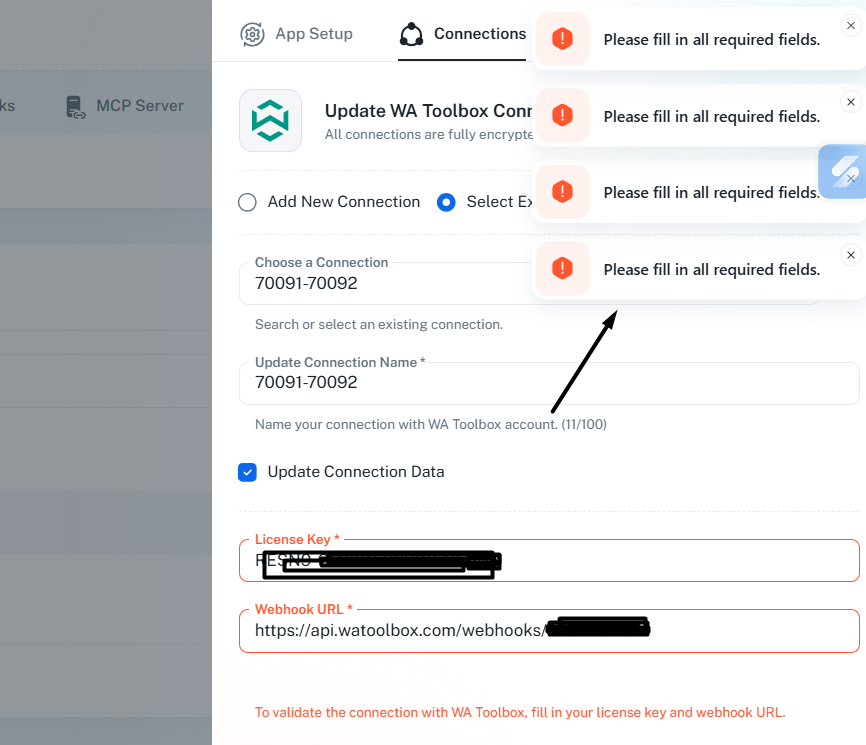
Watoolbox error - update connection
Status: Open · Asked by Deepak Dhingra on · 0 views
Yesterday, it was working
Hi @deepak9780097800,
If you're on Windows, try pressing CTRL + Shift + R to perform a hard refresh in your browser and check if that resolves the issue. For Mac users, press Command + Shift + R to hard refresh the browser and see if that fixes your issue.
Thanks & Regards,
Arshil Ahmad
Customer Support Associate
? Pabbly.com
?Rate your support
CTRL+SHIFT+ R = Done
Logout and Login again = Done
Laptop Restart = Done
But still the same issue
I did it
Its done through workflow - while make a connection --> update connection
but, through setting
its gona failed everytime.
Hi @deepak9780097800,
We have escalated this issue to our technical team for further review. Once we receive an update on the same we will get back to you.
while make a connection --> update connectionbut, through setting
its gona failed everytime.
Hi @deepak9780097800,
Our team has implemented fixes for the issue that was escalated. Kindly try setting up the connection again and let us know how it goes.
We’ll be happy to assist further if needed.
Hi @deepak9780097800,
The issue you were facing while creating or updating a connection under Settings → Connections, where the error “Please fill in all required fields” was appearing, has now been resolved.
Kindly try creating the connection again from the Settings → Connections section and let us know if you are able to set it up successfully.
We look forward to your update.