Web Hook Response Format
Status: Open · Asked by hiltondavidow on · 0 views
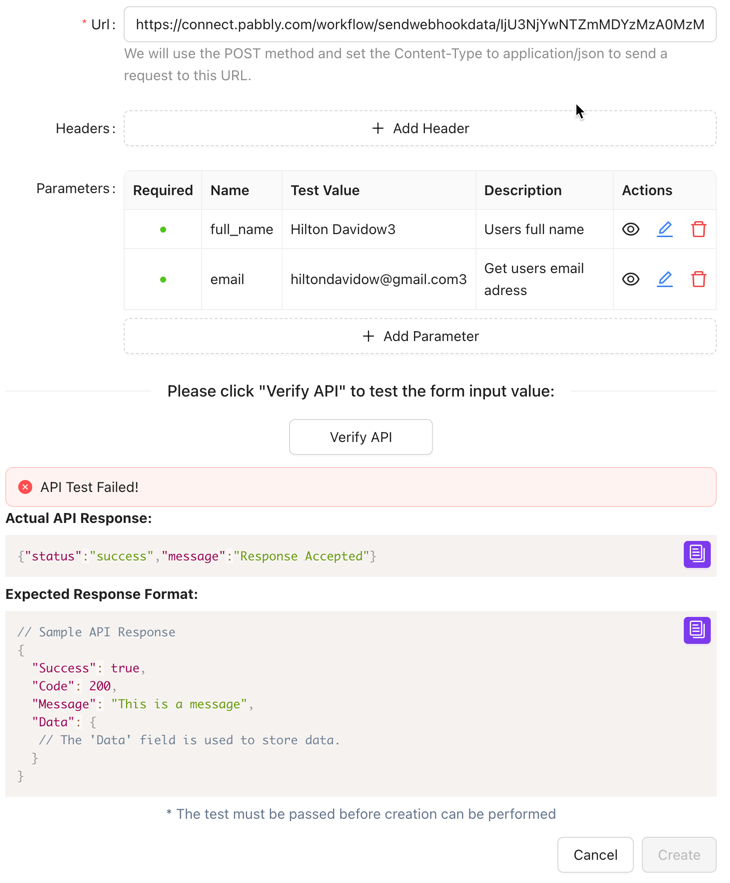
The application I use, NewOaksAI requires a specific response back from Pabbly.
This is what I am getting back from Pabbly:
{"status":"success","message":"Response Accepted"}
This is what NewOaksAI is expecting:
// Sample API Response
{
"Success": true,
"Code": 200,
"Message": "This is a message",
"Data": {
// The 'Data' field is used to store data.
}
}
How do I configure the Pabbly Webhook to return the expected response?
The data from NewOaksAI is being passed through. I am unable to save the NewOaksAI workflow because the response is not what NewOaksAI is expecting back.
Hi @hiltondavidow,
Webhook by Pabbly is used to capture data from applications that support webhooks. It cannot be used to send data to other applications. Could you please create a short screen recording and provide more details about your exact use case? Additionally, share the Workflow URL where you are experiencing this issue.
Thanks for your response
Here is the screen share
https://www.loom.com/share/ed70a91a0cc148b9ba072c7ae3929783?sid=d40eba2a-1263-4f58-bc09-d6b55d09c32c
Here is the Workflow URL
https://connect.pabbly.com/workflow/mapping/IjU3NjYwNTZmMDYzMzA0MzM1MjY4NTUzNDUxMzQi_pc
Hello @hiltondavidow,
It seems like you're looking to change the webhook response object. Unfortunately, this is not possible at the moment in Pabbly Connect. If this feature becomes available in the future, we will certainly let you know.
Feel free to reach out if you have any further questions!
Hello @hiltondavidow,It seems like you're looking to change the webhook response object. Unfortunately, this is not possible at the moment in Pabbly Connect. If this feature becomes available in the future, we will certainly let you know.
Feel free to reach out if you have any further questions!
Thank you for taking the time to view the video. Until I can modify the webhook response, I will use an alternative when integrating with NewOaksAI.