Webhook to Beehiiv Error Message - Custom Fields
Status: Open · Asked by kurt on · 0 views
hi,
I'm getting an error back from Beehiiv, but I think its due to formatting, not that the custom fields are not available, as I've made them and verified.
I made this video of the issue, including both Pabbly and Beehiiv screens : https://d.pr/v/k3GvX6
screen shot here
https://d.pr/i/5sanlp
when I send a test of the api, I get back 'unprocessable_entity' from Beehiiv. and I have verifed in Beehiiv that the data is not appearing.
can you help me?
Not sure if it's related, but this is something happening in the same webhook, with the data passing into pebbly. customer.io requires the json webhook to have placeholders, but I'm only getting the default placeholders, (ie default: 'form name') not the data, int Pabbly. Is there an issue with the json?
video of issue. https://d.pr/v/YnQlOr
JSON
{
"campaign_id": {{ campaign.id }},
"segment_id": 38,
"customer.email": "{{ customer.email }}",
"customer.first_name": "{{ customer.first_name }}",
"customer.SIGNUP_URL": "{{ customer.SIGNUP_URL | default: 'URL' }}",
"customer.DUE_DATE": "{{ customer.DUE_DATE | default: 'due-date' }}",
"customer.utm_source": "{{ customer.utm_source | default: 'utm_source' }}",
"customer.utm_content": "{{ customer.utm_content | default: 'utm_content' }}",
"customer.FORM_NAME": "{{ customer.FORM_NAME | default: 'form name' }}",
"customer._created_in_customerio_at": "{{ customer._created_in_customerio_at | default: 'cio_created_date' }}"
}
Hello @kurt,
Apologies for the delayed response.
Upon reviewing the workflow, it appears that you’ve already resolved the issue on your end. Please let us know if you need any further assistance — we’re here to help.
Hello
Hello @kurt,Apologies for the delayed response.
Upon reviewing the workflow, it appears that you’ve already resolved the issue on your end. Please let us know if you need any further assistance — we’re here to help.
Actually they are both in the same workflow, but this issue is not resolved. (thought the earlier one was!). perhaps you can help.
This is something happening in the same webhook, with the data passing into pabbly. customer.io requires the json webhook to have placeholders, but I'm only getting the default placeholders, (ie default: 'form name') not the data, int Pabbly. EVEN when the data exists. Is there an issue with the json?
video of issue. https://d.pr/v/YnQlOr
JSON
{
"campaign_id": {{ campaign.id }},
"segment_id": 38,
"customer.email": "{{ customer.email }}",
"customer.first_name": "{{ customer.first_name }}",
"customer.SIGNUP_URL": "{{ customer.SIGNUP_URL | default: 'URL' }}",
"customer.DUE_DATE": "{{ customer.DUE_DATE | default: 'due-date' }}",
"customer.utm_source": "{{ customer.utm_source | default: 'utm_source' }}",
"customer.utm_content": "{{ customer.utm_content | default: 'utm_content' }}",
"customer.FORM_NAME": "{{ customer.FORM_NAME | default: 'form name' }}",
"customer._created_in_customerio_at": "{{ customer._created_in_customerio_at | default: 'cio_created_date' }}"
}
Hi Preeti, Here is the most clear version looking into a single task form task history:
IjU3NjUwNTY4MDYzNDA0Mzc1MjY0NTUzMjUxMzA1MTY2NTQzOTBmMzUi_pc
you can see the data is now coming into the connect, but not passing out, but it is visible mashed up in one field.
video of task: https://d.pr/v/MnJWbL
It looks like you're now receiving the correct data in your trigger step. Apart from the Due Date field, all other fields are showing actual data instead of placeholders.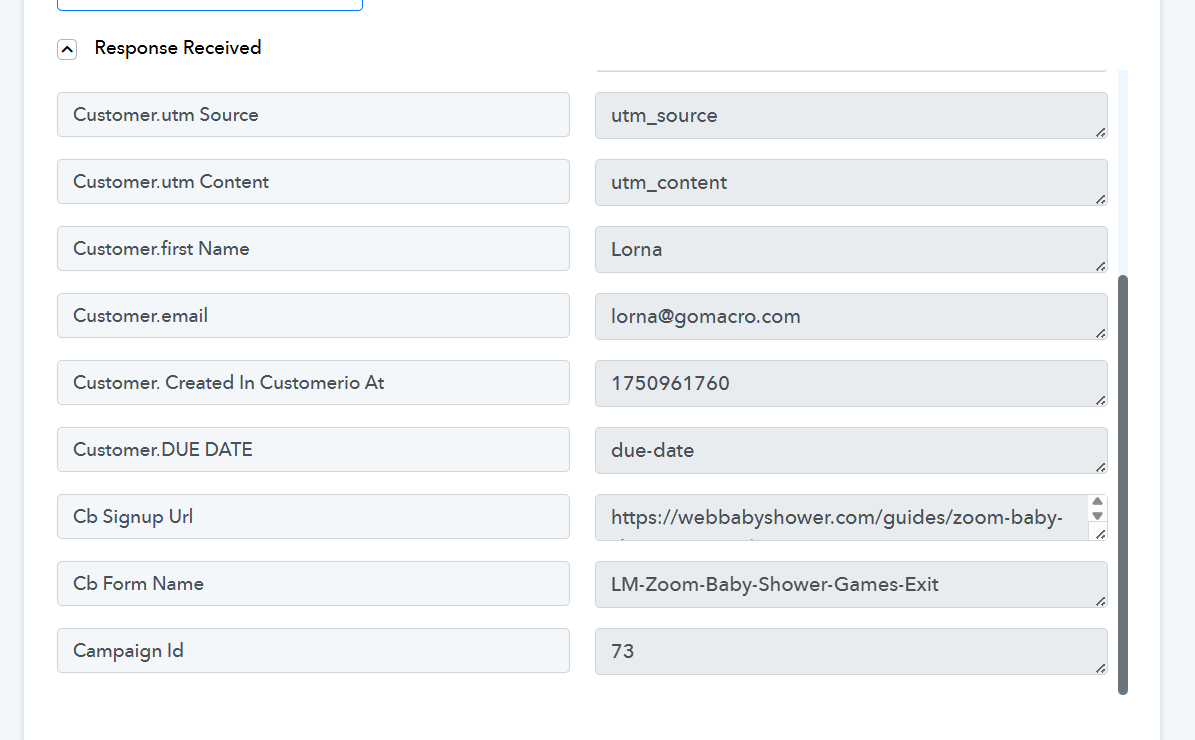
We have now set up the 'Custom Field: Name(s)' and 'Custom Field Value' fields on your behalf, based on the information previously shared. We cannot pass the Due Date to Beehiiv, as we are not receiving it in the trigger step. Additionally, there appears to be an issue with the 'signup_URL' field. Have you made any changes to the 'signup_URL' custom field in Beehiiv?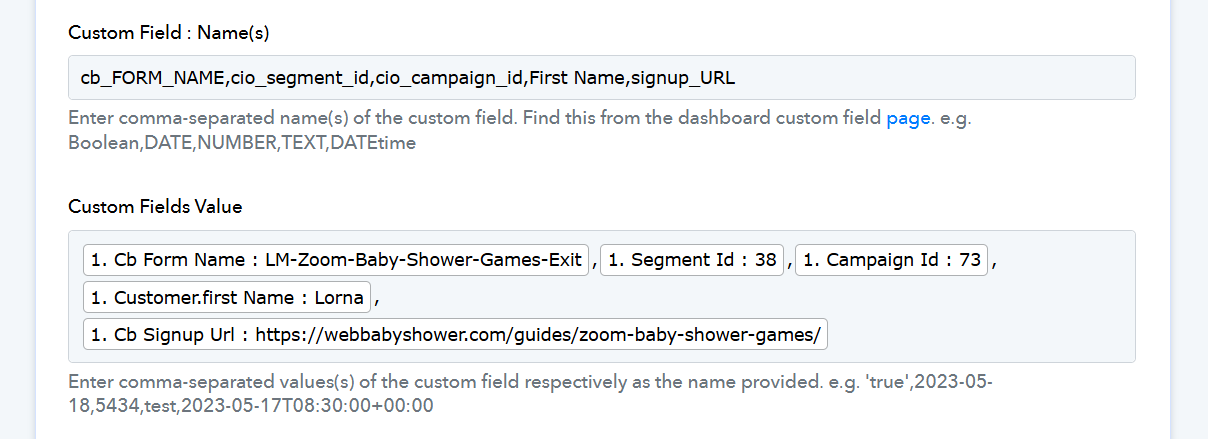
Just a quick note—please create separate threads for different issues to help avoid confusion.
Thank you that fixed it! MUCH appreciated.
We are glad that our team was able to help. If you have a moment, please rate us on Google. Your feedback helps us improve.