Webhook to Mailchimp - Member update Res 2 field invalid
Status: Closed · Asked by Caroline Bommers on · 0 views
Hi,
I am automating a fitness platform called bsport with Mailchimp, via Pabbly Connect (webhook).
I've successfully created the webhook Member create automation: when there is a new member added in bsport, Pabbly sends the information to Mailchimp.
Now I'd like to update the members based on their purchasing behaviour. Whenever a member books a class on bsport, I'd like it to be shown on Mailchimp: next booking date. I've mapped this successfully in the automation member update (another workflow, based on the bsport webhook member update,
While testing the response, I receive this info:
Res2 HTTP Status Code 204
Res2 Message The application processed the request but returned a blank response. Refer to the HTTP status code above for details.
Where is the error?
Thank you for your help!
Best wishes
Hello @Bomeline
As we have checked the workflow it seems that the tags aren't entered under the "Tags" field. KIndly enter the tag name and tag status as shown in the help text, please refer to the attached screenshot.
For example: {"name": "tag1","status": "active"},{"name": "xyz","tag2": "inactive"}
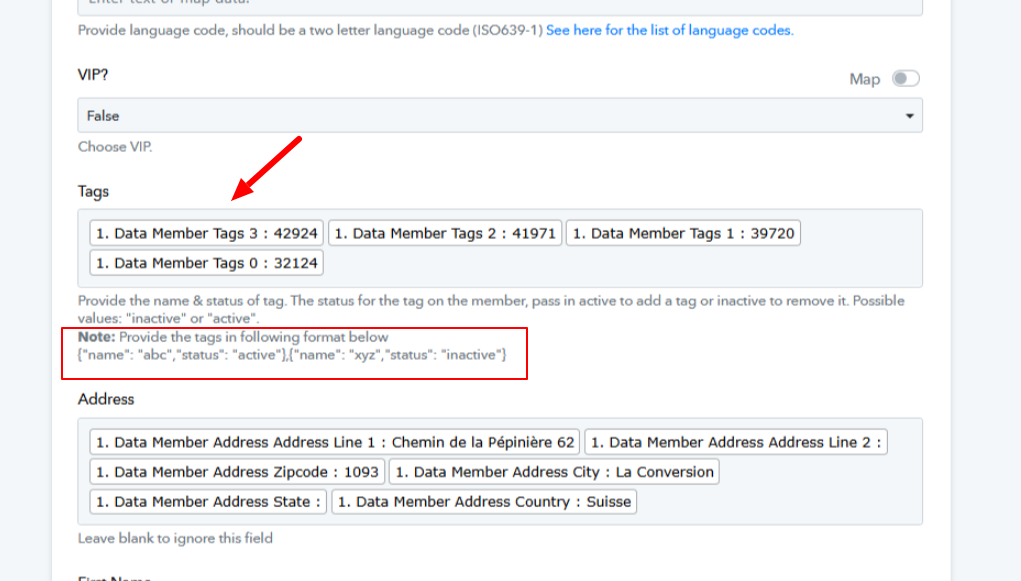
Thank you Preeti for your quick help. I have tried various forms, as mentioned, but it is still giving me the same response. I am not quite sure what is meant by tag, as these aren't the same tags mentioned in Mailchimp, correct?
Thank you again for your help
Hello @Bomeline
We have made a small change in the step 2 of your workflow, refer to the attached image for more info.

Kindly add a new member and check if works for you.
Hi Preeti,
Thank you for taking the time to help me out. I see what you did in your screenshot, but it don't see it in my actual workflow. Also, it doesn't let me map the tags (the tags aren't available in the information retrieved through the webhook.
It is available in the workflow "member create", but not member update. I've tried with other information, eg : "is coach: 1 or 0 for example, but it is giving me a 400 response.
Where did you manage to retrieve the tags from?
Thanks again for your help, Preeti!
I've refreshed everything, let's just see for now, if this works. I'll keep you posted.
Hello @Bomeline
Can you please confirm if the issue is resolved or if you still facing it
Hi Preeti,
...it seems working all fine now... Thanks!