Webhook
Status: Open · Asked by Lauren Drake on · 0 views
Why is my webhook only returning 4 of the 16 fields? I'm connecting to Leadconnector and am not seeing the rest of the fields to map?
Hello @Lauren Drake
Kindly let us know the name or URL of your workflow so that we can look into it and assist you more effectively.
Thank you!
Skills Cafe ATS Account Creation https://connect.pabbly.com/workflow/mapping/IjU3NjYwNTZkMDYzMTA0MzE1MjY4NTUzZDUxM2Ei_pc
Webhook by Pabbly is based on descriptive webhooks and captures whatever data the application sends to us. We do not have any control over the data that the source application sends to Pabbly Connect. Since only 4 fields are being sent from the source application, only those fields will show up in your trigger step.
You can try testing this on Webhook.site to check whether the 16 fields you mentioned are captured there or not.
This error persists see email from Pabbly!
[JUSTIFY]Hello Lauren Drake,
This email is to notify you that for the workflow "ATS Onboarding Skills Cafe" , a recent task was not executed due to following error -[/JUSTIFY]
Task History ID: IjU3NjUwNTZkMDYzMzA0MzI1MjZjNTUzMzUxMzA1MTY0NTQzODBmMzUi_pc
Step Name: LeadConnector V2 > Create Location (Sub-Account)
Connection Name: LeadConnector V2 #1
Task Error Detail:
{
"message": "This authClass type is not allowed to access this scope. Please reach out to the Platform team to get it added.",
"error": "Unauthorized",
"statusCode": 401
}
Note that the workflow has not been paused and continues to run according to your settings. Further, you have the option to re-execute tasks that encountered error from the history section.
See Loom walkthrough of error https://www.loom.com/share/9d61f245fe884acda0dd0818e55beae9?sid=e69c6f13-be3c-4cf8-b733-b7f83f8b2986
Hello @Lauren Drake
Kindly try making a new connection with Lead Connector and let us know if you still face the same issue.
Hello @Lauren DrakeKindly try making a new connection with Lead Connector and let us know if you still face the same issue.
I have tried that 10 times already the issue remains the same, I deleted Leadconnector V4 now it does not want to connect at all see Loom https://www.loom.com/share/da540508360c4a6dacda3c71775ba4f3?sid=eb3ffdee-e9d7-44c0-b290-2b349c1b1035
Hello @Lauren Drake
You are encountering an error while connecting with GoHighLevel, which is not related to Pabbly Connect. We suggest reaching out to the GoHighLevel support team for assistance with your query.
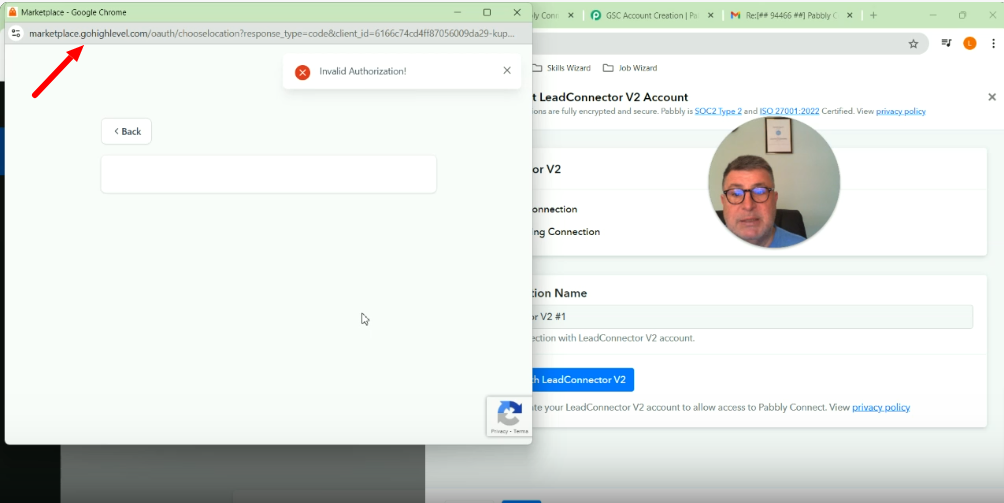
Hello @Lauren DrakeYou are encountering an error while connecting with GoHighLevel, which is not related to Pabbly Connect. We suggest reaching out to the GoHighLevel support team for assistance with your query.
That's true, I discovered the issue is between Leadconnector V1 and V2, V1 works fine but there are new security blocks with V2 which blocks the flow
Hello @Lauren Drake
The authorization issue you are facing while connecting with LeadConnector V2 is from GoHighLevel's end, our team has mailed them regarding the same.
We recommend you contact them at your end as well regarding your query.