When will ChatGPT 4.5 be available?
Status: Closed · Asked by 松本昭彦 on · 0 views
GPT4.5 is not displayed in the OpenAI task module.
When will it be available?
GPT4.5 is not displayed in the OpenAI task module.
When will it be available?
Turn On the map button beside action namename and add name of the model there refer below screenshot for reference.
If you are still not able to solve this on your own feel free to DM me and we can do a free zoom call. FYI I'm not from Pabbly Connect team, just a freelancer who helps other Pabbly users.

The model `gpt-4.5` does not exist or you do not have access to it.
The model `gpt-4.5` does not exist or you do not have access to it.
Check if your existing Open AI plan includes gpt-4.5 or not.
thanks,
From the OpenAI official website
How to use GPT-4.5 in the API
GPT-4.5 is available in preview for developers in all paid usage tiers(opens in new window) in the Chat Completions API, Assistants API, and Batch API.
I have determined that gpt4.5 cannot be used with Pabbly connect,
so I will not waste any more time on this.
Thank you, so much.
I have determined that gpt4.5 cannot be used with Pabbly connect,
so I will not waste any more time on this.
Thank you, so much.
Actually I am already using it. And it works fine in Pabbly Connect.
Feel free to contact me if you are looking for paid help.
I am already using it.
I see. So it can be used.
I haven't studied it enough, so I can't do it.
I'd love to try it again if I get the chance.
Thank you.
If you're a Pabbly support person,
please tell me how to use gpt-4.5.
Hey @tokyo2025
You can change the model in action step -
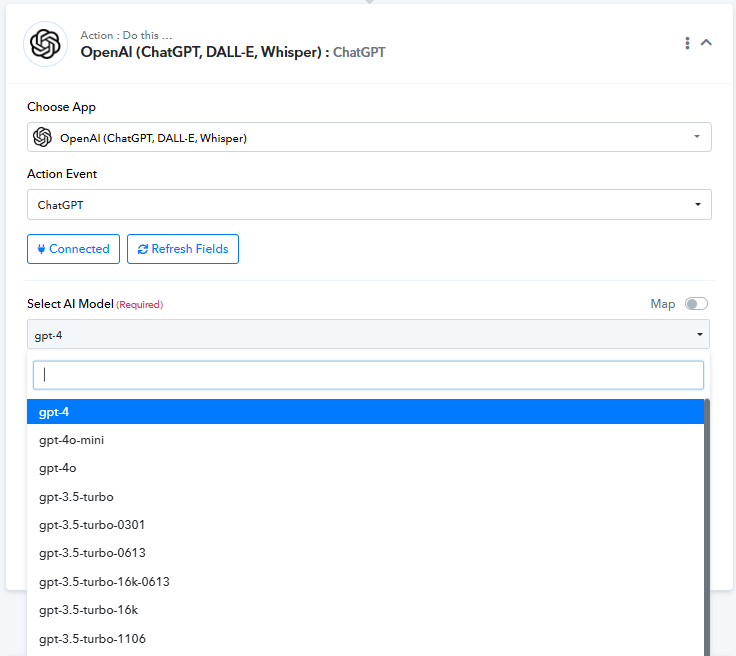
Let us know if it works for you.
So does that mean ChatGPT 4.5 won't exist in Pabbly?
Hello @tokyo2025,
Please check if your OpenAI plan includes access to GPT-4.5, as this error typically occurs if the model is not available in your subscription. For more details, you can also reach out to OpenAI support.
However, if you do have access to GPT-4.5, you can simply enable the "Map" button and manually enter the model name to use it—it should work fine.
Thank you for everything.
It has nothing to do with subscriptions, right?
It can be run on the following models with Map turned on:
"gpt-4.5-preview-2025-02-27"
It won't work with just "gpt-4.5".
I learned something.
Hello @tokyo2025,
Apologies for the inconvenience you're facing. Could you please share the workflow URL where you're testing this? This will help us investigate the issue and assist you more effectively.
Sorry for the lack of explanation.
The problem has been resolved.
"gpt-4.5-preview-2025-02-27"
This model name worked fine.
Thank you!
Thank you for the update. We are glad the issue is fixed now.