Why Are Multiline Inputs in Pabbly Still This Broken in 2026?
Status: Open · Asked by avielchik on · 0 views
The multiline input fields are extremely frustrating to use. Instead of proper or code fields, they’re implemented as iframes, which completely breaks basic text handling.</p><p>New lines are hard to control, copy/paste behaves unpredictably, cursor placement is unreliable, and editing code or structured text is painful.</p><p>For an automation platform where users constantly work with JSON, scripts, and long text, this is a serious UX issue. <br>Please replace iframe-based inputs with proper textareas or dedicated code editors (with monospaced font, line breaks, and sane cursor behavior).</p>
Hi @avielchik,
Please make a short screen recording showing the exact UX issues you’re encountering so our development team can look into your concern.
Also, share the same on our dedicated platform, where our development team can look into your suggestions.
https://roadmap.pabbly.com/b/Feature-Request
Thanks & Regards,
Arshil Ahmad
Customer Support Associate
? Pabbly.com
?Rate your support
This is frustrating. Are you saying you’re not experiencing this issue on your end? Is this scenario covered in your testing?
This is frustrating. Are you saying you’re not experiencing this issue on your end? Is this scenario covered in your testing?
Thank you for sharing the video. We tried replicating the issues shown in the video, but were only able to reproduce the result related to the cursor not being in the correct place.
https://drive.google.com/file/d/1FQF4V7Bu6DraBsDWSGEoWm696Kl-rXP8/view?usp=sharing
We have forwarded the cursor-related issue to our development team. For the other issues, we suggest performing a hard refresh of your browser and checking if they are resolved.
https://streamable.com/uyehex
We are unable to access the videos share here. Could you please upload it to a Google Drive and share the link so we can look into this issue?
Thanks & Regards,
Arshil Ahmad
Customer Support Associate
? Pabbly.com
?Rate your support
The videos work perfectly fine, I just accessed them again. The issue was never typing. The problem is that I can’t delete from the end of the line, and I can’t reliably copy/paste with the correct line breaks (new lines get stripped/missing), and related formatting issues.
Please watch the videos in the links. They clearly show that I can type. The issue isn’t what I’m able to do - it’s what I’m unable to do.
The issue was never typing. The problem is that I can’t delete from the end of the line, and
We’re unable to replicate this issue. We’re able to delete the data at the end of the line.
https://drive.google.com/file/d/1iNTjOjXI-5k1a38NTGRAzeMvTbUVDSft/view?usp=sharing
I can’t reliably copy/paste with the correct line breaks (new lines get stripped/missing), and related formatting issues.
We have forwarded this concern regarding line breaks not being copied correctly to our development team.
Please watch the videos in the links. They clearly show that I can type. The issue isn’t what I’m able to do - it’s what I’m unable to do.
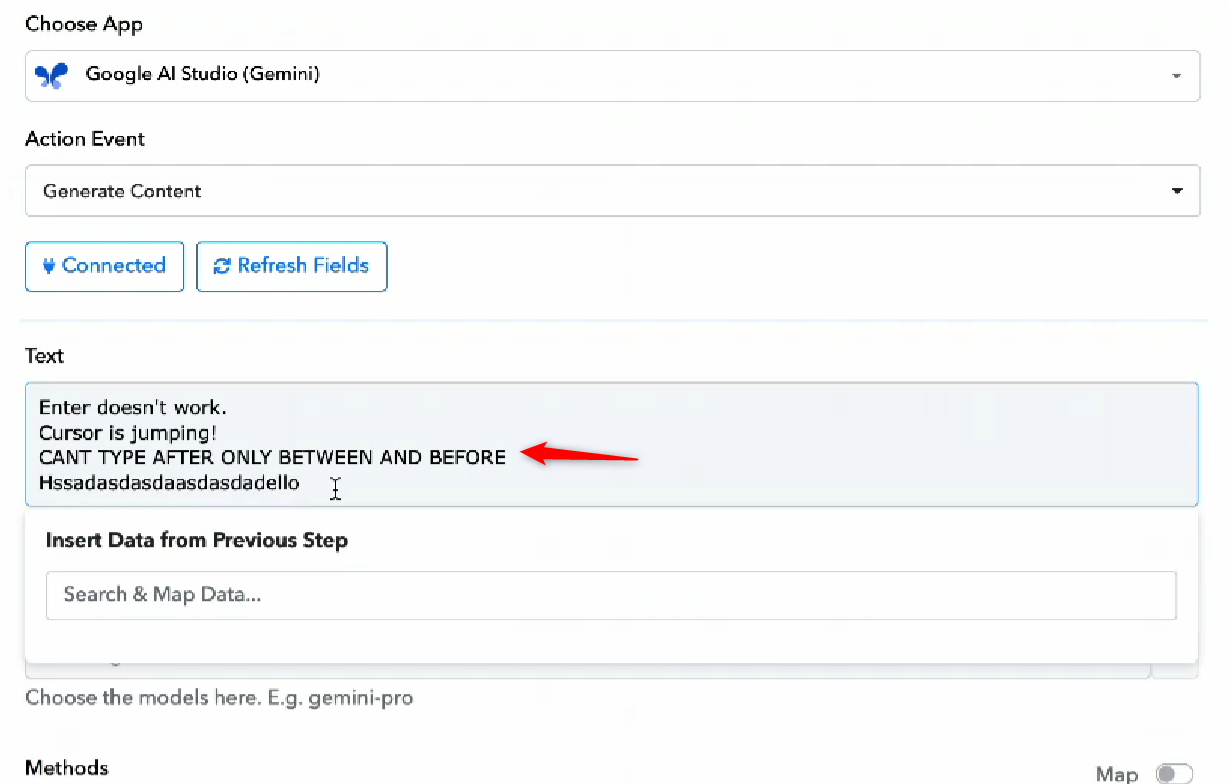
In the video, you mentioned that you can’t type after, only between and before.
Thanks & Regards,
Arshil Ahmad
Customer Support Associate
? Pabbly.com
?Rate your support
It’s inconsistent.
Try other browsers, i.e Safari, Firefox, Zen.
Hi @avielchik,
As per the latest update from our team, we recommend using the new UI instead of the old one. Please try it from your end and let us know how it goes.