WooCommerce → Shipday via Pabbly: How to map multiple order items? Only first item is being sent.
Status: Open · Asked by nasir101m on · 0 views
Hi,
I’m integrating WooCommerce → Pabbly (Webhook) → Shipday API.
WooCommerce is sending multiple line_items in the webhook payload correctly. I can see all products inside the line_items array.
I am already using Iterator by Pabbly on line_items[], but the issue is: Shipday is still creating only one order item.
My goal is:
✔ One Shipday order
✔ With all WooCommerce products inside the orderItems array
Currently, Pabbly seems to Map only line_items[0]
How can I properly:
- Combine all line_items into a single orderItems array
- Send them in one API call to Shipday
If someone has a working WooCommerce → Shipday setup with multiple products, please share the correct structure.
Thanks!
Hey @nasir101m,
We have escalated this issue to our technical team for further review. Currently, the action doesn't support creating a multi-line item order. Kindly allow us some time to investigate this.
We will get back to you with an update as soon as we receive it from our team.
Thank you for your patience and cooperation.
Hey @nasir101m,
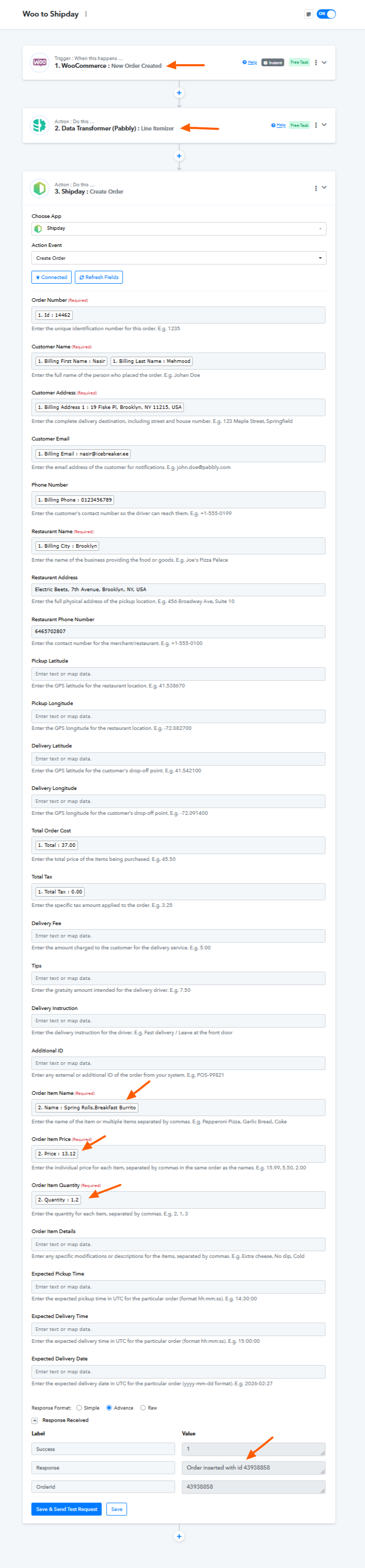
Our team has updated the Create Order action, and it now supports creating multi-item orders.
We have made some changes to your workflow. Instead of using an Iterator, we added Data Transformer → Line Itemizer, and then mapped the comma-separated line items into the Create Order action.
Previously, the Iterator was creating multiple orders (one for each line item). The Line Itemizer combines values with the same keys and returns them in a comma-separated format, allowing a single order with multiple items to be created correctly.