wordpress to google sheet - google analytics to google sheet
Status: Open · Asked by serwar habib on · 0 views
i am currently saving all my newly published posts on google sheet. i want to add the google analytics sessions traffic data for each post in its row( 30 days since it published). how can i create this workflow.
there does not seem to be api dimensions for post title . how can i achieve it?
Could you please elaborate a bit more on what you mean?
here is what i want. any post that is added in google sheet. now this post has post title, link, description, image in google sheet. i want to update the row with the views this post got from google analytics. or in simple words the traffic it received lets say in form of sessions. i want to update the row with the traffic it achieved in last 48 hours. how can i do this.
Hello @serwar24554
You can achieve this using Pabbly Connect with the following steps:
Workflow Steps:
- Trigger Application:
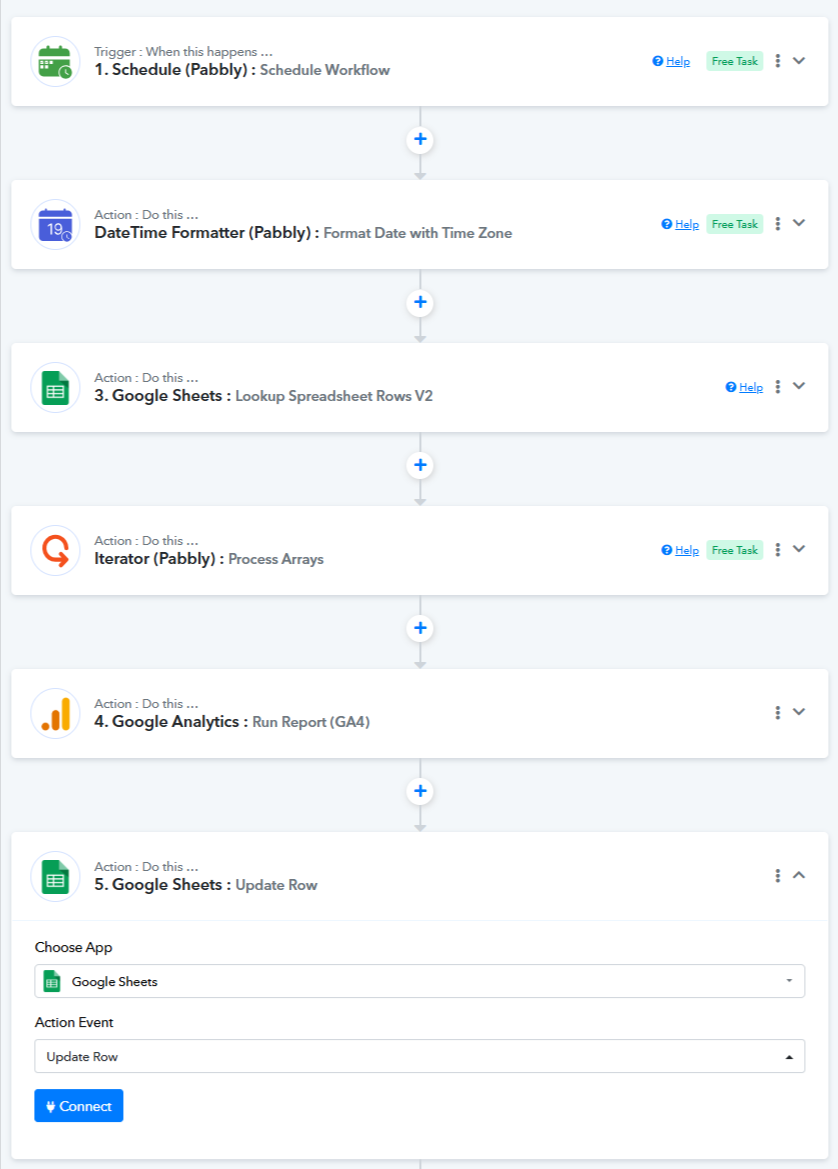
Schedule (Pabbly) – Schedule Workflow- Set this to run once per day (or as per your requirement) to automate the process daily.
- DateTime Formatter (Pabbly): Current Date
- This will fetch the current date in UTC.
- If you want it in your local time zone, use the "Format Date with Time Zone" action event.
- Google Sheets: Lookup Spreadsheet Rows V2
- In your Google Sheet, add a separate column to log the current date against each new post.
- This will help Pabbly filter and fetch only the latest posts added within the last 24 hours.
- Match the date format with the output from the DateTime Formatter step.
- Capture the response with Simple Response turned off.
- Iterator (Pabbly): Process Arrays
- This helps to loop through each post (row) retrieved from the Google Sheet.
- Google Analytics 4: Run Report
- Here Property ID, Metric Name and Filter by Metric are required fields.
- Google Sheets: Update Row
- Update the same row in your Google Sheet with the traffic data (e.g., sessions) you received from GA4.
You can try the above setup to achieve your use case.
thank you for detailed reply. but my issue is actually setting up google analytics. meaning i cannot fetch the data from google analytics for the post traffic. for example the acceptable data that i want to fetch is either of following.
post sessions
post users
post views
but none of these i can setup in google analytics. ideally i want post sessions data. could you please fill the missing data in this worflow url.
i am also stuck on craeting looking function for google sheet. one i dont know how to create a date column in google sheet that will automatically update the date when a new post is added in sheet. seconly i need to know how to setup lookup function in pabbly connect google sheet step.
i am also wondering in google sheet i will add the lookup function but how will i map the lookup function for each post in google analytics. so it returns the post data for each post. meaning google analytics is returning the data for whole website, not for each post separatetly. how can we filter the sessions data for each post.
https://connect.pabbly.com/workflow/mapping/IjU3NjYwNTY4MDYzZjA0MzE1MjY1NTUzNTUxMzAi_pc
You can refer to the video at
youtube.com/watch?v=jpAierpnPw0
, starting from the 5:00 minute mark. It will help you configure the "Google Analytics: Run Report (GA4)" action step.If this doesn’t resolve your concern, please let us know the specific issue you're facing — we’ll be happy to assist you further.
hi this is the basic video using which i have setup google analytics that returns that data for all posts on the website. now how do i search a specific post in google analytics returned results. how do i map that post from google sheet and which function i use.
Hello @serwar24554
We are currently looking into whether it is possible to retrieve post-level metrics from Google Analytics and whether this use case can be achieved through the available options. Please allow us sometime.
thank you waiting
Hello @serwar24554
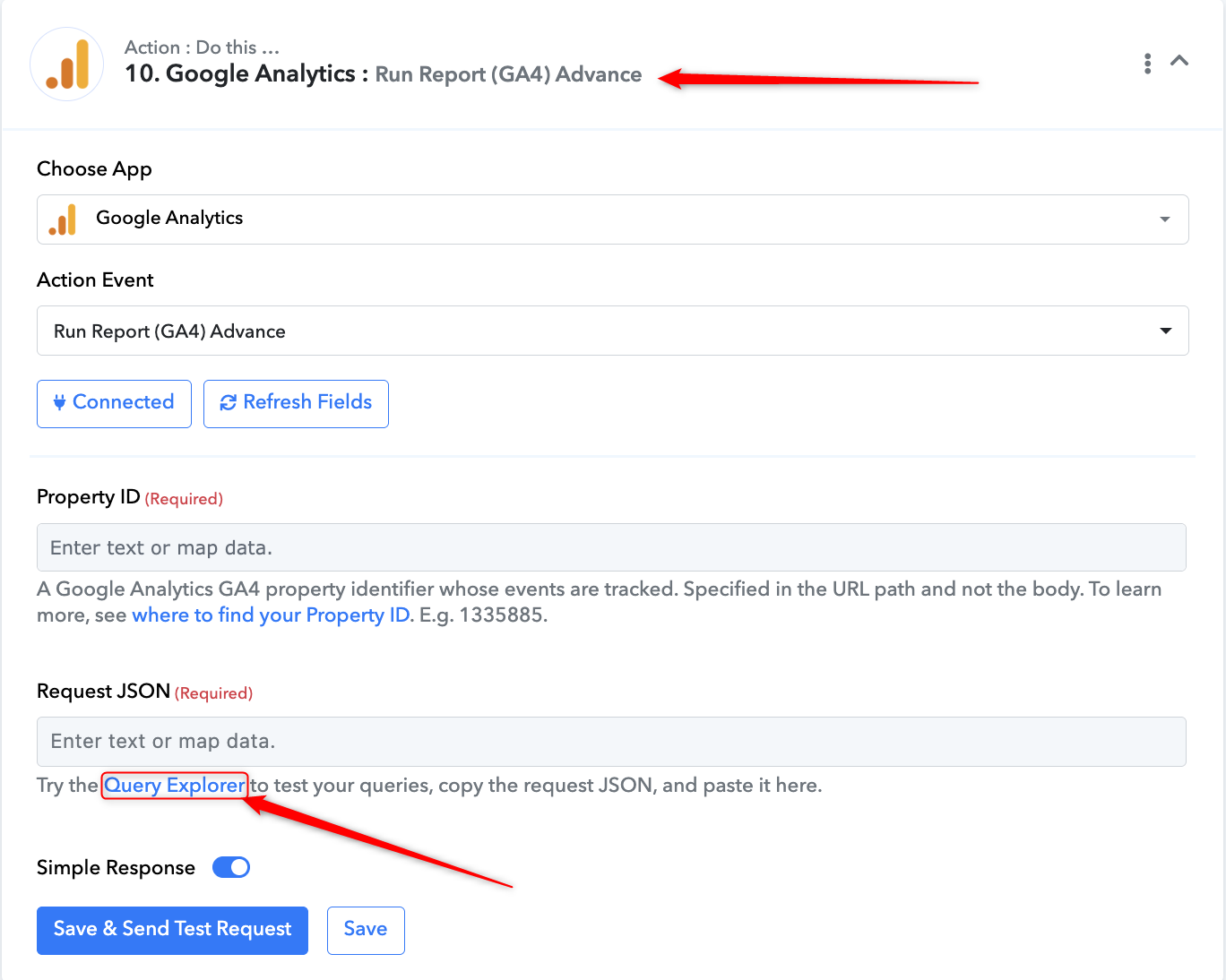
To achieve your use case, you can use the action step "Google Analytics: Run Report (GA4) Advance".
You can refer to the thread below for guidance on how to achieve this:
https://forum.pabbly.com/threads/google-analytics-report-custom-event-and-filters.18655/#post-90795